Understand any technical drawing in plain words
It reads the symbols and dimensions on a builder's drawing and tells you what each one means in real life.
Published . Steps as of October 2026.
How can I understand a blueprint or technical drawing with AI?
Attach the drawing to ChatGPT and ask it to explain each symbol, line and measurement in plain words. As of October 2026, GPT-6.1 Terra in ChatGPT Work is built for reading technical drawings and needs a Plus, Pro, Enterprise or Edu plan. Use a clean PDF when you have one, since a blurry scan is harder to read. For a home project, ask for the questions to bring to your contractor; for a business job, ask it to flag anything inconsistent between views.
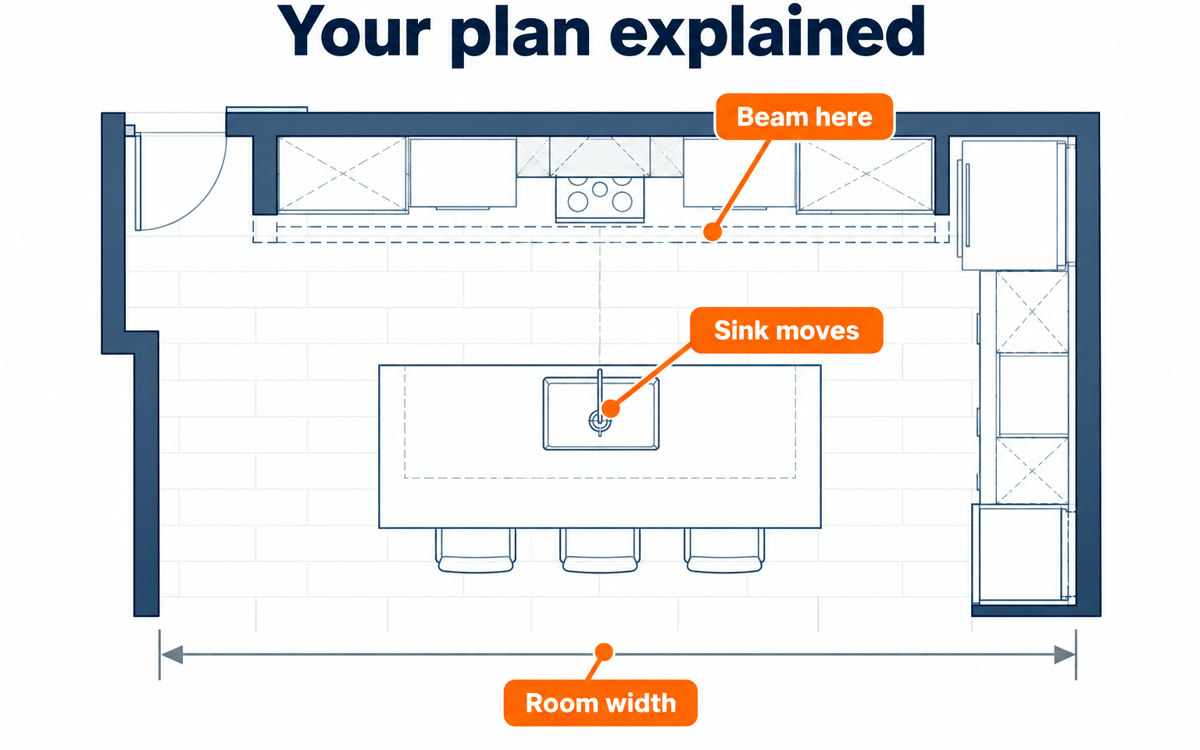
A sample of what you get back, made with AI.
Your prompt
Fill in your details. Skip any you like.
ChatGPT opens with your prompt already typed in. It's copied too, just in case.
The prompt that gets copied
I've attached a technical drawing for [THE PROJECT, e.g. our kitchen remodel]. I'm not an engineer or a builder, so explain it to me like a patient friend. First, tell me in two sentences what the drawing shows overall. Then walk through it section by section: what each symbol, line type, abbreviation and measurement means, and what it'll look like in real life. Convert measurements to [MY UNITS, e.g. feet and inches]. Point out anything that looks unusual, unclear or inconsistent between views. Finish with the five most useful questions I should ask [WHO MADE IT, e.g. my contractor] before work starts, and two things I should double-check myself on site. If any part is too blurry to read, say so instead of guessing.
Attach a blueprint, wiring diagram or contractor's plan in ChatGPT Work and get every symbol, line and measurement explained, plus the questions to ask before work starts.
Step by step
- Open ChatGPT and switch to Work
- Pick GPT-6.1 Terra from the model list
- Attach the drawing as a PDF or a clear scan
- Paste the prompt and fill in what the project is
What you'll get
A plain-English walkthrough of the drawing, a list of anything that looks off, and five questions to ask before work starts.
GPT-6.1 Terra is in ChatGPT Work on Plus, Pro, Enterprise and Edu plans. Rollout started 2026-10-26.
- Made for
- Everyone, Small business owners
- Works in
- ChatGPT