Put your business on autopilot
Get the exact spreadsheet formula you need from plain words
You type 'flag any job unpaid after 30 days' and get the formula, the cell to paste it in and a way to check it.
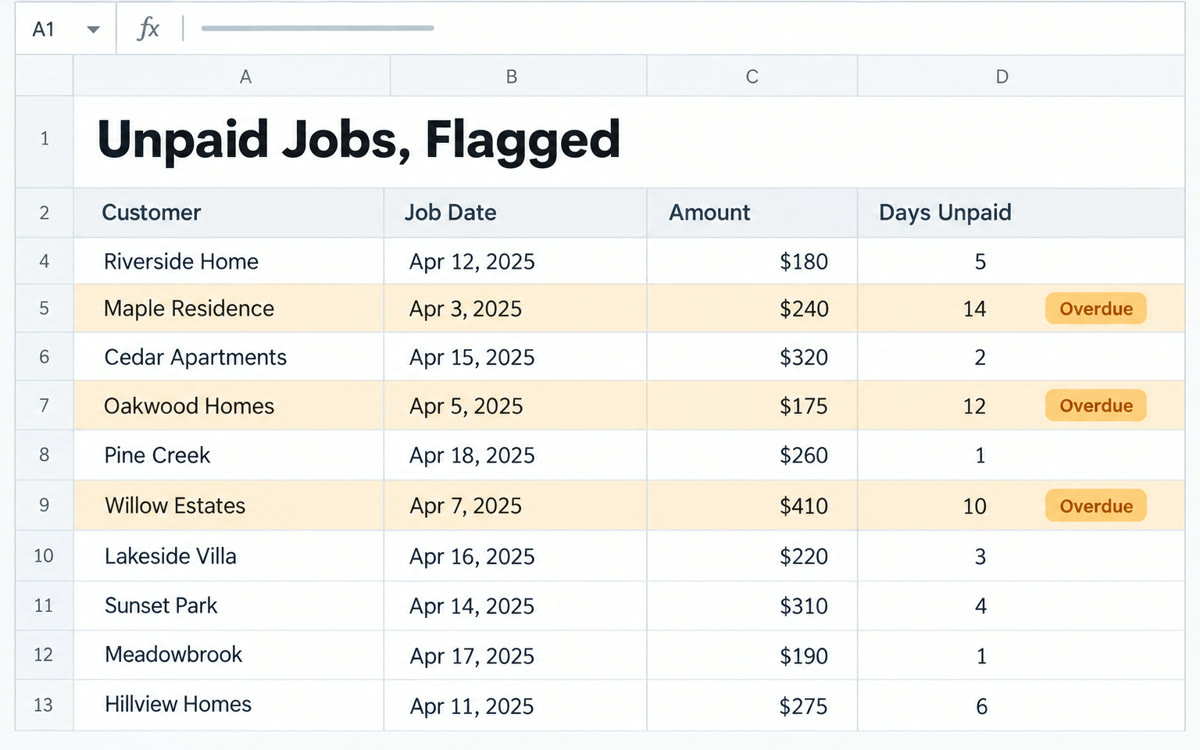
A sample of what you get back, made with AI.
Your prompt
Fill in your details. Skip any you like.
ChatGPT and Claude open with your prompt already typed in. Gemini can't be filled in from a link, so its button copies your prompt: paste it into the new chat.
The prompt that gets copied
I use [YOUR SPREADSHEET APP, e.g. Google Sheets]. Here are my column headers and 3 sample rows:
[PASTE HEADERS AND ROWS]

What I want the sheet to do: [WHAT YOU WANT, e.g. flag jobs unpaid after 30 days]

Give me:
1. The exact formula, and which cell to put it in
2. How to copy it down the column
3. A plain-English explanation of each part, as if I've never used a formula
4. What the result should be for my 3 sample rows, so I can check it works
5. One common mistake that would break it

If there's a simpler way, like a filter or color rule, tell me that too.
Paste your column headers and a few rows, then say what you want the sheet to work out. You get the formula, where to put it and a plain explanation of how it works.
Step by step
- Copy your header row and three sample rows.
- Paste them into the prompt and describe what you want.
- Paste the formula into the cell it names.
- Check the results against the sample answers it gave you.
What you'll get
A working formula, where to paste it, a plain explanation and expected results to check it against.
ChatGPT for Google Sheets can also build and edit sheets in plain language right inside Sheets.
- Made for
- Small business owners, Everyone
- Works in
- ChatGPT, Claude, Gemini


