Put your business on autopilot
Turn a rambled plan into a team board with owners and dates
You describe the plan out loud and get a board your team can edit, then a deck from the same board.
Published . Steps as of November 2026.
How can AI turn my messy project plan into a team whiteboard?
Paste your brain dump into Claude and ask it to lay the plan out on a Claude Whiteboard with owners and dates. As of November 2026, the whiteboard is shared, so teammates can edit it with you in real time. If you work alone, use the board to see your stages and blockers at a glance. If you run a team, share it and ask Claude to turn the finished board into a doc or deck afterward.
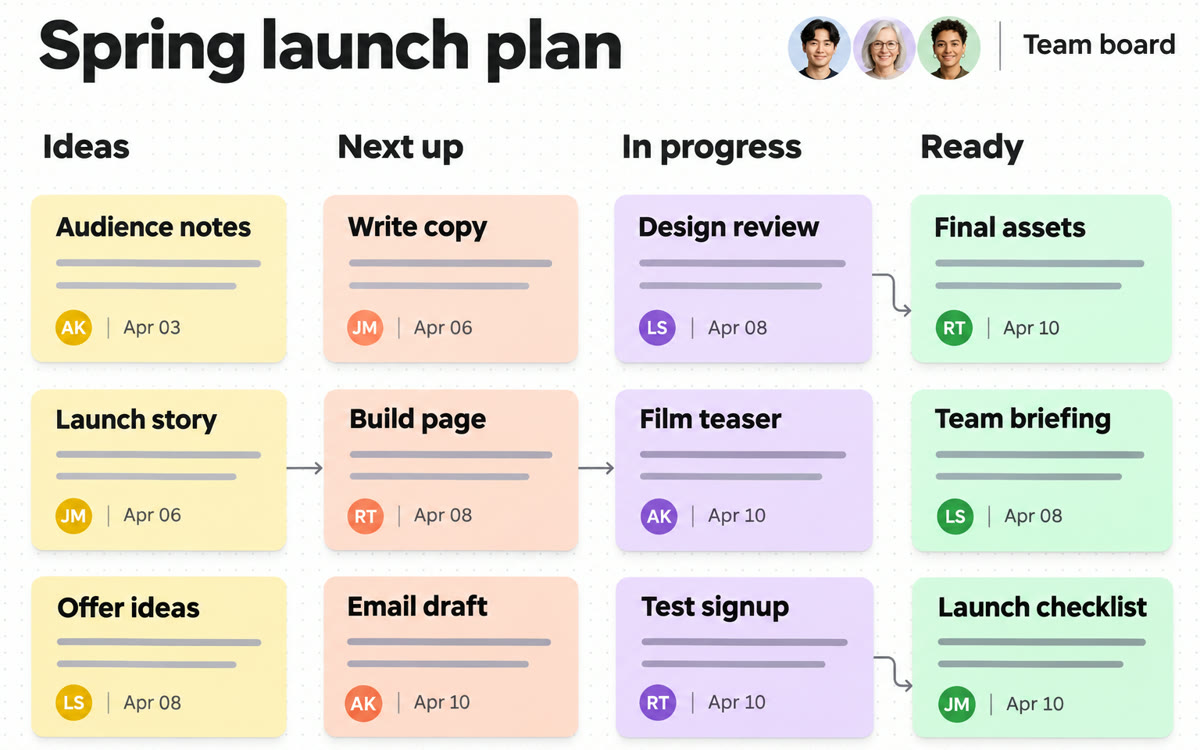
A sample of what you get back, made with AI.
Your prompt
Fill in your details. Skip any you like.
Claude opens with your prompt already typed in. It's copied too, just in case.
The prompt that gets copied
I need a shared whiteboard for this plan. Put it on a Claude Whiteboard. The goal is [PROJECT GOAL, e.g. open our second location by March]. The people involved are [TEAM AND ROLES, e.g. me, Sam on ops, Jo on marketing]. Here's my messy brain dump of everything that has to happen: [YOUR PLAN NOTES]. Lay it out as a timeline from today to [DEADLINE, e.g. March 1]. Group tasks into clear stages, give every task one owner and a due date, and flag any task that blocks another. Put open questions in a separate area so we can decide them together. Keep each sticky short enough to read at a glance.
Talk through a messy plan in Claude and get a shared whiteboard with a timeline, owners and dates your team can edit with you live. When you're done, Claude turns the board into a doc or deck.
Step by step
- Open Claude and start a new chat
- Paste the prompt below and add your messy plan notes
- Ask Claude to put the plan on a Claude Whiteboard
- Share the board with your team so everyone edits it live
- Ask Claude to turn the finished board into a doc or deck
What you'll get
A shared Claude Whiteboard with stages, a timeline, one owner and date per task, flagged blockers and a parking area for open questions.
Claude Whiteboards is in beta on paid Claude plans. Enterprise admins must switch it on.
- Made for
- Small business owners, Consultants, Coaches
- Works in
- Claude