Put your business on autopilot
Get a sign-up dashboard for your event that updates itself
If sign-ups stall a few days before your event, it tells you. If nothing changes, it stays quiet.
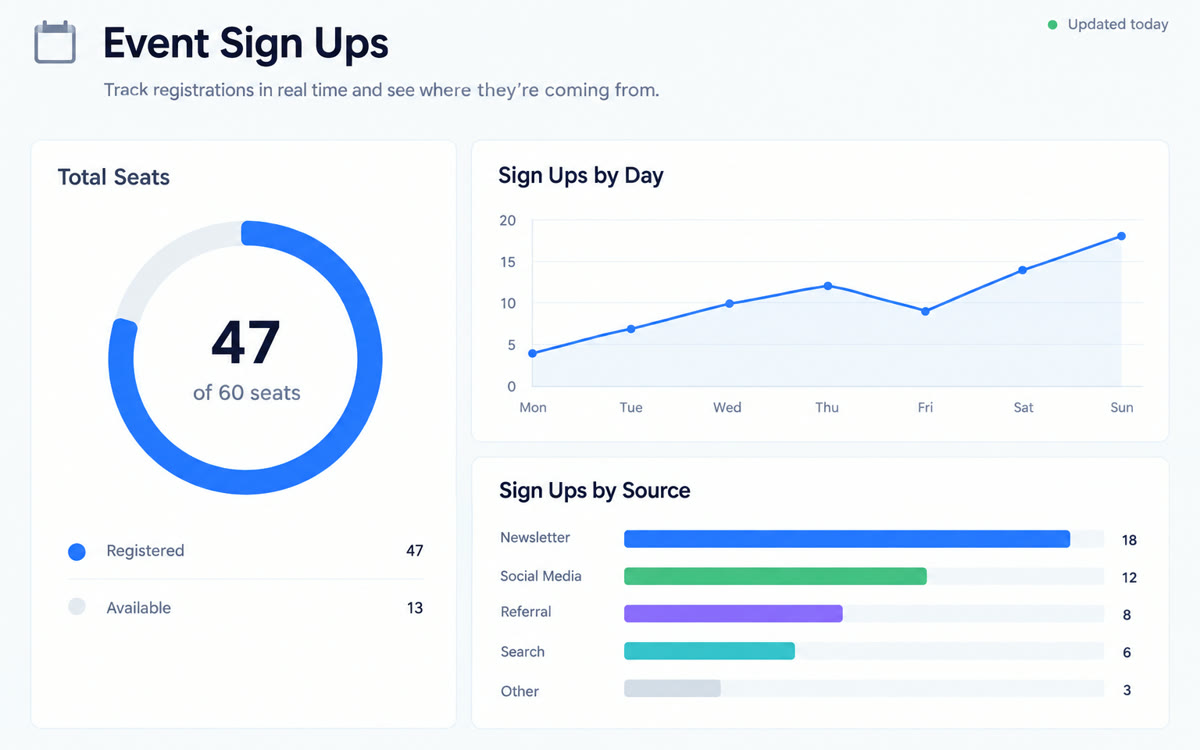
A sample of what you get back, made with AI.
Your prompt
Fill in your details. Skip any you like.
ChatGPT opens with your prompt already typed in. It's copied too, just in case.
The prompt that gets copied
Use Sites and Google Drive to build a private dashboard from my sign-up sheet: [SHEET LINK]. It's for [EVENT NAME, e.g. my April online workshop] on [EVENT DATE, e.g. April 24], and my goal is [SIGNUP GOAL, e.g. 60 sign-ups].

Show: total sign-ups against the goal, sign-ups per day, where people heard about it, ticket types if listed, and a last-updated time. First check for duplicates, blank rows and odd dates, and tell me what you found.

Then check the sheet every weekday morning and update the dashboard. Message me only when something matters, like a jump or a stall in sign-ups, a data problem, or the goal being reached. If nothing changed, stay quiet. Don't publish, share or change any permissions without asking me.
Point ChatGPT Work at the Google Sheet your sign-up form fills. It builds a private dashboard of registrations, sources and trends, refreshes it each weekday, and messages you only when something changes.
Step by step
- Connect Google Drive in ChatGPT under Customize, then Plugins.
- Copy the link to the Google Sheet your sign-up form fills.
- Paste the prompt in Work and check the dashboard it builds.
- Approve the weekday check, and share the dashboard only if you choose to.
What you'll get
A private, always-current sign-up dashboard and short alerts only when registrations jump, stall or hit your goal.
Uses ChatGPT Work with Sites and a scheduled task. Web checks run with your laptop off. Sharing always needs your OK.
- Made for
- Coaches, Creators, Small business owners, Consultants
- Works in
- ChatGPT


