Turn any trip plan into tappable pins on Google Maps
Every stop on the trip becomes a tappable pin in Google Maps, grouped by day, so you just head to the next one.
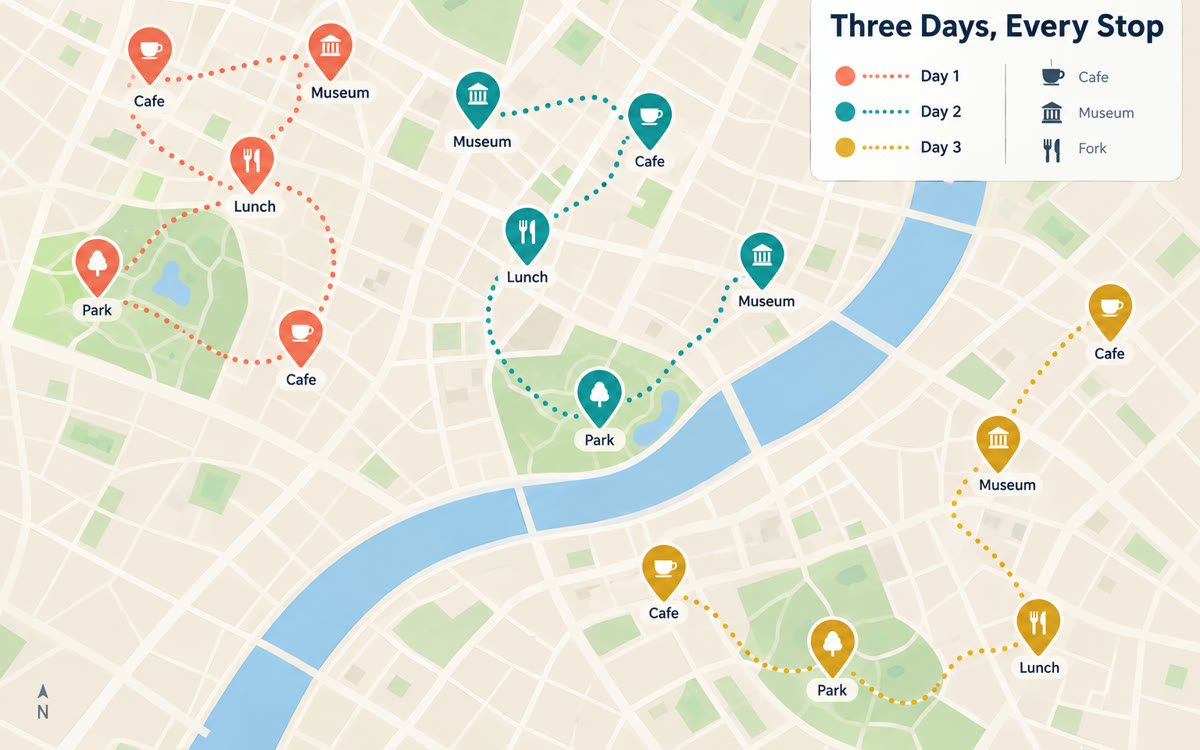
A sample of what you get back, made with AI.
Your prompt
Fill in your details. Skip any you like.
ChatGPT and Claude open with your prompt already typed in. It's copied too, just in case.
The prompt that gets copied
Here's my trip plan for [TRIP DESTINATION] on [TRIP DATES, e.g. June 3 to 7]: [YOUR TRIP PLAN, e.g. itinerary, hotel, restaurants, sights].

Please turn this into a KML file I can import into Google My Maps.
1. Look up the correct address and location for every place. If a name is ambiguous, ask me before guessing.
2. Group the stops into layers by day (Day 1, Day 2, and so on) in a sensible visiting order.
3. Give each pin a short label and a one-line note (what to see, hours to check, booking needed).
4. Give me the file as a download, plus a plain list of every stop with its address so I can double-check it.
5. Then tell me in simple steps how to import it at mymaps.google.com and open it in the Google Maps app on my phone.
Paste your itinerary and ask for a KML map file. Import it into Google My Maps and every stop shows up as a tappable pin on your phone, grouped by day.
Step by step
- Paste your itinerary and must-see list into the chat with the prompt.
- Download the KML file it creates.
- In your browser, go to mymaps.google.com, create a map and import the file.
- On your phone, open Google Maps, find Maps in your saved lists and tap your next pin.
What you'll get
A downloadable map file with every stop pinned and grouped by day, plus simple steps to open it on your phone.
AI can misplace a pin, so spot-check a few addresses. The file download works best in ChatGPT or Claude.
- Made for
- Everyone
- Works in
- ChatGPT, Claude


