Know what to bring to every appointment on your iPhone calendar
It pairs each calendar event with the email that booked it and pulls out exactly what you need to bring.
Published . Steps as of October 2026.
Can ChatGPT check my iPhone calendar and email together?
Yes. Connect the iCloud Mail and iCloud Calendar plugins in ChatGPT, then ask it to match each appointment with its booking email. As of October 2026, the plugins work on every ChatGPT plan, on the web, the desktop app and iOS. If you only want a quick look, ask what's next on your calendar. If you have a busy week, use the full prompt so you get addresses, what to bring and cancel-by dates in one list.
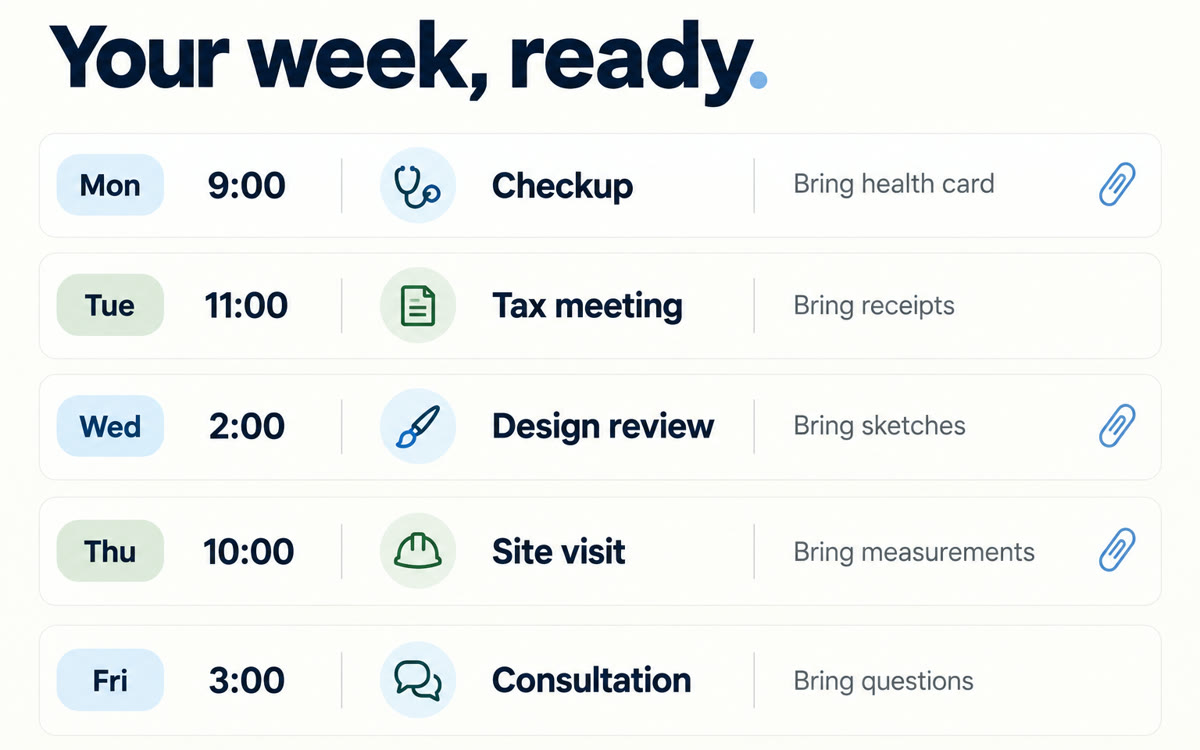
A sample of what you get back, made with AI.
Your prompt
Fill in your details. Skip any you like.
ChatGPT opens with your prompt already typed in. It's copied too, just in case.
The prompt that gets copied
Use my connected iCloud Calendar and iCloud Mail. Look at every appointment on my calendar for [HOW FAR AHEAD, e.g. the next 7 days]. For each one, search my email for the confirmation, reminder or booking message that goes with it. Then give me a simple list in date order with: the time, the place and full address, who it's with, anything I need to bring (forms, ID, cards, paperwork, payment), anything I need to do beforehand (arrive early, fill in a form online, confirm by text), and the last day to cancel or change without a fee. If you can't find a matching email for an event, say so instead of guessing. Flag any two events that are too close together to get between, given that I'm [HOW I GET AROUND, e.g. driving]. Don't change anything on my calendar until I say yes.
Connect iCloud Mail and Calendar to ChatGPT, then get each appointment this week matched to its booking email, with the address, what to bring and any cancel-by deadline.
Step by step
- Open ChatGPT on the web, the desktop app or your iPhone
- Turn on the iCloud Mail and iCloud Calendar plugins in ChatGPT
- Paste the prompt and choose how many days ahead to check
- Say yes to any calendar updates you want it to make
What you'll get
A date-ordered list of your upcoming appointments with addresses, what to bring, prep steps and cancel-by dates, plus a flag on any tight squeezes.
iCloud Mail and Calendar plugins work on all ChatGPT plans, on the web, desktop app and iOS. Released 2026-10-27.
- Made for
- Everyone
- Works in
- ChatGPT


