Give every member a finished funnel, fast
This summer a client brought me a problem I hear a lot, just at a bigger scale than usual.
They run a program for health and wellness practitioners. Part of what members get is a marketing kit, and the centrepiece of the kit is a complete sales funnel built for their own practice: pages, video, booking and follow-up emails, all in their own brand.
The funnel design itself was proven. The bottleneck was building it. Every funnel was assembled by hand, page by page, in GoHighLevel's drag-and-drop builder, and members were waiting their turn.
So the question was simple: could AI build these?
It could. From the first build in late July to early September 2026, the system I built produced 52 funnels for 51 practitioners (one member needed 2). 41 were video funnels and 11 were webinar funnels. Then I packaged it so the client's own non-technical team runs it without me.
It kept going after the hand-off. As of November 2026, the system has delivered 75 member funnels for 74 practitioners: 61 video funnels and 14 webinar funnels, from the first delivery on July 31 to the newest member's on November 4.
This article is the high-level story: how it works, why GoHighLevel stays in the picture, and the lessons I'd hand anyone building funnels, or anything else, at volume with AI.
75 member funnels as of November 2026, 52 of them built in the first 6 weeks by one person who can't write code.
Know what one funnel actually includes
"Funnel" can mean a single landing page. Here it means a lot more, which is exactly why hand-building was slow.
Every member gets one of 2 versions:
| Version | Pages |
|---|---|
| Video funnel | Opt-in page, video sales page, booking page, confirmation page |
| Webinar funnel | Registration page, confirmation page, booking page, "your call is confirmed" page |
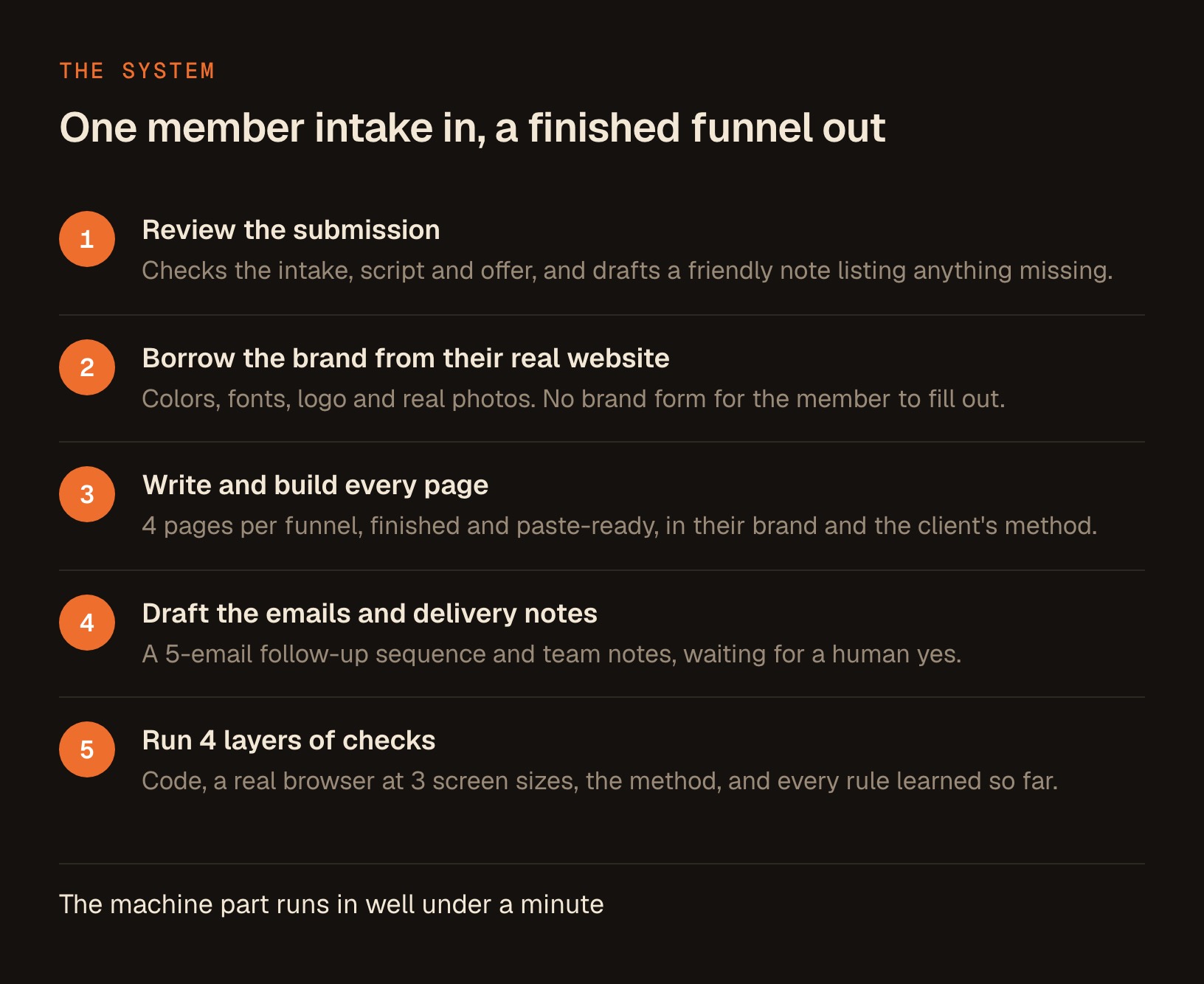
On top of the pages, the system drafts a 5-email follow-up sequence that nurtures a new lead toward a booked call.
Every page has to look like the member's own practice: their colours, their fonts, their logo and their real photos. And every word has to follow the client's marketing method, which is specific and strict about headlines, offers and calls to action.
Multiply 4 pages by the 52 funnels of the first 6 weeks, and you get the real size of the job: more than 200 pages, plus the email sequences, each one in a different brand, all following one method. At 75 funnels, it's at least 300 pages.
Let GoHighLevel run the CRM, and let AI write the pages
The first big decision was where AI should stop and GoHighLevel should take over.
GoHighLevel is excellent at the things a practice needs behind a funnel: the contact database, forms that feed it, calendars, automations, reminders and the follow-up machinery. None of that needed rebuilding, and the members' accounts already ran on it.
What it isn't fast at is producing 200 distinct, on-brand, carefully written pages by hand. So the split became:
- AI writes and builds the pages as finished, paste-ready code, one set per member.
- GoHighLevel hosts them in a Custom Code element on each page, and keeps doing everything it's good at.
- Forms, calendars and popups stay native GoHighLevel pieces, embedded into the pages, so every lead and booking lands in the CRM exactly as before.
One ruling made the whole system maintainable. We decided early not to use GoHighLevel's custom values, the placeholders that let one template fill in different details per account. Every page is member-specific code instead. Any change, however small, means regenerating the page and pasting it again.
That sounds slower. It's the opposite. There's one source of truth for every page, it lives in the build system, and nobody edits a live page by hand where the change would be lost on the next build.
The last step stays manual. As of November 2026, GoHighLevel's funnels API can list funnels, list their pages and count them, but it has no endpoint to create, edit or publish a page. So a person pastes the finished code in. With the pages already built and checked, that's a few minutes per funnel.
Pick the right builder: GoHighLevel's AI Studio or your own system
If you use GoHighLevel, you may be wondering why I didn't use its own AI. It's a fair question.
GoHighLevel now has an AI page builder called AI Studio. Its help center calls it "a conversational, AI-powered builder." It starts from a prompt or a template, can take files, images or a live URL as inspiration, and publishes to a preview link first, then to your own domain.
It also handles the CRM side. Per GoHighLevel's guide to connecting forms and calendars in AI Studio, a form on an AI Studio page can send submissions into your account, and a booking section can use a real calendar from your sub-account. Neither is connected automatically: you ask AI Studio to connect it.
As of November 2026, AI Studio comes with GoHighLevel's AI Employee plans (Starter, Growth and Unlimited) or on pay-per-use, and usage is measured in 5-hour windows. One limit is worth knowing before you put a client's funnel in it:
GoHighLevel's help center says AI Studio projects "cannot be moved into the standard Sites or Funnels builders."
Here's how I'd choose:
| You need | A good fit |
|---|---|
| One or a few funnels, quickly, inside GoHighLevel | GoHighLevel's AI Studio |
| Pages that live in the standard Funnels builder | Finished code pasted into Custom Code elements |
| Many funnels that must follow one strict method | A build system with its own checks |
| Every page in a different client's real brand | A system that reads each client's website |
| Proof that every page passed the same tests | A system with written checks and screenshots |
For one funnel, use whatever gets it live today. For 50 that all have to meet one standard, you need a system that checks its own work, and that's the part a page builder doesn't give you.
Pull the brand from each member's own website
The second decision saved more time than anything else in the project.
The obvious way to brand 50 funnels is a form: colours, fonts, logo, photos, please. Forms get filled in slowly, partly and sometimes wrongly. Every gap becomes an email thread.
So the system doesn't ask. It visits each member's existing website and pulls the brand from what's already there: the colours, the fonts, the logo and the real photos of the practitioner. The member's own site is the brand guide.
That led to a broader rule: ask the member for almost nothing. The way I put it to the team: "I'm not their coach." The only things we ask a member for are the ones that can't exist without them: their recorded video, a portrait when none exists anywhere online, an outside booking link, or an asset their own pages promise.
Everything else, the build takes from what they've already given. Every question you don't ask a client is a week you don't wait for an answer.
Build the checks before you build the second funnel
The machine part of a build runs in well under a minute. The hard part was trust, because when you ship 50 funnels to 50 real businesses, one silent mistake gets copied 50 times.
So I spent more time on the checks than on the builder. Every funnel passes 4 layers before a person looks at it:
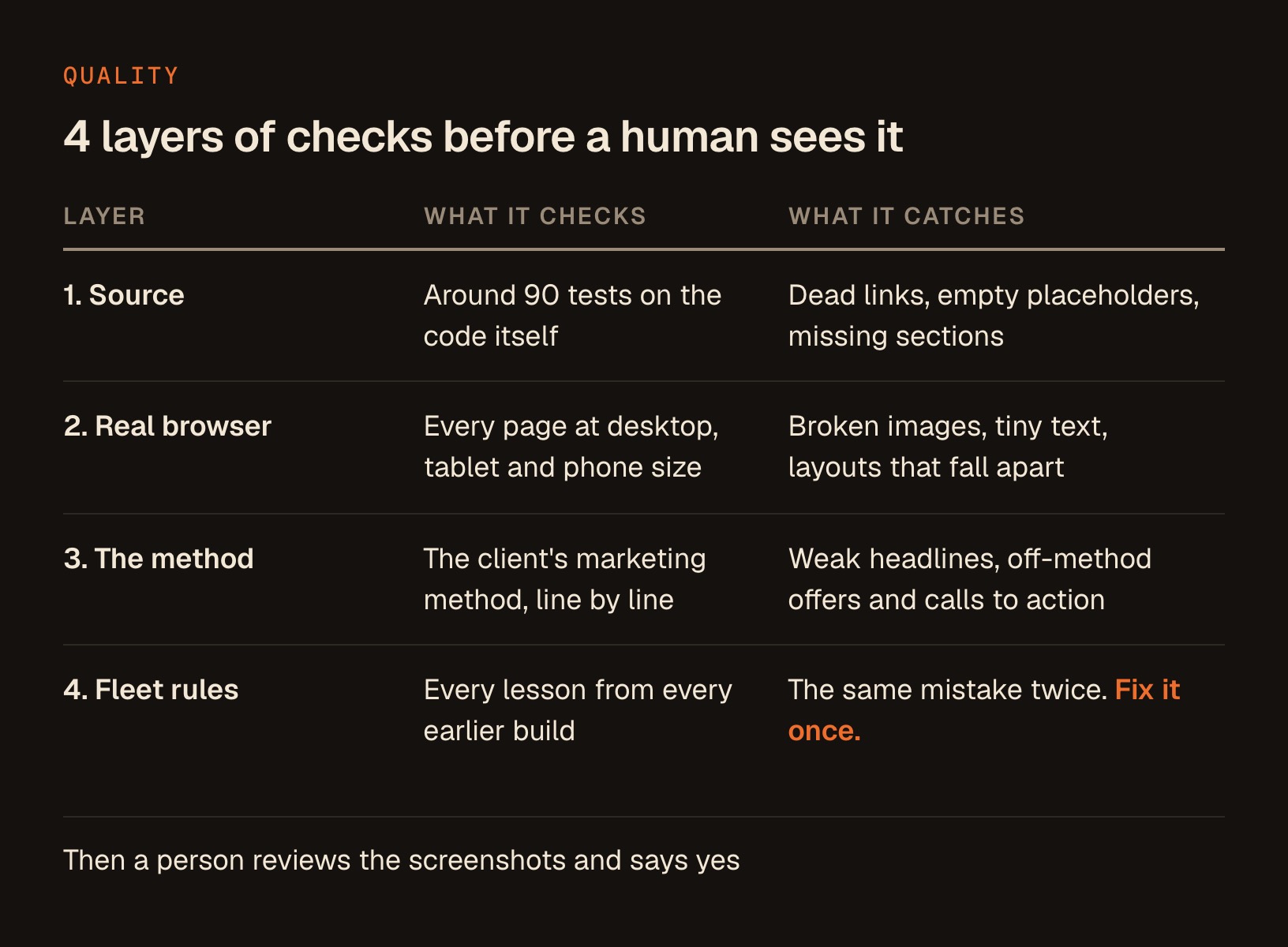
Layer 1: source checks. Around 90 automatic tests per member on the code itself. Every link is real, every placeholder is filled, every section is present and in order.
Layer 2: a real browser. Every page opens in an actual browser at 3 widths, 1280, 768 and 375 pixels, which is desktop, tablet and phone. Broken images, text that's too small and layouts that collapse on a phone all get caught here.
Layer 3: the method. The copy is checked against the client's marketing framework, item by item. Anything that needs a human decision is flagged as open, never quietly resolved by the AI.
Layer 4: fleet rules. Every lesson from every earlier build becomes a rule for the next one. Fix a problem once, and it can't come back.
Then a person reviews the screenshots and says yes. The same habit protects any client-facing AI work, and I wrote up the general version in how to catch what AI made up before your client does.
The rule that saved me the most pain: check what the reader will actually see. Every page here was opened at 3 screen widths before a person looked at it.
One trap I'd warn anyone about: make sure the screenshots you're reviewing are newer than the build. Old screenshots with the same filenames will happily show you problems you already fixed, or hide new ones. The review now checks the timestamps before anyone looks.
Fix every bug once, in the template
Here's something I didn't expect. The mistakes in AI-built pages are boring and systematic, which turns out to be good news.
A few real examples from the first full review:
- Spacing rules that were declared in the wrong order in the stylesheet, so they silently did nothing and left large empty gaps on 2 page types.
- Portrait images that stretched to a tall, thin shape because a size attribute in the code beat the intended proportions.
- People's heads cropped off the top of photos because the crop centred on the middle of the image.
Each one appeared on many pages at once. None of them needed fixing page by page. Fix it once in the template, rebuild, and every funnel gets the fix. Then add a check so it can't return.
That's the real advantage of building at volume with a system. A hand-built page with a bug is one bug. A system with a bug is one fix.
Use real photos, and verify every one by eye
Photos were the one area where I wouldn't let the system decide alone.
The ruling: every member's real photo goes on their pages, even if the only one available is low resolution. And a person photo ships only after a human has matched it by eye against the page that names that person. That check gets recorded, with a date.
It sounds fussy until you see why. In one case, 2 different practitioners with the same name existed, and the wrong photo was a real risk. In another, a portrait on a member's own site looked like it might be AI-enhanced. The rule there: flag it, never silently ship it, and never quietly remove it. A person decides, because it's their face on their business.
The same care went into the words. When a grammar sweep fixed real errors across the fleet, testimonials got mechanical fixes only, like a typo or a missing apostrophe. A testimonial is someone's own words, so it's never rephrased.
Find your next automation by watching the person who pastes
Some of the best improvements came from watching the people who use the pages.
The person pasting the finished pages into GoHighLevel was, on every single paste, changing one link by hand: the button that opens the opt-in popup. The build used one trigger name and their setup expected another. To them it had simply become part of the job.
The fix was small. One setting now feeds every opt-in button, matched to the popup trigger they actually use. Their manual step disappeared from every future paste.
If you build anything that someone else finishes or uses, spend 10 minutes watching them do it. The repeated manual step they've stopped noticing is usually the best thing you can automate next.
Protect client accounts with narrow GoHighLevel API keys
Some of the work needed GoHighLevel's API, for example to confirm which member each account belonged to. GoHighLevel calls these keys private integration tokens. 3 lessons from that are worth passing on to anyone who runs an agency account.
Grant the narrowest access that does the job. It's tempting to tick every box up front, because some permissions can change live accounts across your whole agency. Start narrow instead. As of November 2026, GoHighLevel's private integrations guide says you can change a token's scopes later "without generating a new token." We kept the everyday key read-only and made a separate, clearly named key for anything riskier.
Match accounts by website domain. We assumed sub-accounts were named after the practitioner. Most were named after the practice instead. The website domain proved the most reliable signal, and the person's name alone the least.
Verify a key opens the account you think it does. Before trusting any key, we confirmed which account it actually opened. That check caught a member with 2 separate accounts that name-matching had confidently got wrong.
1 read-only key for everyday work, and 1 separate, clearly named key for anything risky. GoHighLevel allows up to 20 private integration tokens at each level as of November 2026, so there's room for both.
Make every funnel ad-ready with privacy and terms pages
This lesson applies to every funnel builder, AI or not.
When we checked the first group of members, 16 of the first 19 had no privacy policy or terms page linked anywhere. That's easy to miss when you're focused on headlines and video.
It matters the moment a member wants to advertise. Google Ads, for one, says in its lead form help page that when you create a lead form, "you need to provide a link to your privacy policy." A funnel page that collects names and emails needs the same paperwork in place.
So privacy and terms links are now part of what a finished funnel needs, with a place for both in every build. It's boring work, and it decides whether a finished funnel is ready for ads.
Hand the whole system to the client's team
From day one, the goal was a tool that works without me. So I packaged the system for the client's own team, none of whom write code.
They run it with 3 sentences in the Claude Code desktop app, which lives in the Code tab of the Claude app:
- "Review the funnel submission for [member]." It checks what the member sent and drafts a note listing anything missing.
- "Build the funnel for [member]." It builds everything, runs every check, takes the screenshots and prepares the delivery.
- "Update [member]'s funnel: [what changed]." It edits, rebuilds and redelivers.
There are 4 points where it stops and waits for a person to say yes: the script and copy, the screenshots, the email to the member, and the update for the team's project board. Nothing is sent, posted or written to GoHighLevel without an explicit yes on that exact action.
After every delivery, it drafts the email to the member, short and matter-of-fact, with what to review and one deadline. A team member reads it and sends it from their own inbox.
Part of the team works on Windows, so every Mac-only piece of the system was rewritten to run on both. And I recorded 2 short walkthrough videos, about 7 and 10 minutes, so nobody has to call me to get started. If the desktop app is new to you, here's how Claude Code works without a terminal.
The hand-off held. Since then, 23 more member funnels have been delivered with the system, the newest on November 4, 2026.
Grow the add-ons the bottleneck reveals
Once the funnel builder was humming, the next bottlenecks showed up right behind it.
Video editing. Every video funnel needs a recorded sales video, and those were being edited by hand too. So I built an editor that takes a raw recording, cuts the retakes and stumbles, and adds captions and branded title cards. In its first full test, it took a raw recording of almost 22 minutes down to about 10, and its cut matched 96% of the words in the professional editor's version. The human ear still caught 2 small problems the automatic checks missed, which is exactly why a person signs off.
Webinar slides. Webinar members need a slide deck. The deck builder turns a member's script into a branded deck with the spoken script in the speaker notes. To prove it could match real work, it rebuilt 3 decks that had already been delivered, at 41, 24 and 24 slides.
Neither add-on was in the original plan. The first bottleneck you fix shows you the second one. That's normal, and it's where a lot of the value turns out to be.
Copy the pattern for anything you build over and over
You probably don't need 75 funnels. But the pattern works for anything you produce repeatedly: proposals, onboarding packets, client reports, landing pages, course pages or social posts.
Here's the playbook, in order:
- Build one complete example by hand, with AI beside you. That example becomes the blueprint.
- Ask for almost nothing. Pull what you can from what already exists, like the client's website.
- Write the checks before you scale. Decide what "good" means and make the system prove it on every output.
- Check what people see on a real screen. Take real screenshots at real screen sizes.
- Fix problems in the template. And add a check so they can't come back.
- Watch the people who use the output. Automate the manual step they've stopped noticing.
- Keep a human yes before anything goes out. Every send, post and publish waits for a person.
If you want to start on step 3 today, this is the prompt I'd use. It works for any deliverable you make again and again:
I produce [the deliverable] for clients over and over. Here's one finished
example I'm happy with: [file or link]. Help me turn it into a repeatable system.
First, list every check that separates a good one from a bad one, grouped as:
things a script can check, things that need a real screen at phone and desktop
size, and things that need my judgment. Then propose how each check would run
before I ever see the result. Don't build anything yet.
None of these steps needs code. I built the whole system in the Claude Code desktop app by describing each step in plain English, testing it on a real member, and fixing what broke.
Get a system like this built for your business
Systems like this are the kind of work I take on for clients. They all start the same way this one did: a real bottleneck, a proven process, and a person spending their week on work a system could do.
Inside the Solo Creators AI Studio, you get every skill I ship, including the Website Launch Builder, Slide Deck Designer and Auto Video Editor that grew from projects like this one, plus a direct line to me. That line is also the place to start a conversation about a custom system for your own business.
Key takeaways
- Let GoHighLevel run the CRM and let AI write the pages. Finished page code goes into a Custom Code element, while forms, calendars and popups stay native.
- Use GoHighLevel's AI Studio for a few quick funnels. As of November 2026, its projects can't be moved into the standard Sites or Funnels builders, so many funnels on one method need their own system.
- Pull the brand from each client's own website, and ask them only for what can't exist without them, like their recorded video.
- Write the checks before the second build. Around 90 code checks, a real browser at 3 screen sizes, a method check and fleet rules, then a person signs off.
- Fix every bug once, in the template. AI mistakes are boring and systematic, so one fix and one new check cover every funnel.
- Start every GoHighLevel API key with the narrowest access. As of November 2026, you can add scopes later without a new token, and some permissions can change live client accounts.
Get this skill, and every one I build.
30-day money-back guarantee. Cancel anytime.
Questions people ask
Can AI build a GoHighLevel funnel?
Should I use GoHighLevel's AI Studio or Claude to build funnels?
How many funnels has this system built?
How long does it take to build a funnel with AI?
Can GoHighLevel pages be published automatically by AI?
Can you change a GoHighLevel API key's permissions later?
How do you stop AI-built pages from having mistakes?
Do I need to know how to code to build a system like this?

Ronnie spent 18 years building a SaaS with a team of 20 that served over 650,000 customers, generated over $14M in sales, and sent over 550M emails. Now he's solo, solving real business bottlenecks and turning them into working AI skills, workflows, and automations. He teaches all of it, with direct access to him, inside the Solo Creators AI Studio Skool community. See what he's built →
 Michael HattawayFounder, Iron Strengthens Iron
Keep reading