Give attendees a filterable schedule from your Google Sheet
Attendees get one clean schedule link, and it can update itself each time you change the sheet.
Published . Steps as of November 2026.
How do I share an event schedule from Google Sheets with attendees?
Turn the sheet into a Sheets canvas with Gemini, then publish the canvas as its own link. Pick automatic republishing if the schedule may still change, so attendees always see the latest version. Pick a static view if the schedule is final and you want it locked. Either way, attendees can't open your source sheet. As of November 2026, publishing works in Sheets on the web for Google AI Pro and Ultra and some Workspace plans.
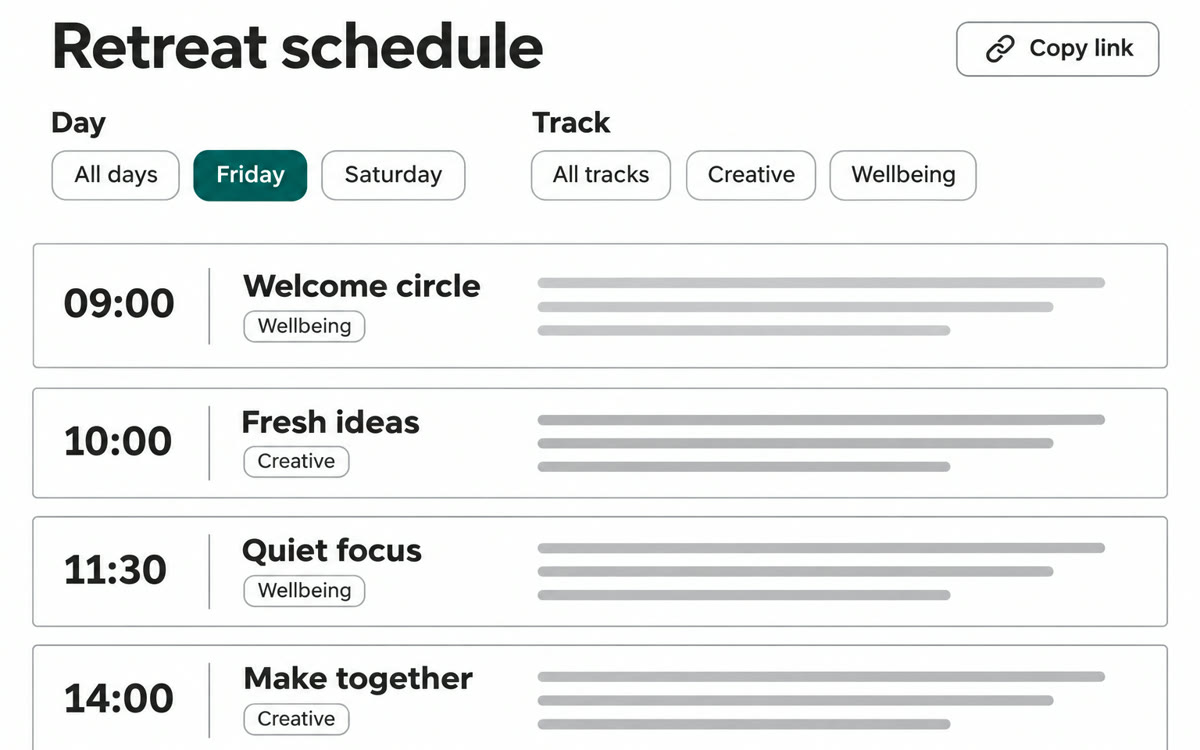
A sample of what you get back, made with AI.
Your prompt
Fill in your details. Skip any you like.
This AI can't be filled in from a link, so the button copies your prompt: paste it into the new chat.
The prompt that gets copied
Build a Sheets canvas from this sheet that works as a public schedule for attendees of [EVENT NAME, e.g. Spring Clarity Retreat]. The columns in my sheet are [YOUR COLUMNS, e.g. day, time, session, speaker, room]. Show the sessions as a day-by-day timeline with big, readable times. Add a filter for day and for [SECOND FILTER, e.g. track], plus a search box for speaker names. Each session card shows the title, speaker, room and a one-line description. Show breaks and meals in a softer color so people can plan around them. Put the event name and dates at the top, with a short 'last updated' line. Leave out any columns about [PRIVATE INFO, e.g. costs and internal notes], because attendees will see this. Keep it clean and easy to read on a phone.
Ask Gemini to turn your event sheet into a Sheets canvas schedule, then publish it as its own link. Attendees filter sessions by day or track and never see your planning sheet.
Step by step
- Open your event sheet in Google Sheets on the web.
- Ask Gemini to build a Sheets canvas with the prompt below.
- Click the publish icon in the canvas toolbar, then click Publish canvas.
- Choose automatic republishing so sheet changes show up, then copy the link.
- Paste the link into your welcome email.
What you'll get
A read-only schedule page with day and track filters that attendees open from one link, while you keep editing the sheet behind it.
Publishing works in Sheets on the web for Google AI Pro, Ultra and some Workspace plans. Rolling out from November 11, 2026.
- Made for
- Coaches, Consultants, Small business owners
- Works in
- Gemini