Turn your best guide into a mini course with built-in quizzes
A PDF that sat unread becomes a short course people can finish in one evening.
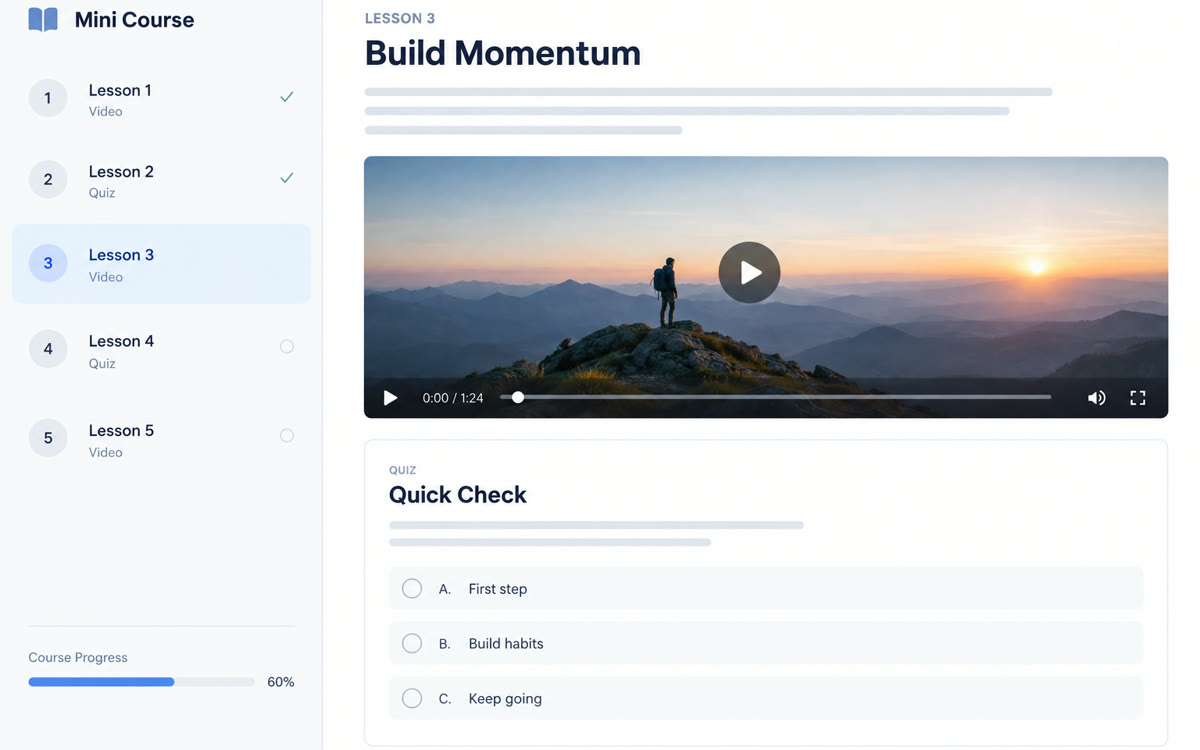
A sample of what you get back, made with AI.
Your prompt
Fill in your details. Skip any you like.
This AI can't be filled in from a link, so the button copies your prompt: paste it into the new chat.
The prompt that gets copied
Using only the attached [SOURCE MATERIAL, e.g. client welcome guide] by [YOUR NAME], build a mini course app called [COURSE TITLE, e.g. Your First 30 Days]. It's for [YOUR IDEAL CLIENT, e.g. new coaching clients]. Split it into [NUMBER OF LESSONS, e.g. 5] lessons of about 3 minutes each. Each lesson has a short plain-words explanation, one real example and a 3-question quiz. After each answer, explain in one or two sentences why it's right or wrong. Open each lesson only after the one before it's finished. Show a progress bar and a finish screen with the learner's first name, today's date and one clear next step: [NEXT STEP, e.g. book your first session]. Don't add facts that aren't in my material. Use a calm, clean design that works well on a phone.
Attach a guide or workshop notes in Gemini Canvas and get a course app with short lessons, a quiz after each one, a progress bar and a finish screen, shared from one public link.
Step by step
- Open Gemini on the web, select Canvas in the Tools menu, and attach your guide.
- Paste the prompt, then read every lesson against your guide before you go on.
- Take every quiz yourself and ask Gemini to fix any answer that's wrong or unclear.
- Select Share & export, then Share, and copy the public link.
- Send the link to new clients, or add it as a bonus on your offer page.
What you'll get
A shareable course app with bite-size lessons, quizzes that explain every answer, a progress bar and a finish screen that points to your next step.
Canvas works for all Gemini users. Shared links open in a browser at gemini.google.com, not in the Gemini app.
- Made for
- Coaches, Consultants, Creators
- Works in
- Gemini


