Let Google phone local shops for prices while you relax
An AI makes the phone calls for you and reports back.
Published . Updated . Steps as of October 2026.
Can Google call local stores to check prices for me?
Yes. Open Google Search, switch to AI Mode, and paste the prompt with what you need, your area, budget and deadline (as of October 2026). Google's AI calls nearby stores and sends you who has it and what it costs. If you're comparing several places, let it make all the calls. If one option looks best, call or visit it yourself to confirm before you count on it. Asking takes about two minutes.
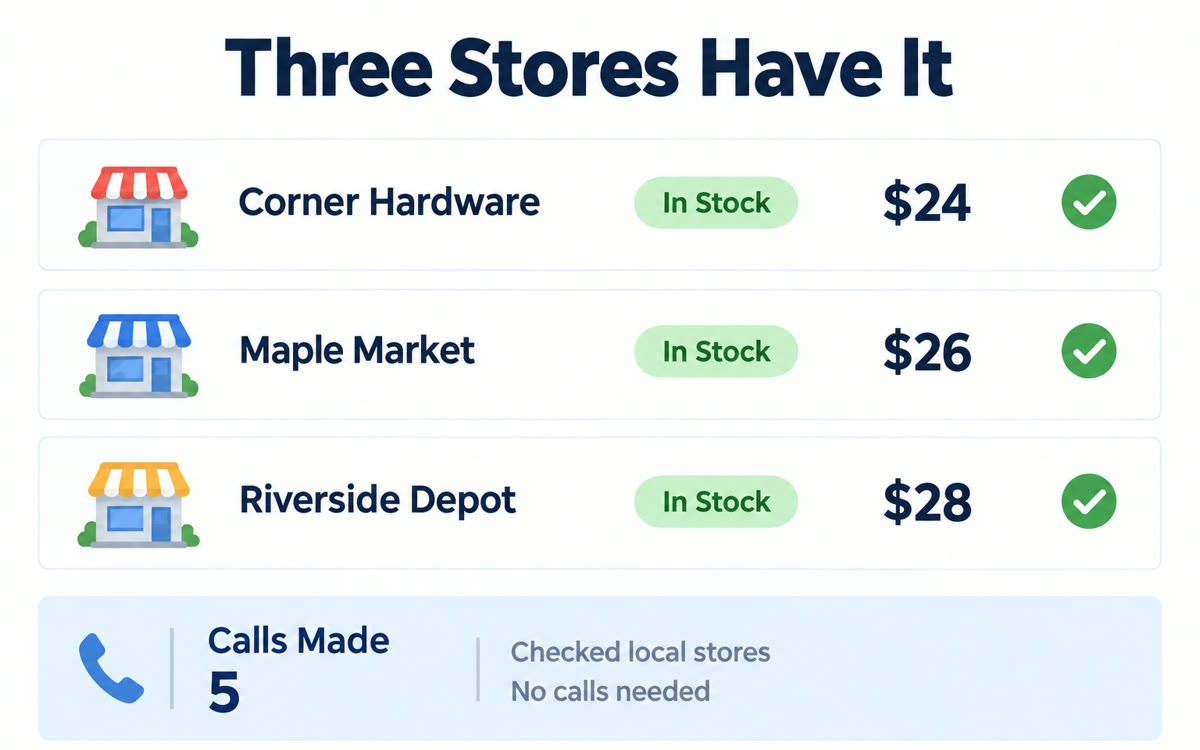
A sample of what you get back, made with AI.
Read the transcript
You can find out which store near you has what you need, without making one phone call.
And it all happens inside Google Search.
So Google's AI Mode can now call local stores for you.
You just describe what you need, it makes the calls, and it sends you the details afterwards.
So open the Google app, tap AI Mode, and paste in the prompt.
Fill in what you need, your area, your budget and your deadline.
Then tap Check for me, and then Looks good.
If a store doesn't list it online, Google can call and ask if it's in stock, and what it costs.
It only shares the details you confirmed.
Calls can take up to 30 minutes, so go do something else.
Then you get a notification, and it compares the options for you.
Oh, this is super cool.
It's not everywhere yet, so call or visit the best one to confirm.
Save it now, so it's there when you need it.
Give me a follow for more like this.
Your prompt
Fill in your details. Skip any you like.
ChatGPT and Claude open with your prompt already typed in. Gemini can't be filled in from a link, so its button copies your prompt: paste it into the new chat.
The prompt that gets copied
I'm looking for [ITEM OR SERVICE, e.g. a dog grooming slot this week] near [ZIP CODE OR NEIGHBORHOOD]. My budget is about [YOUR BUDGET, e.g. $80] and I need it by [NEEDED BY, e.g. Friday]. Please check which nearby businesses have it in stock or can do it, what it costs, and whether there are any current deals. Then compare the options for me and tell me which one fits best.
Describe what you need in Google's AI Mode, and Google's AI calls nearby stores to find out who has it and what it costs. Then it sends you the details.
Step by step
- Open Google Search and switch to AI Mode.
- Paste the prompt with your details filled in.
- Let Google make the calls. It sends you what it learns afterward.
- Call or visit the best option yourself to confirm.
What you'll get
A rundown of which local stores have what you need, at what price, without you making a single call.
U.S. only. Not every store or category is covered, and businesses can opt out of calls.
- Made for
- Everyone
- Works in
- Google Search