Know exactly when to wake up with a backward morning planner
It learns from real mornings: if hair keeps taking 25 minutes, not 15, it suggests the new estimate.
Published . Steps as of October 2026.
How do I plan a morning routine backward from when we leave?
List each task with a rough time and your leave time, then ask Claude to build a planner page that works backward and shows the wake-up time. A one-off plan works on any Claude plan. If you want the page to remember yesterday's list and learn real task times, you'll need a paid plan, since artifact storage needs one as of October 2026. Families with one rushed morning person get the most from it.
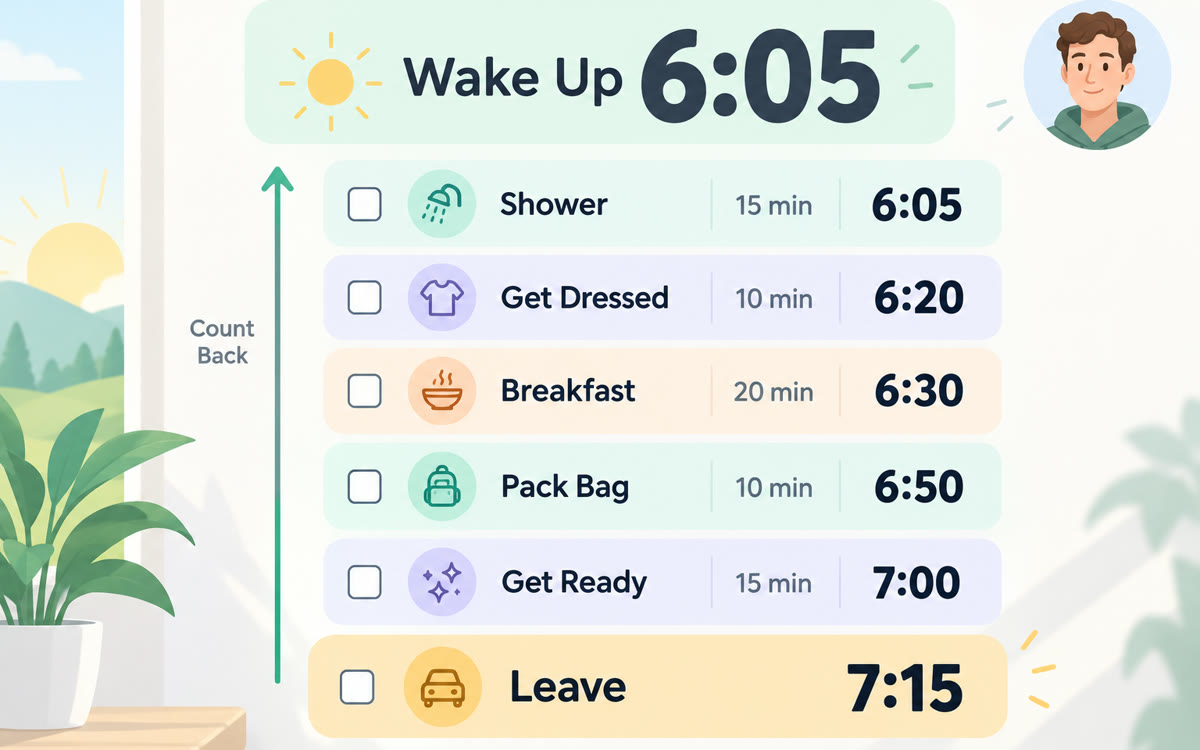
A sample of what you get back, made with AI.
Your prompt
Fill in your details. Skip any you like.
Claude opens with your prompt already typed in. It's copied too, just in case.
The prompt that gets copied
Build me a simple morning planner as an interactive page for [WHO IT'S FOR, e.g. my 15-year-old daughter]. Mornings are rushed because it's hard to tell how long each task really takes.

Tasks and rough minutes: [MORNING TASKS, e.g. shower 15, hair 15, dress 10, breakfast 15]
Leave time: [LEAVE TIME, e.g. 7:40]

The page should:
1. Work backward from the leave time, add a 3-minute buffer between tasks, and show the wake-up time in big numbers.
2. Show each task with its start time, in order.
3. Keep yesterday's list so planning tonight takes under a minute. Let me add, remove or reorder tasks with a tap.
4. Have a Done button for each task that records how long it really took. After three mornings, suggest a new estimate for any task that keeps running over.
5. Use a calm, friendly design with large text that's easy to read on a phone.

Ask me any questions before you build it.
List the morning tasks and the time you leave, and Claude builds a small planner page that works backward, adds buffers, shows the exact wake-up time and keeps yesterday's list.
Step by step
- Open Claude and paste the prompt with the tasks, rough minutes and leave time filled in.
- Try the planner page Claude builds and ask for changes, like bigger buttons or calmer colors.
- Open the page on the phone that will use it and plan the next morning the night before.
- Tap Done after each task in the morning so the time estimates keep getting better.
What you'll get
A phone-friendly planner page that shows the wake-up time, a start time for every task with buffers, and smarter estimates after a few mornings.
Saving the task list between days uses artifact storage, which needs a paid Claude plan (Pro, Max, Team or Enterprise).
- Made for
- Everyone
- Works in
- Claude


