
How do I know if AI is actually saving me time?
Measure it, because your gut is a bad stopwatch. In a 2025 METR study, experienced developers were 19% slower with AI while believing they were about 20% faster. It depends on the task. If AI lets you do something you couldn't do otherwise, it wins by default. For a task you already do well by hand, run a one-week test: do it some times with AI and some times without, time each to truly finished, rate quality 1 to 5, and compare medians.
The study that should make you doubt your own gut
Here's the finding that rearranged how I think about my own workday. A group of experienced developers used AI on real tasks, felt noticeably faster the whole time, and were actually slower. Not slightly off. Slower, while swearing they were quicker.
In 2025, a research group called METR ran a careful experiment with 16 experienced open-source developers on 246 real tasks from their own projects. Half the tasks they did with AI tools, half without.
These were not skeptics. Before starting, they expected AI to speed them up by 24%. Afterward, they reported that it had. They felt faster.
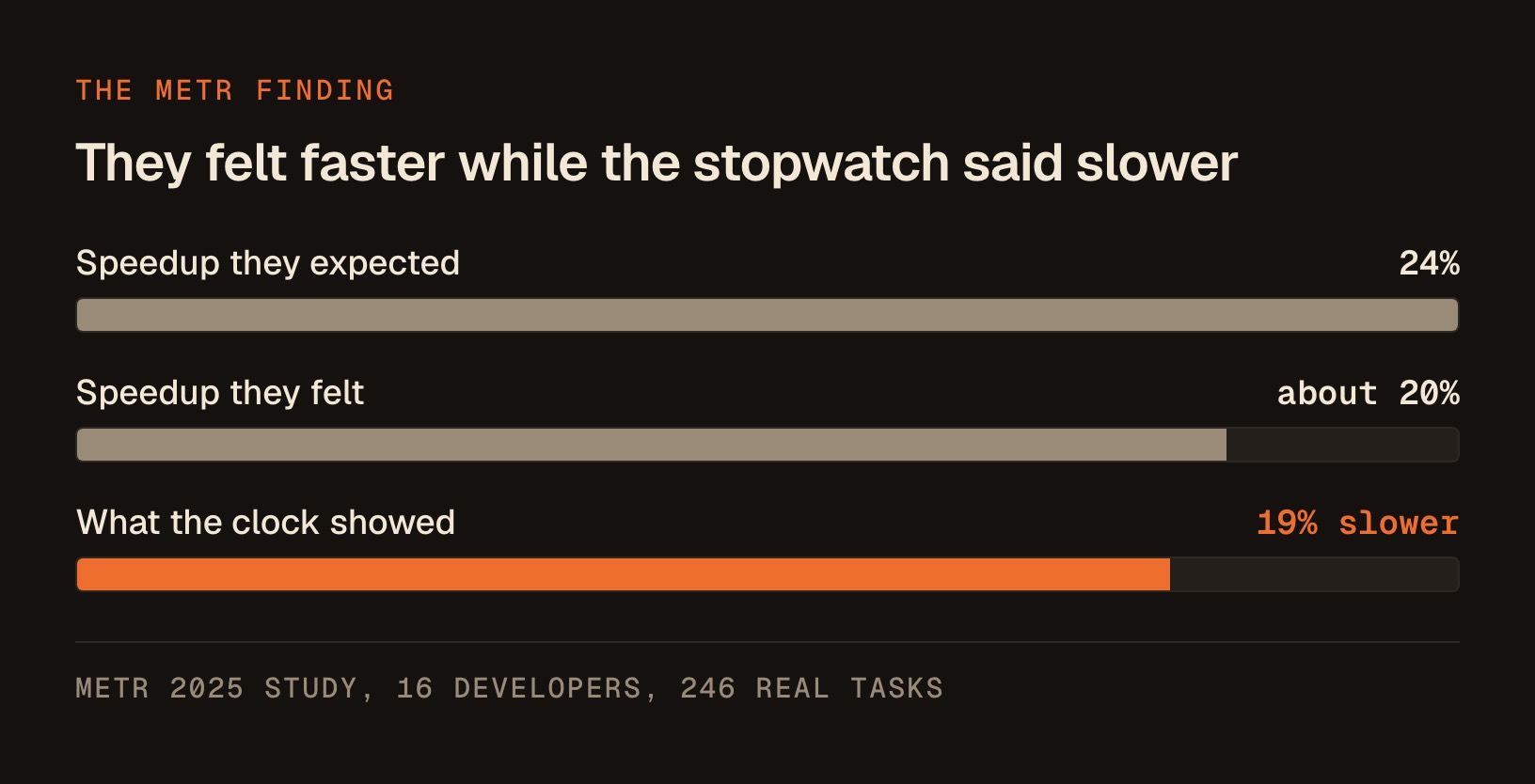
The stopwatch disagreed. With AI, those developers were 19% slower, not faster.
And here's the part that stuck with me: even after living through the slowdown, they still believed AI had sped them up by about 20%. METR called the gap between what people felt and what actually happened "striking." I'd call it a warning label for every one of us.
The number matters less than the pattern underneath it. A developer study on open-source code has almost nothing to do with your coaching calls, your client emails, or your course launch.
16 experienced developers expected a 24% speedup. The clock showed them 19% slower, and they still believed AI had made them faster.
Smart, experienced people were confidently wrong about their own speed, on their own turf, with real work in front of them. That failure mode does not care what industry you're in.
I want to be scrupulously fair to METR here, because being sloppy about a study on measurement would be its own joke.
What METR themselves said afterward
In February 2026, METR published an update, and I'll hand you both halves. Here's the ledger of what survived and what didn't.
| The original 2025 finding | Status after METR's February 2026 update |
|---|---|
| Experienced developers were 19% slower with AI | Softened. Based on conversations with the original participants, METR now believes developers are likely more sped up by AI in early 2026. |
| The result describes AI tools as they were in early 2025 | Confirmed as a snapshot. Tools improved and people got better at using them. |
| A newer experiment would settle the question | Not settled. METR called their fresh data "an unreliable signal," largely because of who selected into it. |
| Developers felt faster while actually being slower | Untouched. Nothing in the update says they became accurate judges of their own pace. |
So if someone waves the "19% slower" headline at you as proof that AI is useless, they're citing half a study. AI may well be making you faster today. METR's own follow-up leans that way.
METR called their own newer data "an unreliable signal." Nothing in the update says the developers became accurate judges of their own pace.
The felt-versus-real gap is the durable finding, and it's the one you can actually do something about this week. Whether AI speeds you up by a lot, a little, or not at all, your gut is a bad instrument for telling which. That's true for me too, and measuring is the only thing that's ever corrected me.
Why your brain is a terrible stopwatch
You don't need a psychology degree to see why the feeling and the reality came apart. 3 plain reasons, and you'll recognize every one of them.
| The illusion | What it feels like | What it's actually costing you |
|---|---|---|
| AI feels like progress even when it's motion | You typed a request, a polished answer streamed back, you did a thing, fast | Reading the output, catching where it went sideways, re-prompting, fixing the subtly wrong bits |
| Effort and time get confused | Handing over a draft takes less mental strain than a blank page, so it feels shorter | Easier is not faster, and your gut quietly swaps one measurement for the other |
| You remember the wins and forget the reruns | The client email AI nailed in 10 seconds is a story you tell | The 4 redo-the-prompt-then-rewrite-it-yourself sessions blur into background noise |
Memory keeps the highlight reel and quietly drops the ledger. None of this makes you gullible. It makes you human, running on the same wiring as 16 professional developers who were sure they were flying.
The only fix that has ever worked is boring: write down what actually happened, in numbers, before your memory launders it.
What this means for a solo operator (and what it doesn't)
Let me draw the line clearly, because I don't want you walking away with the wrong takeaway.
This is not a reason to drop AI. I'd be a hypocrite. One of the skills I built with Claude got bundled into a WordPress plugin that now runs on 250,000+ sites, and I couldn't write a line of the code behind it.
One skill I built with Claude now runs inside a WordPress plugin on 250,000+ sites, and I can't write a line of the code behind it.
AI unquestionably lets me do things I otherwise couldn't do at all, and "couldn't do at all" beats any speed comparison. For a lot of work, the question is simply whether the thing gets done at all, with faster or slower a distant second.
This is a reason to stop trusting the vibe on the specific tasks where speed is the whole point. Here's the useful split:
| Where "faster" is the point | Where "possible at all" is the point |
|---|---|
| Writing routine client emails you could already write | Building a landing page you couldn't code yourself |
| Repurposing a call into social posts | Designing a slide deck when you have zero design skill |
| Drafting a proposal from a template you know cold | Analyzing a spreadsheet you wouldn't know how to model |
| Cleaning up a transcript | Producing a video edit from scratch |
For the right-hand column, don't bother measuring speed. AI wins by default because the alternative is not doing it.
Measure the left column, the stuff you already do competently, where AI is supposed to be saving you time you actually have. That's exactly where the METR trap lives, and exactly where you can catch it.
The one-week AI time test
Here's the whole protocol. It's deliberately simple, because a measurement system you won't keep up for 7 days is worthless. You need no new software. A note on your phone or a single document works.
Step one: pick one repeatable task. Choose something you do several times a week and already know how to do without help. Writing follow-up emails. Turning a call into a LinkedIn post. Drafting a client update. One task type, not 5. Narrow beats thorough here.
Step 2: split it into 2 lanes. Over the week, do that task some times with AI and some times fully by hand, the old way. Aim for at least 3 of each. Alternate so you don't do all the easy ones in one lane. The goal is an apples-to-apples race on the same kind of work.
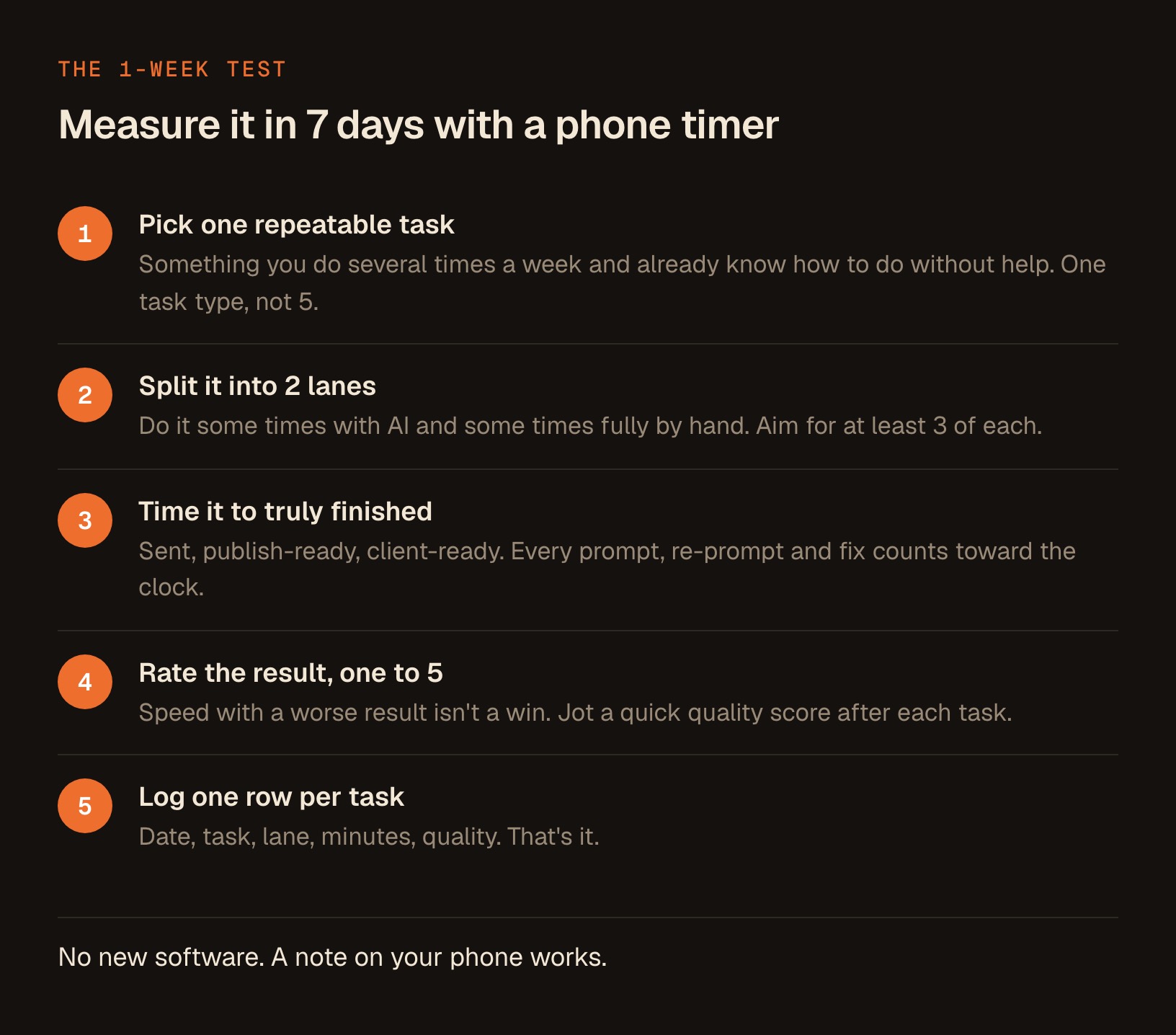
Step 3: time it, start to truly finished. This is where most people cheat without meaning to. "Finished" means the email is sent, the post is publish-ready, the draft is client-ready.
| Counts toward the clock | Does not count as finished |
|---|---|
| Writing the prompt, and every re-prompt after it | The moment the answer appears on screen |
| Reading the output and checking it for errors | A draft you still have to reread tomorrow |
| Fixing the parts that came back subtly wrong | An email written but not sent |
| Formatting, final polish, and hitting send or publish | A post still missing its hook or its link |
If a phone call or a kid interrupts you mid-task, pause the clock and log only your actual working minutes. If a task spans 2 sittings, add the minutes together and log it as one row.
Being slightly imprecise is fine, as long as you're sloppy in exactly the same way in both lanes. If you stop the clock when the answer appears on screen, you're measuring the highlight reel again. Clock the whole job, tax included.
Step 4: rate the result, 1 to 5. Speed with a worse result isn't a win. After each task, jot a quick quality score. Sometimes AI is slower but the output is better, or faster but you'd be embarrassed to send it. You want both numbers so you're not fooled by either alone.
Step 5: log one row per task. Date, task, lane, minutes, quality. That's it. Something like this:
| Date | Task | Lane | Minutes | Quality (1-5) |
|---|---|---|---|---|
| Mon | Client follow-up email | AI | 14 | 4 |
| Mon | Client follow-up email | Solo | 11 | 4 |
| Tue | LinkedIn post from call | AI | 9 | 5 |
| Wed | LinkedIn post from call | Solo | 22 | 4 |
Here's a blank version to steal:
| Date | Task | Lane (AI/Solo) | Minutes | Quality (1-5) |
|---|---|---|---|---|
|  |  |  |  |  |
|  |  |  |  |  |
|  |  |  |  |  |
Paste this into a note on your phone. That's the whole system.
Keep it stupid-simple and you'll actually finish the week. At the end you'll have maybe 8 to twelve rows. That's enough to overrule a feeling, not enough to prove a number.
The week I'm running on my own work
Fair question to ask me: am I doing this myself, or just prescribing it?
I'm running the exact protocol above on one of my own recurring tasks, drafting the weekly email to my list, in both lanes. I'll add the real rows and the verdict to this page once the week is done, including if the result makes me look bad.
Until then, treat the numbers in this article as METR's, not mine.
Turn your logs into a verdict you can trust
At the end of the week, don't eyeball the table and decide. Eyeballing is exactly the instrument that failed the developers.
Hand the raw numbers to Claude and ask it to be a cold, skeptical analyst. Paste this straight into the Claude desktop app:
I ran a one-week test comparing how long a task takes with AI versus by hand. Below are my logs. Each row is: date, task, lane (AI or Solo), minutes to fully finish, and a 1-to-5 quality rating.

Act as a skeptical analyst who does not care about impressing me and has no stake in AI looking good or bad. Do the following:

1. Calculate the median minutes per task for the AI lane and the Solo lane. Use the median, not the average, so one weird outlier doesn't swing it.
2. Tell me the speed difference, and whether AI was faster, slower, or too close to call.
3. Compare the quality scores too. If AI was faster but lower quality, say so plainly.
4. I have very few data points. Tell me clearly whether that's enough to conclude anything, or whether the difference could easily be noise.
5. Give me a one-paragraph verdict in plain English: should I keep using AI for THIS specific task, stop, or run another week to be sure?

Do not soften the findings and do not flatter me. If the data says my gut was wrong, tell me that directly.

Here are my logs:
[paste your table here]
2 things make this prompt do real work:
- It asks for the median instead of the average, so a single disastrous re-prompt session doesn't secretly wreck the result.
- It explicitly tells the AI not to flatter you, which matters, because a model left to its own manners will often congratulate you on your data.
You want a referee. Honest analysis beats applause every time.
Reading the result without fooling yourself again
A few cautions, so you don't over-read a small test.
Thin data is thin data. 8 rows won't give you a reliable percentage, and they don't need to. What this week reliably does is pop the illusion of certainty.
If you were sure AI saved you fifteen minutes an email and the log says it cost you 3, that's worth knowing even at low confidence. Losing that false certainty is the whole prize.
The result can flip by task. You'll likely find AI clearly wins on some tasks, quietly loses on others, and ties on the rest. That's the useful outcome, and a genuinely good one.
Keep it where it earns its keep and stop forcing it where it doesn't. You now have a per-task answer instead of a blanket belief.
Re-run it in a few months. METR's own update is the reason. Tools change, and you get better at prompting, especially once you build the small habits that make AI output better. A task AI lost this quarter might win next quarter. Treat measurement as a recurring habit. The point is to stop guessing.
And when AI does win, lean all the way in. The tasks where it genuinely saves you an hour are the tasks worth turning into a repeatable workflow you never rebuild from scratch.
Turn every task AI wins into a workflow you never rebuild
That last part is most of what I do now. When I find a task AI reliably speeds up, I don't want to re-explain it to a chat window every single time.
I package it into a proper skill that runs the same way on demand, and every skill I build lives in one place, The Solo Creators AI Studio, where you also get a direct line to me if you want help measuring your own.
If you'd rather skip straight to workflows that are already tested and shipping, that's what it's for: the Solo Creators AI Studio.
But you don't need the Studio to start. You need one repeatable task, a phone timer, and 7 days of writing down what actually happened.
Do that, and you'll know something about your own workday that a room full of confident experts got wrong about theirs.
Key takeaways
- In a 2025 METR study, 16 experienced developers on 246 real tasks were 19% slower with AI while believing they were about 20% faster, and had expected a 24% speedup going in.
- The durable lesson is the perception gap, not the number: smart people are confidently wrong about their own speed, so your gut is a bad instrument for judging whether AI saves you time.
- In a February 2026 update, METR said their newer data was an unreliable signal and that developers are likely more sped up by AI now than in early 2025, so the original result is a snapshot, not a permanent verdict.
- Only measure speed on tasks you can already do well by hand. Where AI lets you do something you otherwise couldn't (coding, design, video), it wins by default and speed is beside the point.
- Run a one-week test: pick one repeatable task, do it some times with AI and some times by hand, time the whole job to truly finished, and rate the quality 1 to 5.
- Hand the raw logs to Claude and ask it to act as a skeptical analyst using the median, not the average, and to refuse to flatter you.
- Eight to twelve rows is enough to overrule a feeling, not enough to prove a number, and losing that false certainty is the whole prize.
Get this skill, and every one I build.
30-day money-back guarantee. Cancel anytime.
Questions people ask
Did AI really make experienced developers slower?
Doesn't that prove AI is a waste of time?
Does this study apply to coaches, consultants, and other non-developers?
How do I actually measure whether AI saves me time?
What if AI is slower but the result is better?
Why should I use the median instead of the average when reviewing my times?
What if the results are different for different tasks?

Ronnie spent 18 years building a SaaS with a team of 20 that served over 650,000 customers, generated over $14M in sales, and sent over 550M emails. Now he's solo, solving real business bottlenecks and turning them into working AI skills, workflows, and automations. He teaches all of it, with direct access to him, inside the Solo Creators AI Studio Skool community. See what he's built →
 Michael HattawayFounder, Iron Strengthens Iron
Keep reading