
How do I send AI-assisted work my clients can use right away?
It depends on whether you add the judgment step before you hit send. Pasted AI output looks finished but often isn't, so the work moves to whoever receives it. In one BetterUp and Stanford survey, 40% of desk workers got this "workslop" in a single month, and each case took just under two hours to fix. Use AI for a fast first draft. Then make it specific, verify every claim, cut the filler, and add the one insight only you have.
A coaching client of mine once forwarded me a "strategy brief" her assistant had put together. It was gorgeous. Clean headers, confident summary, 5 neat recommendations.
She'd read it twice and still couldn't act on a single line, because none of it was actually about her business. It was AI output someone had pasted, tidied, and sent. She spent an afternoon rebuilding it from scratch.
Researchers have a name for that thing now, and once you see it, you can't unsee it in your own drafts.
I still can't write a line of code, and I ship real products anyway, including an iPhone app Apple approved in under 3 weeks. AI does the building. So read this as a pro-AI piece about the one specific way AI quietly makes you look worse in front of the people who pay you.
Here's the name. Researchers at BetterUp Labs and the Stanford Social Media Lab, writing in Harvard Business Review in September 2025, called it "workslop." Their definition is simple: AI-generated content that looks like good work but lacks the substance to actually move the task forward. It's the deliverable that reads finished and isn't.
The Deliverable That Looks Done and Quietly Isn't
Here's the trap, and it's a sneaky one. AI is genuinely excellent at the surface of work. It produces clean formatting, confident transitions, headers that sound like a consultant wrote them, and summaries that scan beautifully.
The polish arrives before the substance does. A draft can look 95% done while being 40% done.
Your eye, trained on how finished work usually looks, tells you it's ready. So you send it. To a client, a prospect, a partner, a member of your list.
And the person on the other end opens something that looks like a real deliverable and slowly realizes the thinking isn't there.
- The recommendations are generic.
- The example doesn't match their situation.
- A number is asserted with total confidence and no source.
The document knows the shape of an answer without knowing the answer.
Now the work you skipped becomes their work. They have to figure out what you actually meant, fill in the specifics you left out, check the claims you didn't check, and often redo the piece properly.
You saved 20 minutes. They lost an afternoon. That transfer, from sender to receiver, is the entire story of workslop.
It's also the reason a tool that's supposed to save everyone time can end up costing more of it.
What the Research Actually Found (and Its Honest Limits)
The BetterUp and Stanford team surveyed 1,150 full-time U.S. desk workers. In the month before they were asked, 40% said they'd received workslop from a colleague. Not once in their career. In a single month. That's how common paste-and-send has already become inside normal companies.
The cost showed up in time. On average, people reported spending just under 2 hours dealing with each instance of workslop they received, roughly one hour and 56 minutes, to interpret it, redo it, or go back and forth about it.
BetterUp put an estimated price on that lost time of around $186 per employee per month, extrapolated off the same self-reported data.
Here's the caveat I want to state plainly, because it matters and because most write-ups skip it. This was a self-reported online survey, not a controlled experiment. Nobody measured anyone with a stopwatch, and nobody ran a randomized trial. Memory is fuzzy, people round up on things that annoyed them, and "workslop" is a judgment call.
So here's how much weight I'd put on each piece of it.
| Finding | What it is | How much weight to give it |
|---|---|---|
| The term "workslop" | A definition published in HBR by BetterUp Labs and the Stanford Social Media Lab | Use it freely. It's a naming, not a measurement |
| 1,150 full-time U.S. desk workers | The survey sample | A solid sample, and it tells you nothing about non-desk work |
| 40% received workslop in a month | Self-reported recall of the previous month | High confidence in the pattern, loose on the exact percentage |
| About 1 hour 56 minutes per instance | Self-reported estimate of time spent interpreting, redoing, or going back and forth | Read it as "roughly two hours," never as a stopwatch figure |
| About $186 per employee per month | An extrapolation off that self-reported time | The softest number of the set. Order of magnitude only |
40% of 1,150 desk workers got workslop from a colleague in a single month, and each instance cost them just under 2 hours.
Treat those figures as a strong signal about a real pattern, not as physics. The pattern is what you should act on. The decimals, less so.
Read the Tell Before Your Client Does
The good news is that workslop has a smell, and you can learn it. Once you know what you're sniffing for, you can catch it in your own drafts in about sixty seconds. Every tell comes down to the same thing: generic where it should be specific.
Here's what to look for when you reread something before you send it.
- It could have been written for anyone. Swap the client's name for a competitor's and nothing breaks. Real work is load-bearing on the specifics of one situation. Workslop floats above all of them.
- It asserts numbers or facts without a source. AI will state "studies show" or drop a confident statistic that it invented or half-remembered. If you can't say where a number came from, don't send it, and definitely don't put your name on it.
- The examples are hollow. "For example, a business could improve its onboarding." That's the placeholder shape of an example, with the actual example never filled in. A real example names the actual thing.
- The structure is beautiful and the content is thin. 5 headers, 3 bullets each, a tidy conclusion, and when you read it slowly there's no actual recommendation you could act on Monday morning.
- It answers a slightly different question than the one asked. The draft is fluent about the topic in general and silent on the exact ask.
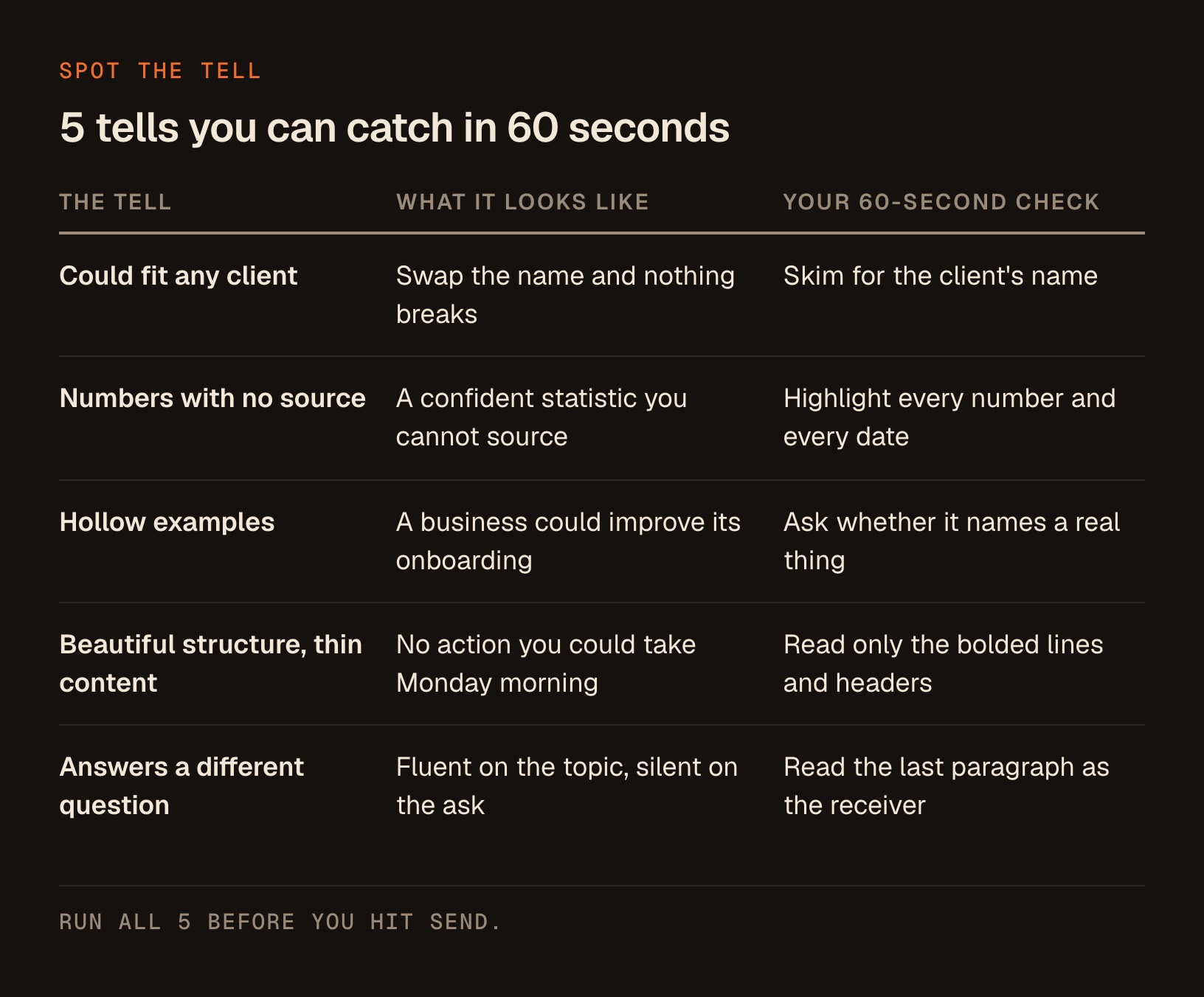
The sixty-second pass. Run these 5 in order on any draft before it leaves your outbox.
- Skim for the client's name and mentally swap it for a competitor's. If nothing breaks, it's generic.
- Highlight every number and every date. Each one needs a source you could name out loud.
- Find each example and ask whether it names a real thing.
- Read only the bolded lines and headers. See whether an action survives that skim.
- Read the last paragraph as the receiver and check that you know exactly what happens next.
The unifying test is dead simple. Read the draft as the person receiving it and ask: could I act on this right now, or would I have to go do more work first? If the honest answer is that they'd have more work to do, you're about to hand someone your homework. That's the moment to stop.
Finished Work vs Workslop: The Difference Your Client Feels
The line between a great AI-assisted deliverable and workslop has nothing to do with whether you used AI. I use it on everything. What matters is whether a human did the judgment. Here's what that difference looks like side by side.
| What the receiver sees | Workslop (pasted) | Work that lands (judged) |
|---|---|---|
| Specificity | Generic, could fit any client | Built on this client's real details |
| Claims and numbers | Asserted, unsourced | Checked, or removed if you can't source them |
| Examples | Placeholder-shaped ("a business could...") | Concrete and named |
| The ask | Answers the topic in general | Answers the exact question |
| Next step | Reader has to figure it out | One clear action they can take today |
| Who does the thinking | The receiver, after the fact | You, before you hit send |
| Time cost | Moved downstream to them | Absorbed by you, where it belongs |
Notice that not one row is about grammar, formatting, or how "AI-sounding" the prose is. Workslop is a skipped-thinking problem wearing the costume of finished writing.
The Judgment Layer That Makes AI Output Land
So what's the actual fix? The fix is to add back the one step that paste-and-send removes. I think of it as a judgment layer that sits between the AI draft and the send button, and it has 4 moves.
First, make it specific. Feed the AI the real details before you accept anything general. The client's actual numbers, their actual situation, the actual constraint they're under. Most workslop happens because someone prompted with a generic question and accepted a generic answer. Specific in, specific out.
Second, verify every claim you didn't already know. This is the big one for anyone whose reputation is their business. If the draft states a statistic, a fact, a date, or a "best practice," either confirm it or cut it.
When I'm unsure of a number, I'd rather write the sentence without the number than ship a confident guess.
Third, cut what you can't stand behind. If a paragraph is filler that sounds smart and says nothing, delete it. A shorter deliverable that's all substance beats a long one padded with air. Your client is paying for your judgment about what matters, and half of judgment is subtraction.
Fourth, add the thing only you know. This is where you become irreplaceable. The AI can draft the framework. You add the read on this specific person, the thing you noticed on the last call, the reason the obvious move is wrong for them.
That human layer is the entire product. It's what they can't get from a chatbot, and it's why they hired you instead of opening one themselves. I wrote a companion piece on not outsourcing the thinking, and this is the practical, ship-it version of that idea.
Here's the whole layer on one screen, so you can run it from the skim.
| The move | The question you ask | What you actually do (60 seconds or less) |
|---|---|---|
| Make it specific | Would this still be true if I swapped in a different client? | Paste in their real numbers, situation, and constraint, then regenerate the parts that stayed general |
| Verify every claim | Where exactly did this number come from? | Confirm it in a second window, or rewrite the sentence without the number |
| Cut what you can't stand behind | If I deleted this paragraph, what would be lost? | Delete it. Nothing of value was lost |
| Add the thing only you know | What do I know about this person that no model does? | Write 1 or 2 sentences from the last call, the read, or why the obvious move is wrong for them |
Catch Workslop Before You Hit Send
Here's a prompt I actually use. Before I send anything a client will read, I paste my draft into Claude and run this. The trick is that I'm not asking it to improve the writing. I'm asking it to hunt for the exact tells above, so I can fix them myself with my own judgment.
You are a skeptical editor protecting my professional reputation. Below is a draft I'm about to send to a client. Do NOT rewrite it or make it prettier. Instead, pressure-test it for "workslop" (polished content that looks finished but lacks real substance).

Go through it and flag:
1. Any sentence that is generic enough to apply to any client, not this specific one.
2. Every factual claim, statistic, date, or "best practice" that is asserted without a source, so I can verify or cut it. List these separately as a checklist.
3. Any example that is placeholder-shaped ("a business could...") instead of concrete.
4. Any section that sounds smart but contains no action the reader could actually take.
5. The single most important question the client probably has that this draft does NOT answer.

For each flag, quote the exact text and tell me what specific information I'd need to add to make it real. Be blunt. I would rather hear it from you than from my client.

My draft:
[paste your draft here]
A good response comes back as quoted lines and a checklist, not a new draft. Here's what to do with it.
- Take the unsourced-claims checklist into a second window and verify each item one at a time.
- Anything you can't source, delete. Don't soften it into "many experts suggest," because that's the same guess wearing a hedge.
- Answer the one question it says your draft misses, in your own words, and put that answer near the top.
2 things make this work. It tells the AI not to rewrite, because if it rewrites you're right back to accepting output you didn't think through. And it forces the unsourced claims into a separate checklist, so verifying them becomes a concrete five-minute task instead of a vague worry. You stay the one doing the judgment. The AI just points the flashlight.
Adapt it rather than only pasting it. Here's why each piece is written the way it is.
| What the prompt does | Why it is written that way |
|---|---|
| Bans rewriting | A rewrite puts you right back to accepting output you never thought through |
| Pulls unsourced claims into a separate checklist | Turns a vague worry into a short, finishable verification task |
| Demands the exact quoted text | You can find and fix the line instead of guessing which one it meant |
| Asks what information would make each flag real | Points at the specific thing you need to go get |
| Ends with the question the draft doesn't answer | Surfaces the gap your client would have noticed first |
| Tells it to be blunt | Softened feedback gets skimmed, and your client won't soften theirs |
Why This Matters More for You Than for a Big Company
When workslop moves around inside a 10,000-person company, it's a productivity drag and an annoyance. When it goes out from you, a solo coach, consultant, advisor, or course creator, it's something worse. You don't have a brand behind you to absorb the hit. You are the brand.
A big firm can send a client a mediocre deck and survive on the logo and the relationship. You don't get that cushion.
A 10,000-person company absorbs a hollow deliverable as an annoyance. Send one when you are the brand, and you've taught them to check your work.
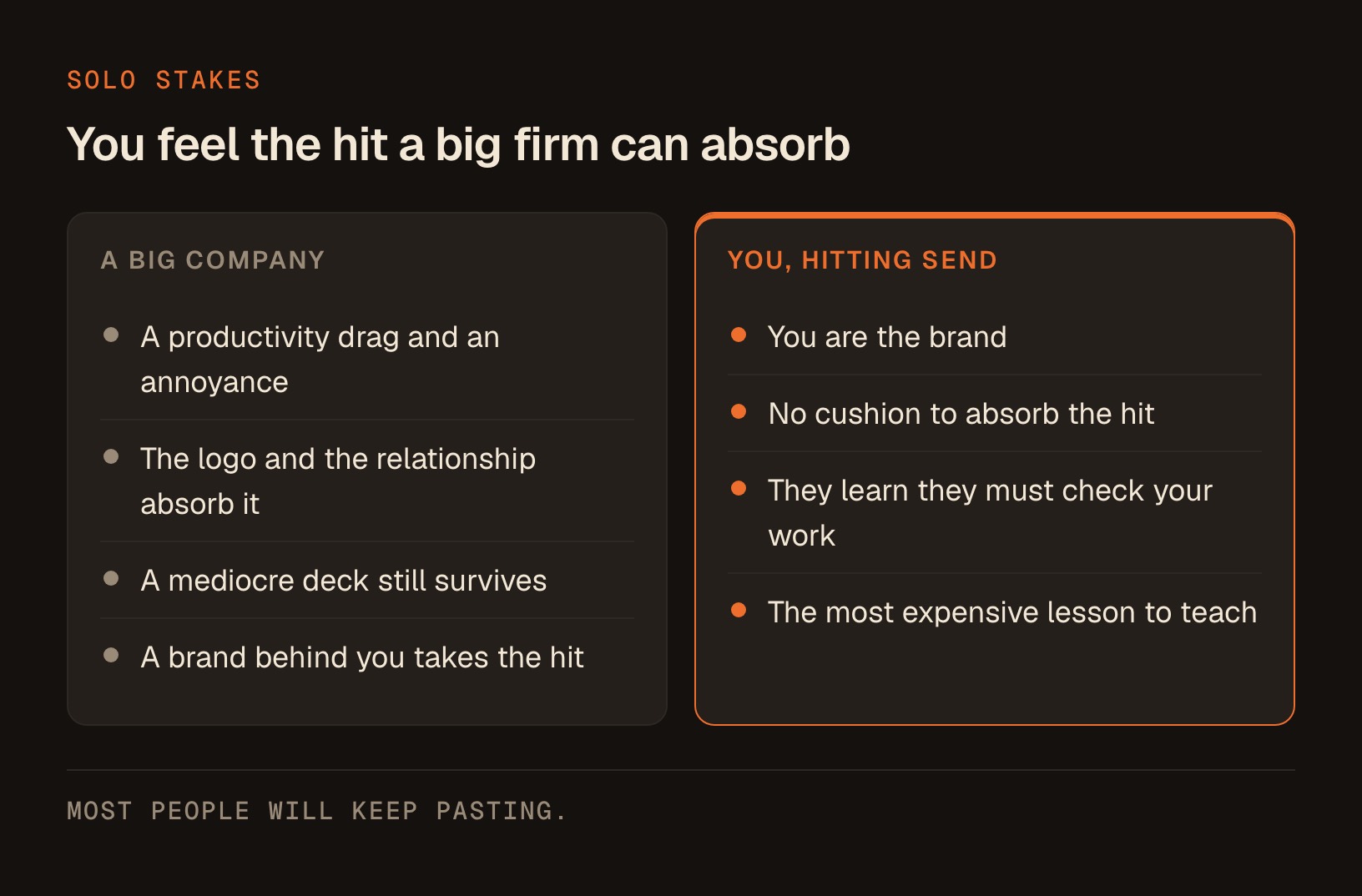
Paste-and-send teaches it in a single email.
The flip side is the opportunity, and it's real. Most people are going to keep pasting. The bar for "this person actually thought about my situation" is dropping every month as more generic AI output floods everyone's inbox.
So the judgment layer does more than protect you. It becomes your edge. The consultant who sends work that lands, in a world where most work needs a second draft from the receiver, is the one who gets referred.
Turn AI Into Your Fastest First Draft
Let me bring this all the way back to where I started, because I don't want you to read this and use AI less. Use it more. I draft with it constantly, and it makes me faster and better than I've ever been. The goal is a great first draft in minutes and a great final version because you did the judgment.
The habit that gets you there is small. AI produces the draft. You run the sixty-second pass. You make it specific, verify the claims, cut the filler, and add the one thing only you know. Then you send.
That loop takes a fraction of the time it would take to write from a blank page, and what lands on the other end is unmistakably yours, and unmistakably about them. Same tool, opposite outcome, and the only difference is whether a human did the last mile.
Every finished AI workflow I build for exactly this kind of thing, the drafting, the checking, the turning-AI-output-into-client-ready-work, lives in The Solo Creators AI Studio.
If you want the tools I use, or you just want to tell me where your own paste-and-send is biting you, come find me over at the Solo Creators AI Studio. I read everything, and I answer.
Key takeaways
- "Workslop," a term from BetterUp Labs and Stanford's Social Media Lab in HBR, is AI-generated work that looks finished but lacks the substance to actually be usable.
- In their survey of 1,150 U.S. desk workers, 40% reported receiving workslop in a single month, and each instance took just under two hours (about 1 hour 56 minutes) to resolve.
- That study was a self-reported online survey, not a controlled experiment, so treat the numbers as a strong signal about a real pattern, not as precise measurement.
- BetterUp estimated the lost time at about $186 per employee per month, an extrapolation off self-reported data, so treat it as an order of magnitude rather than a line item.
- The real cost is a transfer: work you skip by pasting AI output becomes homework for the client, prospect, or partner who receives it.
- The tell of workslop is 'generic where it should be specific': claims with no source, placeholder examples, beautiful structure with thin content.
- The fix is a judgment layer before you hit send: make it specific, verify every claim, cut the filler, and add the one insight only you have.
- For a solo creator, sending work that lands is an edge, because you are the brand and most people will keep pasting.
Get this skill, and every one I build.
30-day money-back guarantee. Cancel anytime.
Questions people ask
What is "workslop"?
Why does AI-generated work create more work instead of saving time?
How common is this, really?
How do I spot workslop in my own draft before I send it?
Does this mean I should stop using AI for client work?
Is workslop a writing-quality problem?

Ronnie spent 18 years building a SaaS with a team of 20 that served over 650,000 customers, generated over $14M in sales, and sent over 550M emails. Now he's solo, solving real business bottlenecks and turning them into working AI skills, workflows, and automations. He teaches all of it, with direct access to him, inside the Solo Creators AI Studio Skool community. See what he's built →
 Michael HattawayFounder, Iron Strengthens Iron
Keep reading