Get booked by proving you know the show
Podcast hosts say yes to guests who make their next episode easy and good. Almost everything else in a pitch is noise. In Buzzsprout's 2026 survey of 271 podcasters, 87.8% named topic relevance as a booking factor and 62% named the guest's expertise. Only 18.5% named a personalized pitch.
That's the job AI can do well: the homework. It can find the shows your buyers listen to, read their recent episodes, find the address the host published, and draft a short pitch about a real episode. What AI does badly is the part that gets pitches deleted on sight: the mass-produced template.
Podchaser's 2026 report: 68% of producers name AI-generated template pitches as the top reason for an immediate no.
So the method in this guide splits the work in 2. The AI researches and drafts. You approve your positioning, pick the shows, read every pitch, and press send yourself from your own email.
I built that split into a skill for the Solo Creators AI Studio called the Podcast Guest Engine. Every step below is what that skill really does, from its own files and from a full demo run. You can follow the same method by hand with any AI, and I'll show you where.
What the top guides leave open
Ask ChatGPT how to get booked as a podcast guest with AI, and it points you to PodMatch, Rephonic, Podchaser and PodcastGuests.com. They're useful, and they mostly answer one question: where do I find shows?
PodMatch matches guests and hosts on paid monthly plans. Rephonic is a podcast database with listener numbers and contact details, and its own guide tells you to use ChatGPT or Claude for research and then edit the draft yourself. Podchaser sells transcripts and audience data to bookers. PodcastGuests.com sends a free newsletter, 2 emails a week with 10 shows looking for guests in each.
What they leave open is everything after the list:
- Whose email address is it okay to use, and what do you do when a show publishes none?
- How do you prove you know a show without claiming you listened when you didn't?
- Who actually sends the pitch, and how do you get yourself to send it?
- How many follow-ups, sent when, and when do you stop?
- What booking rate is normal, so silence doesn't feel like a verdict?
The rest of this guide answers those 5 questions, in the order the work happens.
Watch one full round in about 4 minutes
Here's one complete round for a made-up coach called Wren, who helps therapists in solo practice. The shows are real, the host names are blurred, and nothing was sent.
You start it by typing one sentence into Claude Code or Codex, the desktop apps for Mac and PC:
Get me booked on podcasts.
Start with a positioning page you approve
Before it looks at a single show, the skill writes your positioning page: who you help, what you're the go-to person for, your proof points (each with where it came from) and 3 to 7 topics you can talk about. It builds that from evidence, such as your website and your bios.
It also asks for 3 emails you've really sent, to anyone. That's how the pitches end up sounding like you. Public bios show how you present yourself. Sent mail shows how you actually talk: how you open, how long your sentences run, how you sign off.
Nothing else runs until you approve the page. In the demo, the draft said Wren worked with solo or small group practices. She only works with solo therapists, so she typed one correction, the page was fixed, and then she approved it. A pitch built on the wrong positioning wastes a host's inbox and your name, every time it's sent.
One question from the skill is worth asking yourself even if you never use it. If 100 of exactly these people became clients next quarter, would that be great news? The obvious audience isn't always the profitable one, and you want to fix that before you research a single show.
If you'd like your AI to write like you in every email and post, here's how to make AI write like you.
Find the shows next door to your niche
The shows that book you and pay off are often one step to the side of your own niche. Hosts in your exact niche may be competitors, or already full of people like you.
So the skill starts with what it calls the niches next door. What causes the problem you solve? What results from it?
A marriage coach's clients might listen to parenting shows, or to personal finance shows that cover how couples talk about money. You pick one of those niches per round, and the search terms are the words its listeners would type into a podcast app. Your job title rarely makes that list.
Then it searches 3 places:
- Apple Podcasts, through the free public directory, then each show's own feed to check it's still publishing and actually has guests.
- YouTube, where plenty of the best interview shows for creators live and never chart in a podcast directory.
- Hosts asking for guests this week, from a free weekly newsletter of guest requests and a Reddit community where hosts post open calls. Anything that charges the guest is dropped.
Shows that went quiet for 90 days or more are treated as dead. Solo shows, shows in another language and channels with no real guests get cut before you see the list.
Wren's round: 146 Apple Podcasts shows and 20 YouTube channels searched, 10 kept, 3 picked. The open-call sweep that week found 27 listings and none that matched her niche.
You see the survivors as a short table: the show, why it fits, and when the last episode came out. Then it asks 2 questions about each: do you know this host, and does the host know you? A warm medium show beats a cold big one. You pick up to 5 shows per round, because every one gets real research.
Size matters less than you'd think, and bigger is often worse. In Podseeker's 2026 data, shows with 10,000 to 100,000 listeners per episode booked 0.3% of pitches, and shows above 100,000 booked none of 171. Start with small and medium shows that reach exactly your buyer.
Research each episode so the pitch can't fake familiarity
For each show you picked, the skill pulls the show's feed and reviews 1 or 2 recent episodes. If you also have the Watch It For Me skill installed, it reads full transcripts. Without it, it works from the show notes and tells you plainly that the research is lighter.
The research lands in a brief for each show: what the show really covers, its format, who's been on lately, one gap you fill, why it's timely now, and 2 or 3 quotes from the episode with timestamps. The timestamps stay in the brief. They never go in the email, because a minute mark is the kind of precision a real listener wouldn't type.
A pitch may only mention an episode the skill actually reviewed in that round. If it reviewed full show notes but no transcript, the pitch refers to the topic, never to listening. If it reviewed nothing, the pitch can still connect honestly through something you share with the show, such as being a bootstrapped founder on a show that featured one last month.
If you'd like to see how the transcript side works on any video, this guide shows how to turn any video into a playbook.
Use only the address the host published
This is where many AI pitching setups cut corners. The skill takes a contact only from places the host published, in this order:
- The channel the host named for guests: a guest form, or the route given in an open call.
- The host's own published address.
- The contact route on the show's own website.
- The email in the show's RSS feed, as a last resort, because it often belongs to whoever set up the feed.
It never guesses an address pattern, never uses a bought or scraped list, and never runs an email finder tool. If no address exists, the pitch card says so and points to the show's contact form. In Wren's round, 2 of the 3 shows published an address, and the third card said plainly that none was found.
Podseeker's 2026 data: 37.4% of active podcasts that interview guests have no usable email in their RSS feed, and many feed emails are generic inboxes.
Draft short pitches that sound like you
Each show gets 1 pitch under 200 words, plus 2 follow-ups. Here's a real pitch from Wren's round, written to the host of a show for therapists:
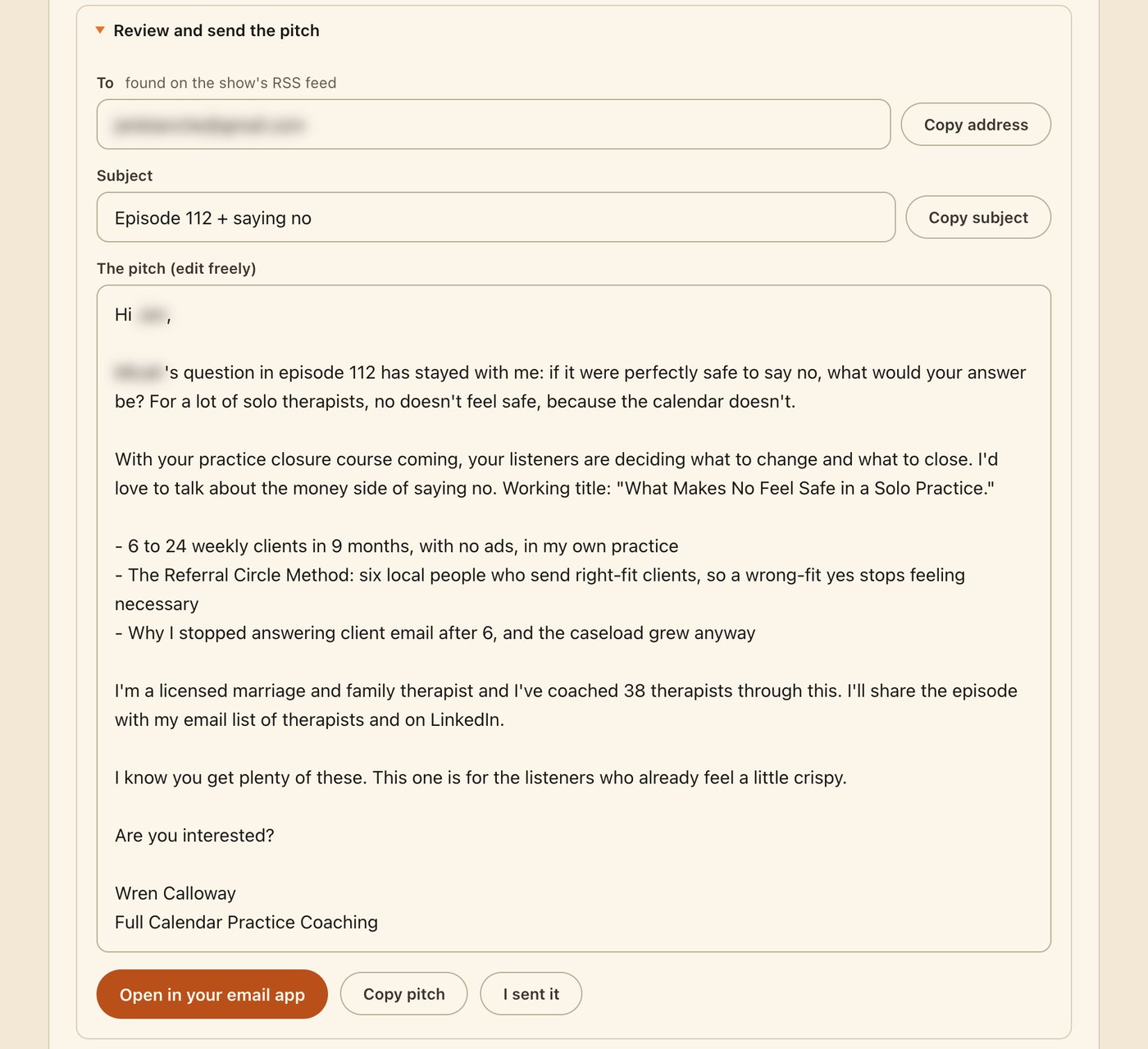
Look at the moves in it:
- The subject reads like listener mail. "Episode 112 + saying no" makes a host curious. Words like guest, pitch, opportunity and interview are banned from subjects.
- The opening reacts to one idea from the episode. It names the question a guest asked, and why it matters to this audience.
- It proposes a working title the host could use as is, and says why the topic is timely now.
- The bullets follow a fixed order: a real number first, then a named method, then something counterintuitive.
- It ends with an open question: "Are you interested?" No calendar link, no media kit, no one-sheet. Those come after a host replies.
Wren is made up, so her numbers are part of the demo profile. In your pitches, every number and claim must trace back to your approved positioning page or to the show's brief.
Before you see any pitch, a script checks the whole round: length, subject words, banned phrases, timestamps, links, and how alike the pitches are to each other.
Pitches that share a skeleton read as a mail merge, so the skill varies 5 things per show: the opening move, the shape of the middle, where the title sits, where the proof sits, and the line before the question. The page refuses to build while any pitch fails the check.
If you have the No AI Slop skill, it also runs each pitch through that for a voice pass. If you don't, read each one out loud. The sentence you stumble over is the one a host skims past.
Send every pitch yourself, in about 2 minutes each
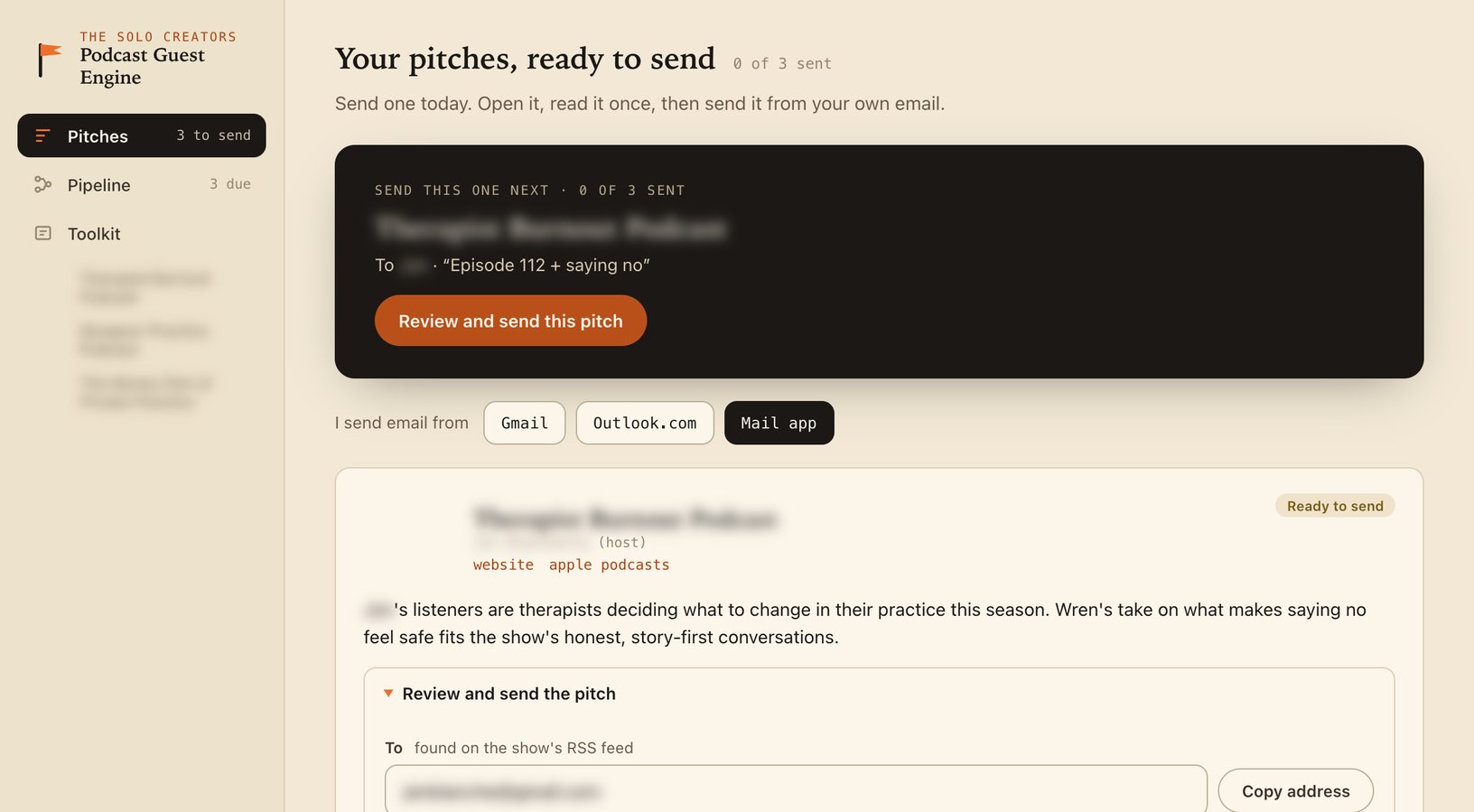
Everything lands on one page called Pitch HQ, with 3 tabs: Pitches, Pipeline and Toolkit. It opens on the pitch to send next.
You tell it once how you send email: Gmail, Outlook.com or your mail app. Then one button opens the pitch in your own email with the address, subject and body filled in. You read it once, change anything you like, and press send yourself. That takes about 2 minutes a pitch.
The skill never sends anything. That's a hard rule written into its instructions, and no setting changes it. It doesn't connect to your email account, it doesn't schedule sends, and it doesn't submit guest forms. For forms, the Toolkit tab holds paste-ready answers to the usual fields, and you paste and click.
There are 2 reasons for the rule. A pitch from your real address, sent by you, is the one a host trusts. And you stay the last check on every word that goes out under your name.
Pick the day you'll send before you finish. Finished pitches that never get sent are the most common way a round fails, and reminders alone don't fix that. So the skill asks which day and time you'll send, and logs that as the due date. That's a well-tested habit: in Gollwitzer and Sheeran's 2006 review of 94 tests, people who planned when and where they'd act followed through far more often (an effect size of d=0.65).
Then it makes the first step small. You don't block out 30 minutes for 5 pitches. You send 1 now.
Follow up twice, then let the show rest
After you send, you press I sent it on the card, then paste the little update the page gives you back into the chat. That's how your follow-ups get scheduled.
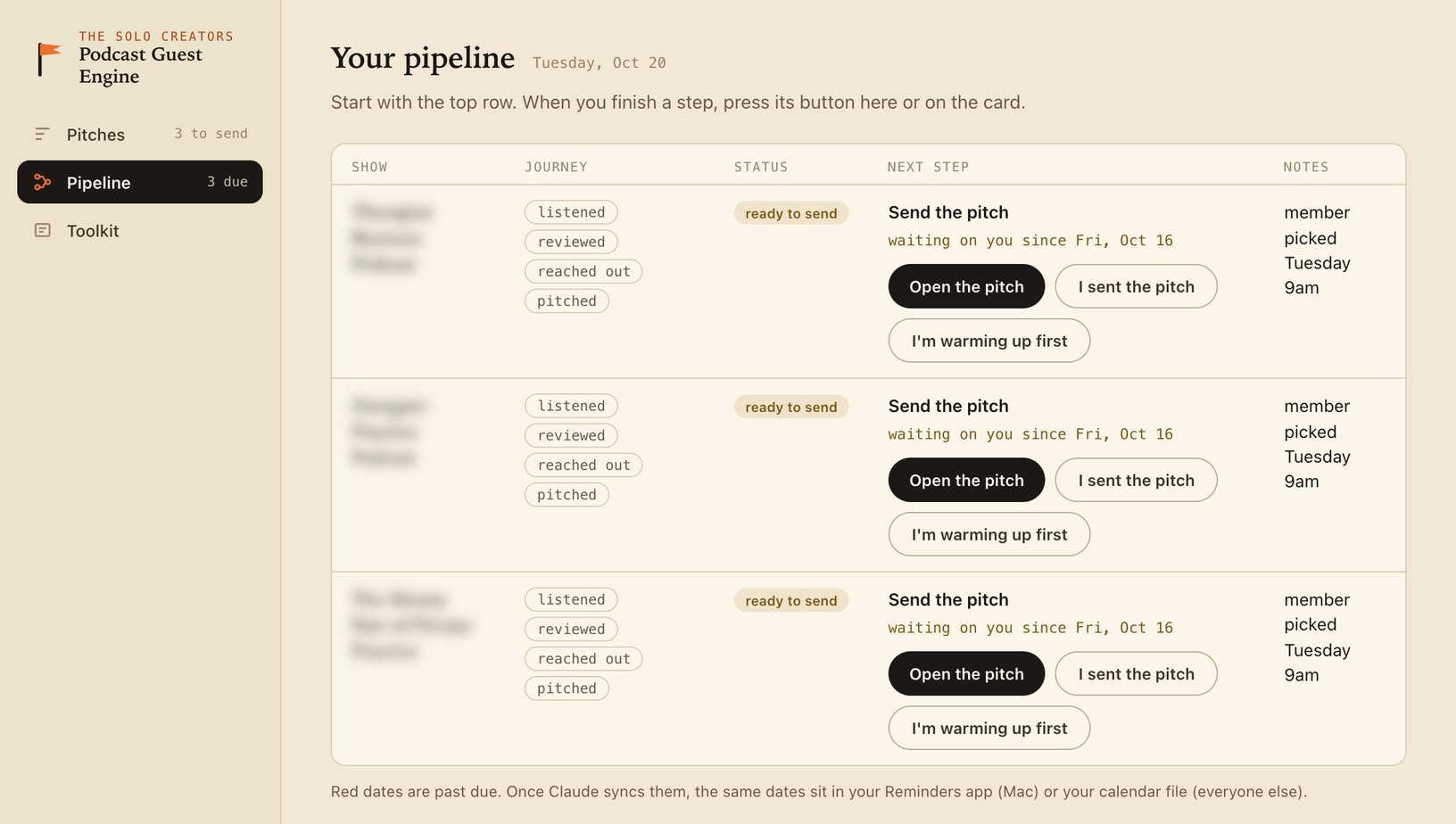
The rhythm is fixed:
| When | What goes out | What it does |
|---|---|---|
| Day 0 | The pitch | Under 200 words, no links except one past interview if you have one |
| Around day 5 | Follow-up 1 | 3 sentences with something new, sent as a reply in the same thread |
| Around day 12 | Follow-up 2 | 2 sentences that close gracefully and leave the door open |
| After that | One message elsewhere, at most | Only where the host is active, then you stop |
| About 4 months later | A fresh look | Only with a new angle and your OK |
Follow-ups go in the original thread so the host sees the whole context, and they carry no links. On a Mac, the due dates go into a Reminders list called Podcast Pitches. On a PC, you get a calendar file instead.
Stopping after 2 follow-ups protects your name, and the door stays open. Bookings arrive late: in Podseeker's 2026 data, the median booking came 3.7 days after the pitch, but the 90th percentile came 56.6 days after it. And 22.6% of bookings began only after at least one follow-up.
If you'd rather warm up first, the card offers that too: follow the show, listen to the latest episode, leave a true review in your own words, add one useful comment where the host is active, then pitch 1 to 2 weeks later.
Plan on about 1 booking for every 10 pitches
Podcast pitching runs on base rates, and knowing them is what keeps you sending. Here's what the published data says, as of November 2026:
| Source | What was measured | Booking rate |
|---|---|---|
| Podchaser, 2026 survey of producers and agencies | Self-reported acceptance of guest pitches | Median 5%, average 10.6%, up to about 40% |
| Podseeker, 5,012 pitches in 2026 | Pitches that ended in a booking | 3.3% overall |
| Podseeker, same data | Pitches to shows scored 85% fit or higher | 6.2% |
| Podseeker, same data | Pitches to shows scored under 50% fit | 0.6% |
Most of that data comes from agencies and PR teams pitching for clients. Nobody has published a booking rate for experts pitching as themselves, with their own research and their own voice.
The skill plans on about 1 booking for every 10 pitches to well-chosen shows, so 10 to 15 pitches per booking, and fewer in your first round. At that rate, a batch of 3 pitches produces at least one yes only about 27% of the time. An early silence is the base rate at work.
Recordings also tend to land weeks after a host says yes. If you have a launch coming, start pitching 3 to 5 months ahead.
Fit moved Podseeker's booking rate from 0.6% to 6.2%, more than 10 times higher. Choosing the show is most of the work.
Compare it with the tools ChatGPT recommends
The tools in ChatGPT's answer and the skill solve different parts of the job. Here's how they line up, as of November 2026:
| Tool | What it gives you | Who writes and sends the pitch |
|---|---|---|
| PodMatch | AI matching between guest and host profiles, paid monthly plans | You, inside the platform |
| Rephonic | A podcast database with listener numbers and contacts | You, with AI drafting if you like |
| Podchaser Pro | Transcripts, audience data and guest history, sold to bookers | You or your agency |
| PodcastGuests.com | A free newsletter of shows asking for guests, plus a paid directory | You, through each host's form |
| Podcast Guest Engine | Shows found, episodes reviewed, contacts checked, pitches and follow-ups drafted, a tracker | The skill drafts, you send every one |
You can combine them. A listing you spot in the PodcastGuests.com newsletter can be pasted into the skill, which sorts it the same way as any other open call.
Turn each appearance into the next booking
When a host says yes, the skill expands that show's interview kit into a one-page prep brief. Every pitch card already holds 5 speaking notes and 6 questions the host could ask, in the host's own style. There's also a printable one-sheet with your topics, credentials and short bio, which goes out only after a host replies.
After the episode airs, it walks you through 4 steps in the order that pays: thank the host, mine the show's past guests, promote the episode, and log what it produced.
A short debrief within a day of each recording sharpens your next pitch. Mining the guests means reading the show's public feed for everyone who's been on before. Those people now share a green room with you, and some are future clients, partners or hosts.
Log the outcome of every appearance. An episode with no recorded result teaches you nothing about which shows to pitch next.
Get the Podcast Guest Engine
The method above works by hand with any AI, if you keep the rules: research first, published addresses only, short pitches about real episodes, 2 follow-ups, and you press send.
If you'd rather have it run as one system, the Podcast Guest Engine is a skill in the Solo Creators AI Studio. It needs no extra accounts or API keys, and nothing to pay for beyond your AI app. You install it by dragging it into Claude Code or Codex and asking. If skills are new to you, here's what a Claude skill is.
A few limits, stated plainly. It's tested on a Mac, and PC support is new. It searches Apple Podcasts and YouTube, not every directory. The skill is new, so as of November 2026 there are no booking results of its own to share. That's why every rate in this guide comes from published industry data.
Type the one sentence, approve your page, pick your shows, and send the first pitch today. It takes about 2 minutes.
Key takeaways
- Hosts book for fit. 87.8% of hosts in Buzzsprout's 2026 survey named topic relevance, so choosing the show is most of the work.
- Use AI for the homework: finding shows, reviewing recent episodes, finding the host's published address and drafting a short pitch.
- Keep the send yourself. 68% of producers name AI-generated template pitches as the top reason for an immediate no (Podchaser 2026).
- Use only addresses the host published, never a guessed address or a scraped list. If none exists, use the show's contact form.
- Follow up twice, around day 5 and day 12, in the same thread, then stop and let the show rest for about 4 months.
- Plan on about 1 booking per 10 pitches to well-chosen shows, so 10 to 15 pitches per booking.
Get this skill, and every one I build.
30-day money-back guarantee. Cancel anytime.
Questions people ask
Can AI get me booked on podcasts?
Will the Podcast Guest Engine send pitches for me?
Where does it get the host's email address?
How many pitches does it take to get booked on a podcast?
How many times should I follow up on a podcast pitch?
Do I need PodMatch, Rephonic or another paid podcast database?
Does it work on a PC?

Ronnie spent 18 years building a SaaS with a team of 20 that served over 650,000 customers, generated over $14M in sales, and sent over 550M emails. Now he's solo, solving real business bottlenecks and turning them into working AI skills, workflows, and automations. He teaches all of it, with direct access to him, inside the Solo Creators AI Studio Skool community. See what he's built →
 Michael HattawayFounder, Iron Strengthens Iron
Keep reading