Faceless Video ProducerAn AI skill in the Solo Creators AI Studio
Make videos without a camera.
The Faceless Video Producer is an AI skill that turns a topic into a researched, voiced and animated video, delivered in a folder ready to upload. You approve the script first, every fact it says is backed by two sources in its research notes, and you never go on camera.
Cancel anytime 30-day money-back guarantee Yours to keep
Press play. These are real videos the skill made.
- You give itOne topic, or ask it for ideas
- You getA finished video, ready to upload
- Styles19 looks, from Whiteboard to Plush 3D
- Your timeApprove the script. It does the rest.
Watch it work, start to finish.
Give it one topic and get back a finished faceless Short: researched with sources, voiced, animated and scored, plus a thumbnail, five title ideas, captions and a description.
How to Make Faceless YouTube Shorts With AI (No Camera, No Editing)
19 real videos, one in every style.
Each one made from a one-line topic, start to finish, with a free voice. Press play on any of them.
19 example Shorts, one per style
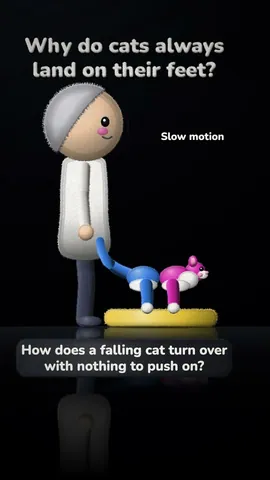
Space and EarthWhy do we always see the same side of the Moon? Kinetic TypeFinally feel how big a billion really is Plush 3DWhy do cats always land on their feet? BlueprintWhy do airplane windows have round corners? ChalkboardWhy folding a pizza slice stops it flopping WhiteboardHow do noise-cancelling headphones work? StorybookWhy we procrastinate, and the kind way to start Flat VectorWhy do prices end in 99? Paper CutWhy does bread rise? Keynote MotionWhy is the keyboard laid out QWERTY? Miniature WorldWhy do roundabouts have fewer crashes than traffic lights? NewsprintWhy Sweden switched to driving on the right PixelWhy were old video games so hard? Ink and WashWhy Marcus Aurelius wrote a notebook only for himself Watercolor CartoonWhy do songs get stuck in your head? Textured DoodleWhy is the night sky dark with so many stars? Retro TerminalWhy websites ask you to click traffic lights Editorial CollageWhy is the Mona Lisa so famous? Dusk LightWhat really happened to the Library of Alexandria?
Everything in the folder, for one video.
This is what the skill delivered for "Why do airplane windows have round corners?": the video, its thumbnail, five title ideas and a description with the sources behind every fact.

upload.md: five title ideas
- Why do airplane windows have round corners?
- The Real Reason Airplane Windows Are Round
- How a Water Tank Solved the Airplane Window Mystery
- Why Airplane Window Corners Are Always Round
- The Jet That Taught Engineers to Round Every Corner
description.md, ready to paste
Why do airplane windows have round corners? Because stress piles up at a tight corner, and a pressurized cabin is stretched on every flight. This Short follows the de Havilland Comet, the water tank test that proved it, and the curve on your window today.
The 12 sources it cites
- Court of Inquiry report, 1955
- Prof. Paul Withey, "The Real Story of the Comet Disasters", RAeS Hamburg, 2019
- FAA Lessons Learned: Comet 1
- Aerossurance: Common Comet Misconceptions
- Prof. M. E. Tuttle: Stress Concentrations lecture, University of Washington
- MIT 2.002 Mechanics and Materials II, Lab 4, 2004
- MathWorks: stress concentration in a plate with a circular hole
- The Engines of Our Ingenuity 1773, University of Houston
- This Day in Aviation, 10 January 1954
- Boeing patent US 8,616,500 B2, 2013
- This Day in Aviation: de Havilland DH.106 Comet 1
- Grace's Guide to British Industrial History: de Havilland Comet
How it works, in three steps.
-
You type“Make a YouTube Short about why airplane windows have round corners.”
Give it a topic
Name a topic, or ask it for 10 video ideas and pick one. Then choose a style and a voice.
-
While it works
- Researches the topic
- Backs every fact with two sources
- Writes the script
- Waits for your OK
Approve the script
It researches the topic and writes the script, and every fact it says is in its research notes with two sources. You read it and approve it first.
-
Get a folder ready to upload
It voices, animates, scores and renders the video, then hands you the video, a thumbnail, captions, a description and five title ideas.


Runs in Claude Code, the desktop app for Mac and PC. No code, no terminal.
What you can use it for.
Start a faceless YouTube channel
Publish explainers in one consistent style without going on camera.
Turn your expertise into Shorts
Answer the questions your clients ask, in under a minute each.
Explain an idea as a visual story
Pick the style that fits the topic, from Chalkboard to Space and Earth.
Make videos when you are camera-shy
The voice, the visuals and the music are made for you.
Get every upload detail done
A thumbnail, captions, a description with sources and five titles come with every video.
Keep your facts straight
Every fact it says is backed by two sources in its research notes.
What you get
A video channel, without the camera.
Never go on camera
The voice, the visuals and the music are all made for you.
Facts you can stand behind
Every fact it says is backed by two sources in its research notes.
You stay in charge
You approve the script first, and it never posts without your OK.
Ready to upload
Video, thumbnail, captions, a description and five title ideas in one folder.
19 looks to choose from
From Whiteboard and Chalkboard to Blueprint and Plush 3D.
No cost per video
The voice, animation, music and rendering run free on your own computer.
Full specsInputs, outputs, what it runs in and more. Facts as of October 2026.
- What it does
- Turn any topic into a researched, voiced, animated video in a folder ready to upload. You approve the script first, and you never go on camera.
- Runs in
- Claude Code, the desktop app for Mac and PC
- Input
- A topic, or a request for 10 video ideas
- Formats
- Vertical Shorts of 45 to 60 seconds, or longer 16:9 videos of 3 to 12 minutes
- In the folder
- The video, a 1280 by 720 thumbnail, captions, a description with sources, five title ideas, and chapters for long videos
- Styles
- 19 styles, including Whiteboard, Chalkboard, Blueprint, Storybook, Kinetic Type and Plush 3D
- Voices
- Free English voices that run on your computer. ElevenLabs is optional, on your own plan.
- Making costs
- The voice, animation, music and rendering run on your own computer, free
- Setup
- A one-time download of about 1 GB. Tested on a Mac. Windows support is newer.
- Your time
- About an hour for a Short and a few hours for a long video, almost all of it done for you while you do something else
- Included in
- The Solo Creators AI Studio, with every other skill
- Updated
Included in the Solo Creators AI Studio
Get the Faceless Video Producer, plus every other skill.
The Faceless Video Producer comes with the Solo Creators AI Studio. One membership gets you all 18 skills available today, a new one every month, the training for each, and a room of solo creators who ship.
Cancel anytime 30-day money-back guarantee Full pricing is on Skool
- All 18 AI skills, yours to keep, even if you cancel.
- A new skill every month, often shaped by what members are working on.
- Two live calls a month: a build call and a hot-seat.
- Step-by-step training for every skill, made for non-technical people.
- Ronnie reads every post and replies, in a room of solo creators who ship.
Questions about the Faceless Video Producer.
How do I make faceless YouTube videos with AI?
It depends on how much of the work you want to hand off. If you want finished, researched Shorts in a consistent style without filming or editing, the Faceless Video Producer goes from one topic to a voiced, animated video in a folder ready to upload, and you approve the script first. If you want your own face on camera, this is not the tool for you.
Do I have to show my face or record my voice?
No. The voice is generated, the visuals are animated, and you never go on camera.
Are the facts accurate?
It researches before it writes, and every fact it says is in its research notes with two sources. You read and approve the script before anything is made.
Will it post the video for me?
No. It never posts anything without your OK. You get a folder with everything ready, and you upload it yourself.
Does each video cost extra to make?
No. The voice, animation, music and rendering run on your own computer for free. ElevenLabs voices are optional, on your own plan.
Will it get me views?
No one can promise views. It makes a well-researched, finished video. What you publish, and how often, is up to you.
Does it work on Windows?
It is tested on a Mac. Windows support is newer.
If I cancel, do I keep the skills I installed?
The skills are yours. They install into your own Claude Code, Codex, or other AI tool, so they live on your machine. Cancelling stops your access to future drops, live calls, and community, but anything you installed stays installed.
What if I'm not technical?
The walkthrough videos assume zero technical background. If you can copy-paste, you can install a skill. The community is full of solo creators who are just regular business owners, coaches, and consultants... not engineers.
How does the 30-day guarantee actually work?
Change your mind for any reason within the first 30 days and email me. I refund your most recent payment, no questions asked. No screenshots, no justification, no hard feelings.
Published .
Works well with.
- Promo Video ProducerMakes your promo video from a sentenceA cinematic promo from a sentence and a few screenshots: your scenes, your footage, a built-in voice, in your brand.
- Auto Video EditorDescribe the editsTurn a screen recording or talking-head into a polished, on-brand video by describing the edits you want: zooms, captions, and callouts.
- TikTok SlideshowPosts slideshows that sell, while you stay off cameraOne idea into a thumb-stopping TikTok photo slideshow, captions and hashtags written, ready to schedule.