Compare vendor quotes in one sheet and negotiate a better deal
It spots the setup fee and rush charge on page three that made the cheapest quote the priciest.
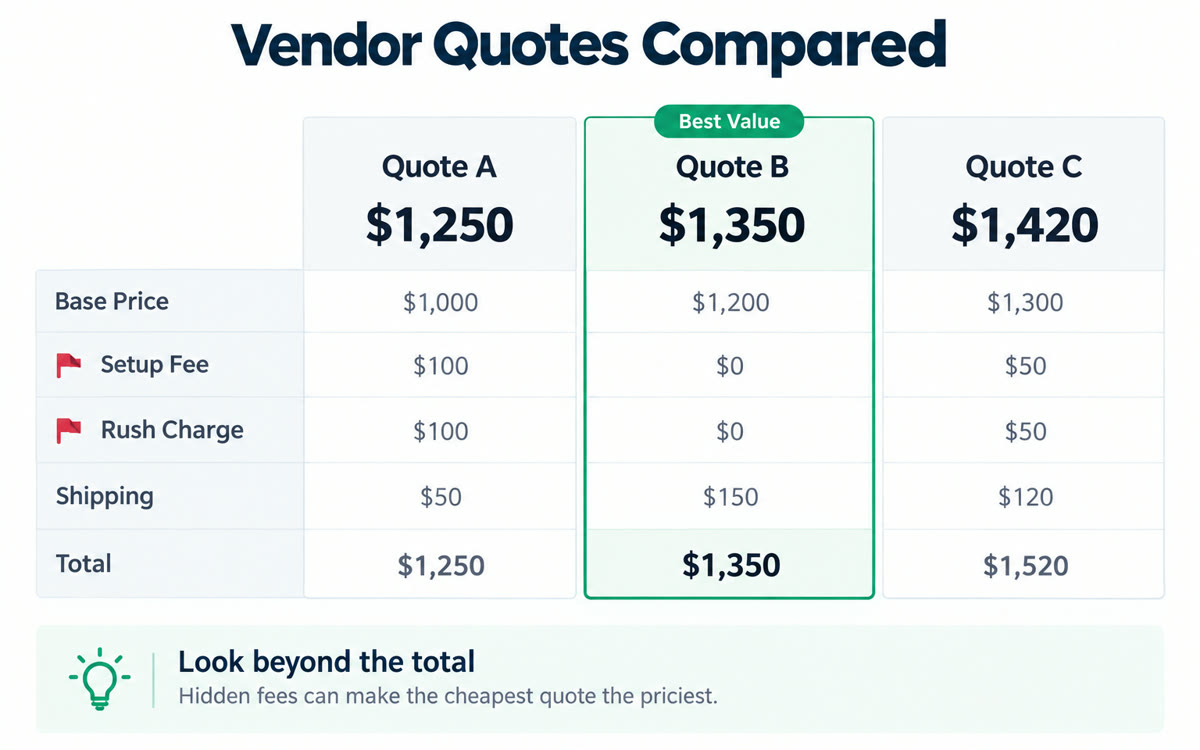
A sample of what you get back, made with AI.
Your prompt
Fill in your details. Skip any you like.
ChatGPT and Claude open with your prompt already typed in. Gemini can't be filled in from a link, so its button copies your prompt: paste it into the new chat.
The prompt that gets copied
I'm choosing a vendor for [YOUR PROJECT, e.g. printing 500 workbooks for my retreat]. I've uploaded the quotes. Build a comparison table with each vendor's total price, what's included, extra fees, timeline, payment terms, guarantees and any red flags. Point out hidden or unusual costs, and anything that's missing from one quote but included in another. Then rank the vendors for my priorities: [YOUR PRIORITIES, e.g. quality first, then price]. Finally, draft a short, friendly email to my top pick asking for a better price or better terms, using the other quotes as fair reasons without sharing their names or exact numbers.
Upload the quotes you've collected for a job, like printing, catering or a new website. You get a side-by-side comparison, the hidden costs and a polite negotiation email for your top pick.
Step by step
- Collect at least two or three quotes as PDFs, screenshots or emails.
- Upload them with the prompt and say what matters most to you.
- Check the numbers, then send the negotiation email yourself.
What you'll get
A side-by-side table of every quote with hidden costs flagged, a ranking for your priorities and a ready-to-send negotiation email.
Gemini Spark can build the sheet in Google Sheets for you on Google AI Pro or Ultra in the US.
- Made for
- Small business owners, Coaches, Consultants
- Works in
- Gemini, ChatGPT, Claude


