Is it safe to paste client information into ChatGPT, Claude, or Gemini?
It depends on the data and the tier. Google and OpenAI both say not to enter confidential information you wouldn't want reviewed or used. Google keeps human-reviewed chats for up to three years, even after you delete them. A paid consumer plan is still a consumer product, so keep raw client data out of it. For regulated or confidential work, use a business or enterprise arrangement your compliance person approves. For everything else, swap names and identifiers for placeholders before you paste, and add them back yourself.
Tool features, plans, and prices as of .
A financial advisor asked me last month if she could drop a client's full intake notes into ChatGPT to draft a summary. Fair question, and the answer surprised her.
I'm not a lawyer, and nothing here is legal advice. If you carry a real confidentiality duty (a therapist, an advisor, an attorney, a bookkeeper, a coach with an NDA), check with your own compliance person or counsel before you trust any tool with client material.
What I can do is show you exactly what the biggest AI companies say, in their own words, about the stuff you type into their free and Pro tools. I read the policy pages so you don't have to, and what they actually say is stronger than any scare story I could invent.
Start By Reading What The AI Makers Themselves Tell You
Here's the part almost nobody does. They warn you, right on their own public help pages. Put 2 of the clearest side by side and the message is hard to miss.
Google, in its Gemini Apps privacy guidance, tells you:
Please don't enter confidential information that you wouldn't want a reviewer to see or Google to use to improve our services.
OpenAI, on its data controls page, cautions against entering sensitive information you would not want reviewed or used.
2 companies, 2 legal teams, one plain instruction: they're telling you a human might read it and the company might keep it. I'm not editorializing about "shadow AI" or waving around a scary percentage here. This is the vendors answering the exact question you're asking, and it carries more weight than anything I could say, because they're saying it about their own product.
So when a client's name, account number, diagnosis, or financial position goes into a free-tier chat box, you've done the one thing they politely asked you not to do.
The tool works fine either way, which is exactly why this is easy to miss. Nothing beeps. Nothing turns red. The warning lives in a policy page, not in the moment you hit enter.
Keep This One Retention Number In Your Back Pocket
If you remember a single fact from this whole article, make it this one, because it's the number that stops advisors cold.
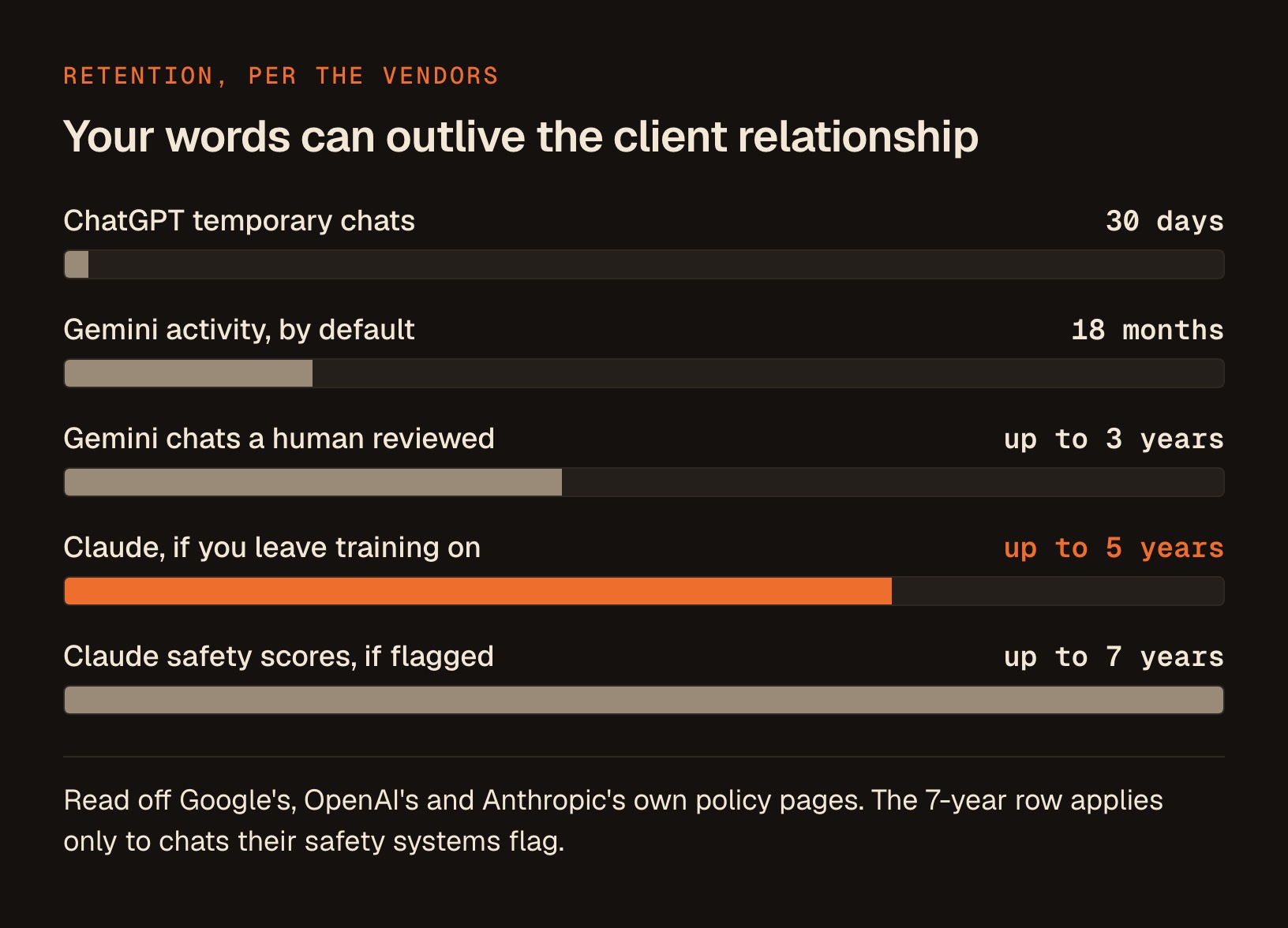
Google's own Gemini Apps privacy page says that chats reviewed by human reviewers (along with related data like your language, device type, location info, or feedback) are not deleted when you delete your activity, and instead are retained for up to 3 years.
Google keeps chats a human reviewer touched for up to 3 years, whether or not you deleted them.
Your tidy-up doesn't reach it.
The "off" switches are narrower than they sound too. Google's own page is clear that human review is part of how the service works, and that reviewed chats sit on a separate, longer clock than the one your history controls. That's Google describing Google, on Google's own domain.
I'm not picking on Google here. They just happen to write it down more plainly than the others. Give them credit for putting the number in writing where you can actually read it.
See Exactly How Long Each Tool Holds Your Words
The retention rules differ by tool, and they're more tangled than a single number can capture. Here's what each company states in its own policies, laid out so you can compare at a glance.
| Tool (free / Pro tier) | Default retention | The catch that surprises people |
|---|---|---|
| ChatGPT (OpenAI) | Temporary chats delete after 30 days; deleted chats are scheduled for removal | The 30-day purge doesn't apply once the data has been de-identified. And a thumbs-up can pull the whole chat into training. |
| Claude (Anthropic) | If you allow training, de-identified data kept up to 5 years; if you decline, 30 days | Flagged by trust and safety: inputs and outputs kept 2 years, classifier scores kept 7 years. A rating can keep that chat even if you opted out. |
| Gemini (Google) | Auto-delete defaults to 18 months (you can set 3, 36, or indefinite) | Human-reviewed chats survive your deletion for up to 3 years. Temporary chats still linger around 72 hours. |
A few things jump out when you see it stacked up. OpenAI has the tightest default at roughly 30 days, which sounds reassuring until you notice the exception: it doesn't apply once the data has been de-identified, and de-identified copies play by different rules.
Anthropic's Claude runs on a longer clock if you leave training on, with de-identified data kept as long as 5 years, per its privacy centre. And the trust-and-safety path is the real eyebrow-raiser: get a conversation flagged, and the inputs and outputs sit for 2 years while the classifier scores sit for 7.
A classifier score isn't an accusation. Automated safety systems read conversations and assign them scores, the way a spam filter scores every email that lands in your inbox, and the vast majority of what they score is completely ordinary.
That's precisely why the seven-year figure matters for normal users rather than only for bad actors. You don't have to do anything wrong to end up with a score attached to a conversation, so treat that number as a general retention fact, not a punishment reserved for someone else.
18 months is the Gemini default, and that's a long time for a client's account details to live on someone else's server. Google chose that number, and you can shorten it, but only if you know to go into the settings and do it. Most people never touch it, so most people are on 18 months without realizing.
Find Out Whether Training Was On Before You Touched Anything
"I turned off training" is the sentence I hear most, and it's worth knowing what the default actually was before you touched anything.
| Tool | Training on by default? | What that means for you | What to do today |
|---|---|---|---|
| ChatGPT (OpenAI) | Yes, opt-out | Doing nothing leaves your chats in the training pool | Open your data controls and switch model improvement off |
| Claude (Anthropic) | No, opt-in | You're asked to choose, so you can't inherit a setting you never saw | Open your privacy settings and confirm which way you answered |
| Gemini (Google) | Not clearly documented | You genuinely can't assume either way from the public pages | Go check your own Keep Activity setting rather than trust a guess |
OpenAI keeps your data by default. It uses an opt-out, meaning training is on until you go switch it off. So doing nothing means your chats are in the pool.
Anthropic works differently, and I want to correct a common assumption. Claude uses an opt-in model: it asks you to choose whether your chats can be used to improve its models. That's better than a buried toggle, because you make a conscious decision instead of inheriting one. It doesn't change what happens after you choose, but you can't say you were never asked.
Google's Keep Activity default is the one gap. Google doesn't clearly document it, so I'm not going to tell you what it defaults to, and I won't invent a fact to fill the hole. Go check your own setting rather than trust anyone's guess, mine included.
There's a paid-tier wrinkle worth knowing too. Google's AI Studio terms spell out the split in plain words.
Google's AI Studio terms, free tier: "Content used to improve our products." Paid tier: "Content not used to improve our products."
Same company, same underlying models, opposite data treatment depending on whether money changed hands. That's the single clearest reason the free box is the wrong home for a client's secrets.
Close The Opt-Out Hole That Works Against You
Even when you do everything right and flip the switches, one quiet hole can undo your choice. It earned its own section because it surprises careful people.
The friendly thumbs-up is the trap. OpenAI's own policy explains that if you choose to provide feedback, the entire conversation tied to that feedback may be used to train its models.
One thumbs-up pulls the entire conversation into OpenAI's training, even after you opted out.
Client details included. Anthropic has a matching catch: a thumbs up or down can keep that conversation even after you opted out.
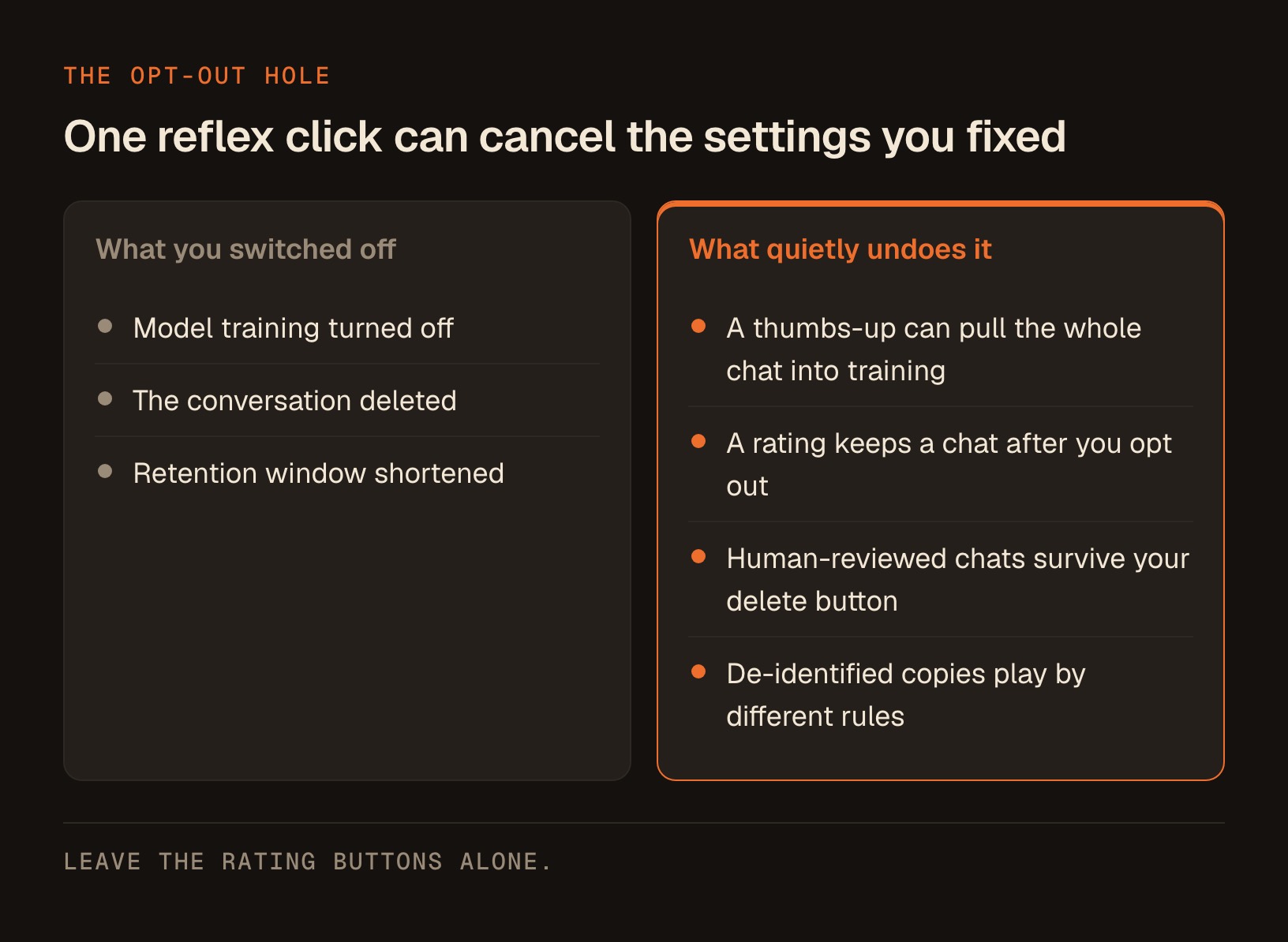
The rating button can override your opt-out for the conversation you rated. Reflex clicks have consequences here. If a chat ever held real client details, the safest move is to leave the rating buttons alone entirely.
Clean Up What You've Already Pasted
Almost everyone reading this has already pasted something they'd rather they hadn't. Let's deal with that instead of pretending the article started today.
Work through these 4 steps, in this order:
- Delete the specific conversation, not just your general history. Find the chat that held real client details and remove it directly.
- Turn training off going forward in the tool's own settings, so today's cleanup isn't undone by tomorrow's chat.
- Stop rating that chat. No thumbs-up, no thumbs-down, no "regenerate and tell us which is better" on anything that ever held a client's details.
- Set your retention window where the tool offers one, so the next thing you paste sits on a shorter clock than 18 months.
Now the limit, which is already established above. Deletion doesn't reliably reach anything a human reviewer already touched. Google says so plainly on its own page, and the other vendors describe review paths of their own.
So there's no undo button. If a client's raw details went into a consumer chat box, the grown-up move is to treat that information as disclosed and act accordingly, the same way you would with an email sent to the wrong address.
That's not meant to scare you. It's meant to make the redaction habit below feel urgent instead of optional, because prevention is the only control you actually hold.
Know Exactly Which Work Belongs In The Free Box
Here's the cleanest bottom line I can give you, and it cuts through every toggle and exception above.
| If you handle this | Consumer free / Pro tier | Business or enterprise arrangement |
|---|---|---|
| General marketing copy | Fine | Fine |
| Redacted client drafts | Redact first | Fine |
| Raw client names and account numbers | Not here | Fine |
| Protected health information | Not here | Fine |
| Work under an NDA | Not here | Fine |
Every "Fine" in that right-hand column assumes a contract your compliance person or counsel has actually signed off on. The tier alone doesn't make anything compliant.
A paid consumer subscription is still a consumer product. Paying for ChatGPT Plus or Claude Pro buys you speed, limits, and features, and it doesn't convert the tool into a business arrangement with confidentiality terms behind it.
The free-versus-paid split in the AI Studio example above is about a developer platform with its own terms, so please don't read it as "my monthly subscription protects me." Those are 2 different products with 2 different contracts.
The vendors themselves ask you not to paste confidential material into the consumer tiers, your deletions don't always reach what a human already read, and the defaults lean toward keeping your data. Not built for client secrets is the right way to describe that box.
If you're a therapist, a healthcare provider, or anyone touching protected health information, that should settle it. The enterprise and business tiers are a separate conversation with separate contracts, and that's the path your compliance person will point you toward if you need AI in a regulated workflow.
Take regulated work to the business tier, not the free chat box, and let someone who signs the contracts make that call.
For the coaches, consultants, and advisors reading this without a strict health-privacy duty, the logic still holds, and the fix is a habit rather than a leap of faith.
Build A Redaction Habit You'll Actually Keep
The good news is you don't have to give up AI to keep your promises. You just have to strip the identifying pieces out before anything leaves your desk. This is the same instinct a good paralegal has. The AI can help you write, summarize, and think, as long as it never learns who the work is about.
Here's what it looks like in practice, using entirely fictional intake notes:
| Before (never paste this) | After (paste this instead) |
|---|---|
| Margaret Chen, 63, account 4471-882-09 | [CLIENT], [AGE-BAND], account [ACCOUNT] |
| Rolling over $412,000 from a former employer plan | Rolling over [AMOUNT] from a former employer plan |
| Worried about outliving savings, wants income by 2028 | Worried about outliving savings, wants income in [TIMEFRAME] |
| Spouse David Chen, 66, already drawing benefits | Spouse [SPOUSE], [AGE-BAND], already drawing benefits |
Read the right-hand column back and notice what survived. Every piece of information the AI needs to write a good draft is still there: the situation, the concern, the timeline, the household. Only the "who" is gone.
Here's the rule of thumb by data type, with a placeholder for each one so you're not holding 2 lists in your head. All sample values below are made up.
| Never paste this | Swap in this placeholder | A realistic example |
|---|---|---|
| Full names | [CLIENT] | "Margaret Chen" becomes "[CLIENT]" |
| Account or policy numbers | [ACCOUNT] | "4471-882-09" becomes "[ACCOUNT]" |
| Social Security or government ID numbers | [GOV-ID] | "000-00-1234" becomes "[GOV-ID]" |
| Email addresses | [EMAIL] | "[email protected]" becomes "[EMAIL]" |
| Phone numbers | [PHONE] | "555-0142" becomes "[PHONE]" |
| Home addresses | [ADDRESS] | "18 Larkspur Lane" becomes "[ADDRESS]" |
| Dates of birth | [AGE-BAND] | "born 4 March 1962" becomes "[AGE-BAND]" |
| Medical diagnoses | [DIAGNOSIS] | "type 2 diabetes" becomes "[DIAGNOSIS]" |
| Anything that points at one specific human | [DETAIL] | "the only orthodontist in her town" becomes "[DETAIL]" |
The AI drafts just as well on placeholders, then you paste the real names back into the final document yourself, offline, where no policy page has a claim on them.
To make this stick, have Claude build you a redaction checklist tuned to your exact line of work. Paste this into the Claude desktop app and answer its questions:
I'm a [your role, e.g. financial advisor / therapist / business coach] and I want to use AI tools to help with client work without ever exposing a client's private details.

Build me a personalized redaction checklist I can run through before I paste anything into an AI chat box. I want:

1. A list of the specific data types someone in my role commonly handles that I should NEVER paste (be concrete to my field, not generic).
2. A simple placeholder scheme, so for each sensitive item you give me a neutral token to swap in (like [CLIENT] or [ACCOUNT-NUM]).
3. A 30-second "final glance" routine: the 5 things to eyeball in any text before I hit enter.
4. Three realistic examples from my field showing a BEFORE (with fake sample details) and an AFTER (redacted), so I can see the pattern.

Keep it plain and printable. I want to tape it next to my monitor.
Notice what that prompt does not ask for: your real client data. You're building the reusable tool with fake samples, then applying it by hand from then on.
The checklist works, and checklists drift. So give yourself a second layer by pasting this short block at the top of any chat where client work is happening:
Standing rule for this conversation: before you answer anything, scan my message for personal identifiers.

If you spot what looks like a full name, an account or policy number, a government ID, an email address, a phone number, a home address, a date of birth, or a medical diagnosis, do NOT proceed with my request.

Instead, stop and reply with: (1) exactly which items you flagged, quoted back to me, and (2) the placeholder you'd suggest for each one.

Wait for me to send a cleaned version before you do any of the actual work.

Apply this to every message I send from here on, including short follow-ups.
That block is a safety net, not a substitute for redacting first. It catches the slip you made at 4:50pm on a Friday, and it will miss things, so keep redacting before you paste rather than treating this as permission to paste raw notes and let the assistant sort it out.
The checklist lives next to your screen, and after a week or 2 the swap becomes automatic. That's the whole trick. You keep the speed of AI and you keep your clients' trust, because the 2 never have to touch.
Watch The AI You Didn't Choose To Use
Manual pasting is the door you can see. Client data flows through several other doors that got opened for you, usually by a feature update you never read.
3 categories to check this week:
- CRM assistants that summarize your notes, score your leads, or draft your follow-ups from records you already stored.
- Inbox drafting tools that read the thread to suggest a reply, which means they read the client's words too.
- Meeting notetakers that join the call, transcribe everyone, and store the recording somewhere you've never looked.
Here's one concrete action for each of them, and it's the same action. Find that vendor's data-use page, look specifically for whether your content is used to train their models, and decide from there.
Turn the notetaker off for confidential calls. A bot that silently sits in an intake conversation is the highest-volume way client details leave your practice, and it's the easiest one to switch off before you hit join.
The Pages I Read
I'd rather you check my work than take my word for it, so here's where these quotes and numbers come from. Policies change, so check the date on the page when you land there.
- Google, Gemini Apps privacy hub
- OpenAI, data controls FAQ
- Anthropic, privacy policy
- Anthropic, how long data is stored (the 5-year and 7-year numbers)
- Google AI Studio and Gemini API additional terms (the free-versus-paid line)
Where This Leaves You
The question that started this ("is it safe to paste client information into ChatGPT?") has a cleaner answer than the internet usually gives it: the vendors ask you not to, your deletions don't always reach a human reviewer, and a reflex thumbs-up can quietly undo an opt-out.
You don't need to fear these tools. You need a five-second redaction reflex and a close read of what you're agreeing to. The other half of the answer is to stop pasting altogether where you can, and instead give the app scoped access to the accounts the work already lives in: here's how to connect Claude Code to Gmail, Drive and Calendar safely.
Get those 2 things right and you can use AI hard, every day, without ever handing a stranger your client's secrets.
Every finished AI skill I build to make this kind of thing effortless (client work, content, outreach, all of it) lives in one place, the Solo Creators AI Studio, and if you want to talk through your own setup, I'm a direct message away.
I run my whole business on AI, and one of the skills I built with it now ships inside a WordPress plugin running on 250,000+ sites. Scale like that is exactly why the habits matter.
Key takeaways
- Google and OpenAI each tell you, in their own policy pages, not to enter confidential or sensitive information you wouldn't want reviewed or used.
- Google states that chats reviewed by human reviewers are not deleted when you delete your activity, and are retained for up to three years, so there's no undo button once client details are pasted.
- Defaults lean toward keeping your data: OpenAI is opt-out and on by default, while Anthropic uses an opt-in model that asks you to choose, and Google's Keep Activity default isn't clearly documented.
- A reflex thumbs-up can undo your choice: OpenAI says feedback can pull the whole conversation into training, and Anthropic can keep a rated chat even after you opt out.
- Free tiers feed training while paid tiers don't: Google's AI Studio says free-tier content is used to improve its products, and paid-tier content is not.
- A paid consumer subscription is still a consumer product, so keep raw client data out of it and take regulated work to a business or enterprise arrangement your compliance person approves.
- Client data also flows through AI you didn't choose: CRM assistants, inbox drafting tools, and meeting notetakers, so check each vendor's data-use page and switch the notetaker off for confidential calls.
- The fix is a redaction habit: swap direct identifiers for placeholders before pasting, then add the real names back into the final document yourself.
Get this skill, and every one I build.
30-day money-back guarantee. Cancel anytime.
Questions people ask
Is it safe to paste client information into ChatGPT?
I already pasted client data into an AI chat. What should I do now?
If I delete my chat history, is my data really gone?
Does paying for ChatGPT Plus or Claude Pro protect my client data?
Does turning off model training fully protect my data?
How long do these AI tools keep what I type?
Can a human actually read my AI chats?
What about the AI built into my CRM, my inbox, or my meeting notetaker?
Which tier is safe for client or health data?
What's the simplest safe way to use AI for client work?

Ronnie spent 18 years building a SaaS with a team of 20 that served over 650,000 customers, generated over $14M in sales, and sent over 550M emails. Now he's solo, solving real business bottlenecks and turning them into working AI skills, workflows, and automations. He teaches all of it, with direct access to him, inside the Solo Creators AI Studio Skool community. See what he's built →
 Michael HattawayFounder, Iron Strengthens Iron
Keep reading