Can Claude make a real Excel spreadsheet or PowerPoint deck I can download?
Yes. Per Anthropic's doc, Claude creates real .xlsx, .pptx, .docx, and PDF files, and it's available on every plan including Free. It depends on how you ask. "Make me a spreadsheet" often gets a table in the chat. "Build this as an .xlsx I can download" gets a file. On Free, Pro, and Max it's on by default, and Settings > Capabilities is where you confirm it. Open what comes back, click a total cell, and check it holds a live formula, not a pasted number.
Tool features, plans, and prices as of .
The Free Feature Hiding in Plain Sight
The first time I asked Claude to "make me a spreadsheet," it printed a tidy grid of text in the chat window and left me to retype the whole thing into Excel myself. That was the old normal.
What almost nobody tells you is that Claude can now hand you an actual .xlsx file, formulas and all, that you download and double-click open. And the part that made me sit up: it costs nothing, and on the plan most people are on, it's already switched on.
Here's the sentence that surprised me, straight from Anthropic's own support doc.
"Code execution and file creation is available to all Claude users (Free, Pro, Max, Team, and Enterprise) on the web, Claude Desktop, and Claude Mobile." (Anthropic support doc)
If you have a Claude account, you already have the ability to get finished files back. And by finished files, I mean the real thing. Anthropic's doc puts it plainly: "Claude can create Excel spreadsheets (.xlsx), PowerPoint presentations (.pptx), Word documents (.docx), and PDF files."
So the 4 formats a solo business runs on all come back as downloadable files. Here's what to ask for, and where each one opens.
| What you need | Ask Claude for | You open it in |
|---|---|---|
| A working tracker or budget | "an .xlsx file I can download" | Excel or Google Sheets |
| A client-ready deck | "a .pptx file I can download" | PowerPoint or Google Slides |
| A formatted proposal | "a .docx file I can download" | Word or Google Docs |
| A leave-behind you email as-is | "a PDF I can download" | Any PDF reader |
For years the deal with AI was that it gave you words and you did the assembly. You'd get a beautifully worded budget in the chat, then spend twenty minutes rebuilding it cell by cell.
That assembly tax is the thing that quietly disappears here. You ask for a spreadsheet, you get a spreadsheet.
I built an iPhone app that cleared Apple's review in under 3 weeks, and I did it without knowing how to code. So when I say this is the kind of thing a non-technical person can use on a Tuesday afternoon, I mean me, and I mean you.
There's no script to run and nothing to install. It all happens inside the Claude app you already use.
It's Already On, and Here's Where to Confirm It
Here's the part that trips people up, and it's the reason so many people think Claude "can't" do this. According to Anthropic's own doc, on the Free, Pro, and Max plans, code execution and file creation is enabled by default. You don't have to flip anything to start.
Where to look, if you want to see it for yourself. Open Claude's Settings, then the Capabilities section, and find the row named "Code execution and file creation." On a personal plan it should already be on. You're there to confirm it, not to switch it on, and if it's off that's your answer for why no file ever came back.
| Plan | File creation | What the Settings > Capabilities screen is for |
|---|---|---|
| Free | On by default | Confirming the "Code execution and file creation" row is toggled on |
| Pro | On by default | Same, plus re-enabling it if it ever got switched off |
| Max | On by default | Same |
| Team | Enabled | Same |
| Enterprise | Enabled | Same |
One quiet detail worth knowing: this same capability also governs uploads. Anthropic's doc notes you must have code execution and file creation enabled to upload XLSX files.
So it works in both directions. Claude can read the Excel file you hand it and write a new one back. If it were ever disabled, uploads would stop working too, which is a handy tell.
If you've never seen a downloadable file come back, it's usually because you never asked for one in the right way, not because a switch was off. The fix is one clause in your request.
| Don't ask | Do ask |
|---|---|
| "Make me a spreadsheet of my clients." | "Build this as an .xlsx file I can download." |
| "Put this into slides." | "Give me the finished .pptx to download." |
Ask that way and Claude goes quiet for a moment, does the work, and then a file appears with a download button.
"Build this as an .xlsx file I can download." That one clause is the whole fix.
Watch a Messy CSV Become a Working Spreadsheet
Let me show you the move I use most, because it's the one that earns its keep for a solo operator.
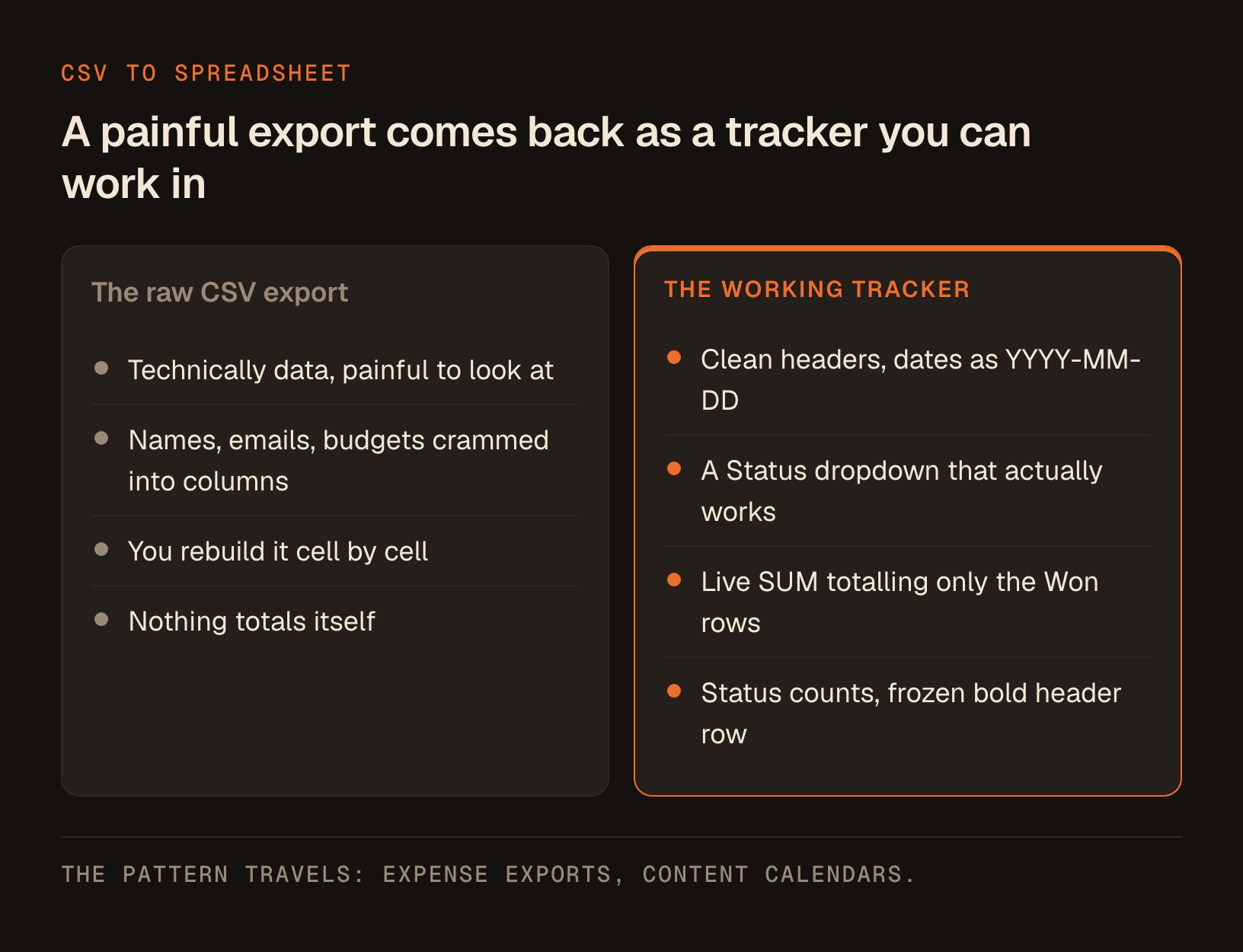
Say you run intake through a form, a Typeform, a Google Form, a Calendly export, whatever, and it spits out a CSV file that's technically data but painful to look at. Names, emails, budgets, and notes all crammed into raw columns.
You don't want the raw file. You want a working tracker.
So you hand Claude the CSV and ask for the finished spreadsheet. Here's the exact prompt I'd paste in. Adjust the column names to match your own export.
I'm attaching a client intake CSV export. Please turn it into a clean, working Excel (.xlsx) file I can use as a live tracker.

Do this:
1. Clean up the columns: proper headers, trimmed whitespace, consistent capitalization on names, and dates formatted as YYYY-MM-DD.
2. Add a "Status" column with a dropdown limited to: New, Contacted, Proposal Sent, Won, Lost.
3. Add a "Monthly Value" column, and at the bottom add a live SUM formula that totals only the rows marked "Won".
4. Add a small summary block in the top right that uses formulas to count how many clients are in each Status.
5. Freeze the header row and make it bold with a light fill so it's easy to scan.

Give me the finished .xlsx to download. Tell me any assumptions you made about my columns.
What comes back is an actual .xlsx file. Open it in Excel or Google Sheets and the SUM at the bottom recalculates when you change a number. The status counts update. The dropdown works.
Mark a row "Won" and the live SUM total moves, right in Excel or Google Sheets.
That last instruction, "tell me any assumptions you made," matters more than it looks. Claude has to guess a little about your columns, and asking it to show its work turns a silent guess into a line you can read. You catch a wrong guess in 10 seconds instead of trusting a silent mistake.
Swap "intake CSV" for "expense export" and "Status" for "Category" and you've got a bookkeeping starter. Swap it again and you've got a content calendar.
The pattern travels. Once you've seen a real file come back once, you start reaching for it constantly.
Where This Actually Fits Your Week
A feature only matters when it saves you a specific hour, so let me ground this in the jobs a coach, consultant, or advisor actually does.
The deck you keep rebuilding. A quarterly review, an onboarding walkthrough, a workshop outline. Ask for a .pptx and you get real slides you open in PowerPoint or Google Slides and refine, rather than a wall of bullet text you'd paste in one slide at a time.
Here's the prompt I use for that one. Change the topic and the audience and it works for any deck you rebuild on repeat.
Please build me a client-ready PowerPoint (.pptx) file for a quarterly review meeting with a coaching client. I'm attaching my notes.

Do this:
1. Make it 10 slides, plus a title slide and a closing slide.
2. One idea per slide. A short headline, then at most three supporting lines. No paragraphs on a slide.
3. Slide 2 is where we started, slide 3 is what we did, and the middle slides cover results and what I noticed about their business.
4. Add speaker notes under every slide with what I should say out loud, in plain conversational language.
5. Make the final slide "Next 90 Days" with three specific next steps and who owns each one.

Give me the finished .pptx to download, and tell me any assumptions you made about the client or the results.
The other 3 jobs work the same way. Describe the outcome, name the format, and edit what comes back.
| The job | Format to ask for | The one-line ask to paste |
|---|---|---|
| The proposal you dread building | .docx | "Turn these discovery-call notes into a .docx proposal I can download, with sections for scope, timeline, investment, and next steps." |
| The numbers you keep in your head | .xlsx | "Build me an .xlsx pricing model I can download, with live formulas so the totals update when I change a rate." |
| The client-facing leave-behind | "Give me a one-page PDF I can download that summarizes these results for the client, in plain language." |
Quick reminder on that last one, and I mean this plainly: I'm not a lawyer, and if a document carries legal or compliance weight, have your own professional review it before it goes out. The AI drafts fast, but the sign-off is still yours.
You move from describing to editing, and editing a near-finished file is a far shorter job than assembling one from scratch. That shift, multiplied across a week, is the real prize here, not the novelty of a robot making a spreadsheet.
The Honest Caveats
Very large files can bounce. There's an upload ceiling, and it moves, so I won't quote you a number that may be wrong by the time you read this. If a file ever gets refused, split it or trim the columns you don't need and send it again.
I'd be doing you no favors if I made this sound flawless, so here's what to watch for.
First, Claude guesses. When it cleans your columns or picks a chart type, it's making reasonable assumptions, and reasonable isn't always right for your business. The assumptions line in the prompts above catches most of it, but you're the final reviewer.
Second, complex formatting and formulas can come back simpler than you asked for. This is the one that bites, because a spreadsheet that looks right and calculates wrong is worse than an obviously broken one.
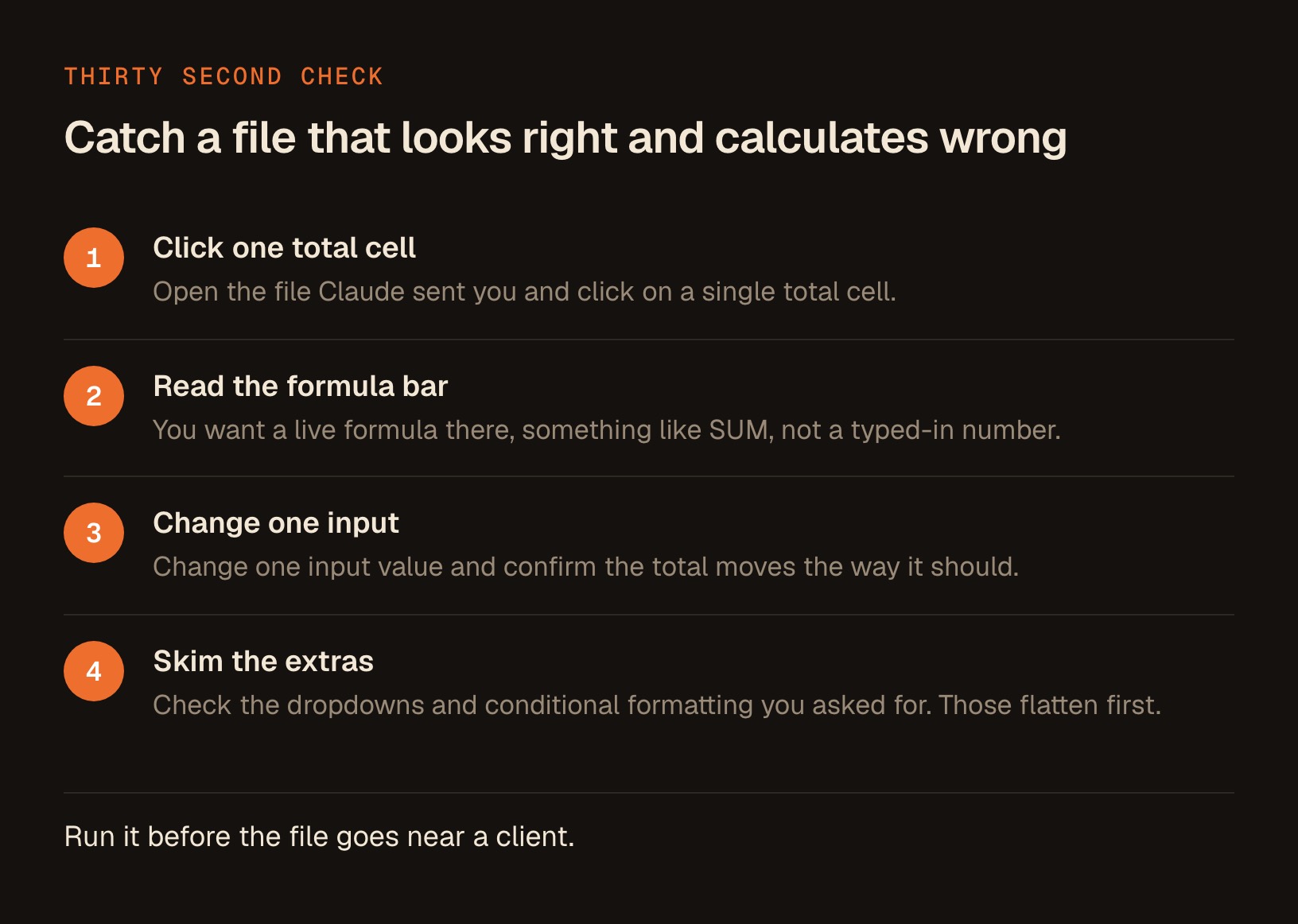
So run this check every time, before the file goes anywhere near a client:
- Open the file and click on one total cell.
- Look at the formula bar. You want to see a live formula there, something like SUM, not a typed-in number.
- Change one input value and confirm the total moves.
- Skim the dropdowns and conditional formatting you asked for, since those are the first things to get flattened.
30 seconds of clicking tells you whether you're holding a live tool or a picture of one.
Third, if file creation seems to have vanished, check Settings > Capabilities and switch it back on.
None of these is a dealbreaker. They're the price of admission for getting real files back from a plain-English request, and it's a price worth paying.
Turn This Into a Button You Press
Everything above is a single feature inside one tool. The bigger unlock, the one I spend my days on now, is stringing these small capabilities into repeatable skills you run the same way every time.
That way, getting a clean client tracker or a formatted proposal stops being a fresh negotiation and becomes a button you press.
That's what I build over at the Solo Creators AI Studio. Every finished AI skill I put together lives there, and there's a direct line to me if you get stuck turning one of these ideas into something you actually use.
No pressure and no pitch here. If the spreadsheet trick alone saves you an afternoon this week, I'll call that a win.
Key takeaways
- Claude can create real .xlsx, .pptx, .docx, and PDF files you download and open, and per Anthropic's own doc the feature is available on every plan including Free.
- On Free, Pro, and Max the feature is enabled by default, so there's nothing to switch on to start. Settings > Capabilities is where you confirm it, or re-enable it if it was ever turned off. Team and Enterprise have it on too.
- The same capability also lets you upload XLSX files, so with it on you can both read your Excel files and get new ones back.
- Very large files can get refused, and the ceiling moves, so don't memorize a number. If a file bounces, split it or trim the columns you don't need.
- Ask for the file by extension. "Build this as an .xlsx I can download" gets a file; "make me a spreadsheet" often just gets a table in the chat.
- Always open the file Claude returns, click a total cell, and confirm you see a live formula and not a pasted number. Asking Claude to state its assumptions catches the rest.
Get this skill, and every one I build.
30-day money-back guarantee. Cancel anytime.
Questions people ask
Can Claude actually create Excel and PowerPoint files, or just show them in the chat?
Is this free?
Why isn't file creation working for me?
What if my file is too big to upload?
Why did Claude show me a table in the chat instead of giving me a file?
Do I need to know how to code or use a terminal for any of this?

Ronnie spent 18 years building a SaaS with a team of 20 that served over 650,000 customers, generated over $14M in sales, and sent over 550M emails. Now he's solo, solving real business bottlenecks and turning them into working AI skills, workflows, and automations. He teaches all of it, with direct access to him, inside the Solo Creators AI Studio Skool community. See what he's built →
 Michael HattawayFounder, Iron Strengthens Iron
Keep reading