Key takeaways
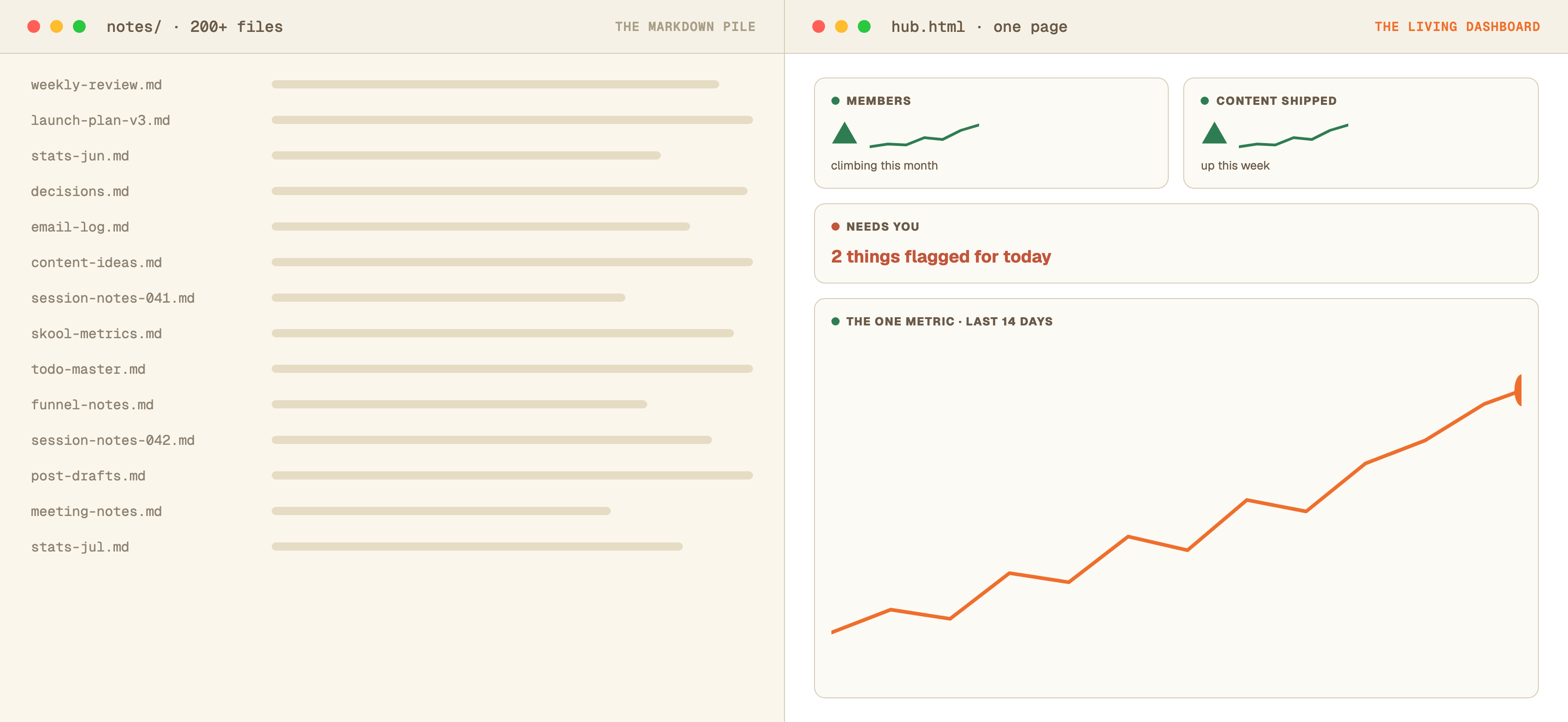
- Markdown overload is a reading problem, not a writing problem: AI produces organized text faster than you can absorb it, so your eyes become the bottleneck.
- Keep markdown as the machine's memory and make HTML the surface humans look at. One self-contained file per job, opening instantly with no server or build step.
- Ship the layout once, then only ever rewrite the marked data block inside the file. Updates become fast, safe, and immune to accidental redesigns.
- Every number carries an "as of" stamp, and the page colors its own freshness dots (green, amber, red) so stale data can never impersonate fresh data.
- Wire real tools in through MCP collectors with one hard rule: an unreachable tool means a stale flag, never an invented number.
- Design is retention: brand tokens, meaningful color only, one measure per chart, and the free taste-skill make a dashboard you actually open every day.
The Solo Creators AI Studio
Get this skill, and every one I build.
The whole vaultA new drop monthlyBuild live with meYours to keep, forever
See inside the AI Studio
30-day money-back guarantee. Cancel anytime.
Questions people ask
What does the HTML-is-the-new-markdown idea actually mean?
It's the argument made by Thariq Shihipar, an engineer on Anthropic's Claude Code team: markdown became the default AI output format because machines write it easily, but as AI does more of the writing, output should be optimized for the human reading it. HTML gives you tables, color, layout, links, and interactivity, so status pages and plans become instruments you scan in seconds instead of walls of text you skim. In practice: keep markdown as the AI's memory, and have it render anything a human reads (dashboards, status pages, plans) as HTML.
Do I need to know how to code to build an HTML dashboard?
No. You describe the page in plain English inside Claude Code (the desktop app), and it writes the entire self-contained HTML file for you. You never edit the code directly. Updates work the same way: you ask for a refresh and the AI rewrites only the data block inside the file.
Where does an HTML dashboard live? Do I need a server or hosting?
It's a single file on your own computer that opens in any browser with a double-click. No server, no hosting, no login, no subscription. It works offline, and because everything (styles, data, icons) is inside the one file, it'll still open unchanged years from now. Want it on your phone? Keep the file in a folder that syncs (iCloud Drive, Dropbox, Google Drive) and open it from the Files app. Because everything lives inside the one file, it renders perfectly there too.
Can Claude Code make charts and graphs in an HTML dashboard?
Yes. Claude Code can draw line, bar, and trend charts directly inside the single HTML file using inline SVG, no external libraries or internet needed. Ask for one measure per chart and colors that mean something (red = needs attention, green = fine), and the charts redraw themselves automatically whenever the data block is refreshed.
How does the dashboard get fresh data without me updating it?
Three layers. End work sessions by having the AI rewrite the data block with whatever changed. Add a scheduled morning task that pulls numbers from your tools through MCP connections and refreshes the block before you sit down. And stamp every value with an "as of" date so the page itself shows red when something hasn't refreshed.
What is MCP and which tools can I connect?
MCP (Model Context Protocol) is an open standard that lets Claude talk directly to other tools. There's a public directory of ready-made servers for popular apps (task managers like ClickUp, Slack, calendars, analytics), and where no MCP server exists, Claude can usually call the tool's regular API instead. Once Claude can read a tool, your dashboard can display it.
Should I stop using markdown notes entirely?
No, and this is the most misunderstood part of the idea. Markdown stays as the AI's memory: session logs, decisions, and plans it re-reads to stay consistent. HTML replaces markdown only as the surface a human reads. Same information, two formats, each serving the reader it's best at.
Can an HTML dashboard replace a Notion dashboard?
For a business cockpit, it's usually the upgrade. A Notion dashboard lives inside Notion's walls: it needs the app, an account, and it can't run its own logic or color its own freshness warnings. A self-contained HTML file opens in any browser in under a second, works offline, draws real charts, flags stale data, and costs nothing per month. Keep Notion for collaborative docs; move the at-a-glance numbers to a file you own.
Can't I just use Claude artifacts on claude.ai instead?
Artifacts are great for one-off pages, but they can't read your notes folder, connect to your tools through MCP, rewrite a file on your disk, or run scheduled refreshes. Claude Code (the desktop app) does all four, and that's exactly what makes a dashboard living instead of disposable. Use artifacts to prototype a look; use Claude Code for the real thing.

Written by Ronnie Nijmeh
Ronnie spent 18 years building a SaaS with a team of 20 that served over 650,000 customers, generated over $14M in sales, and sent over 550M emails. Now he's solo, solving real business bottlenecks and turning them into working AI skills, workflows, and automations. He teaches all of it, with direct access to him, inside the Solo Creators AI Studio Skool community. See what he's built →
“I completely rebuilt my site using the Website Launch Builder. If you've ever built a website, you'll really appreciate this skill. I'm blessed to be a member.”
 Michael HattawayFounder, Iron Strengthens Iron
Keep reading

Getting started
Build a Second Brain So AI Finally Remembers You
Make AI remember your voice, clients, and decisions, every single time.
Replace the stack
Run Your Whole Solo Business From One App: The 2026 Stack That Replaced Seven Subscriptions
The exact subscriptions I cancelled, the installable skills that replaced each, and when to keep paying.

Automation
Wake Up to a Daily Brief: The AI Chief of Staff That Works Overnight
An agent that reads everything overnight and hands you one page at sunrise.