Find which items to push, reprice or drop from your sales export
It sorts every product into keep, push, reprice or drop, from a file you'd normally never open.
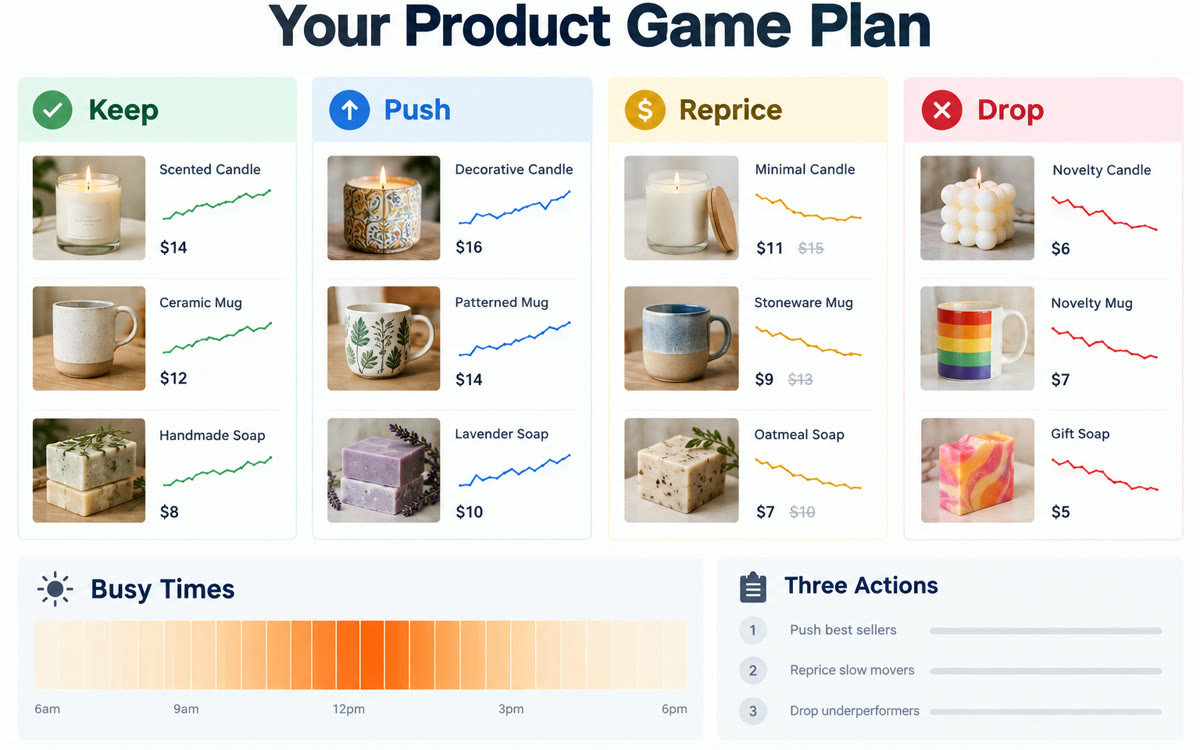
A sample of what you get back, made with AI.
Your prompt
Fill in your details. Skip any you like.
ChatGPT and Claude open with your prompt already typed in. Gemini can't be filled in from a link, so its button copies your prompt: paste it into the new chat.
The prompt that gets copied
Attached is my sales export from [EXPORT SOURCE, e.g. Square, last 3 months] for [YOUR BUSINESS, e.g. a gift shop]. My rough cost for each item, if I have it: [ITEM COSTS, e.g. attached or none].

First, tidy it: fix dates, move refunds and test sales into a separate list, merge items with slightly different names, and tell me what you cleaned.

Then:
1. Rank items by sales and by units, and show my top 10 and bottom 10
2. Sort every item into Keep, Push, Reprice or Drop, with a one-line reason each
3. Show my busiest days and hours
4. Point out any items that are growing, slipping or seasonal
5. Give me three actions for this week

Use simple tables and one chart. If anything in the data looks wrong, list it first.
Upload a messy sales export from your POS or online store. AI tidies the data, then sorts every item into keep, push, reprice or drop, with best sellers, slow movers and busy times explained.
Step by step
- Export your sales by item as a CSV or Excel file.
- Attach it to the chat and paste the prompt.
- Check the list of what it cleaned up.
- Act on the push and drop lists this week.
What you'll get
A cleaned sales file, every item sorted into keep, push, reprice or drop, busy times and three actions.
Remove customer names and card details first. ChatGPT for Excel and Google Sheets works on all plans.
- Made for
- Small business owners
- Works in
- ChatGPT, Claude, Gemini


