Know what's making you money and what to do next week
It tells you, bluntly, what to stop doing, with your own numbers to back it up.
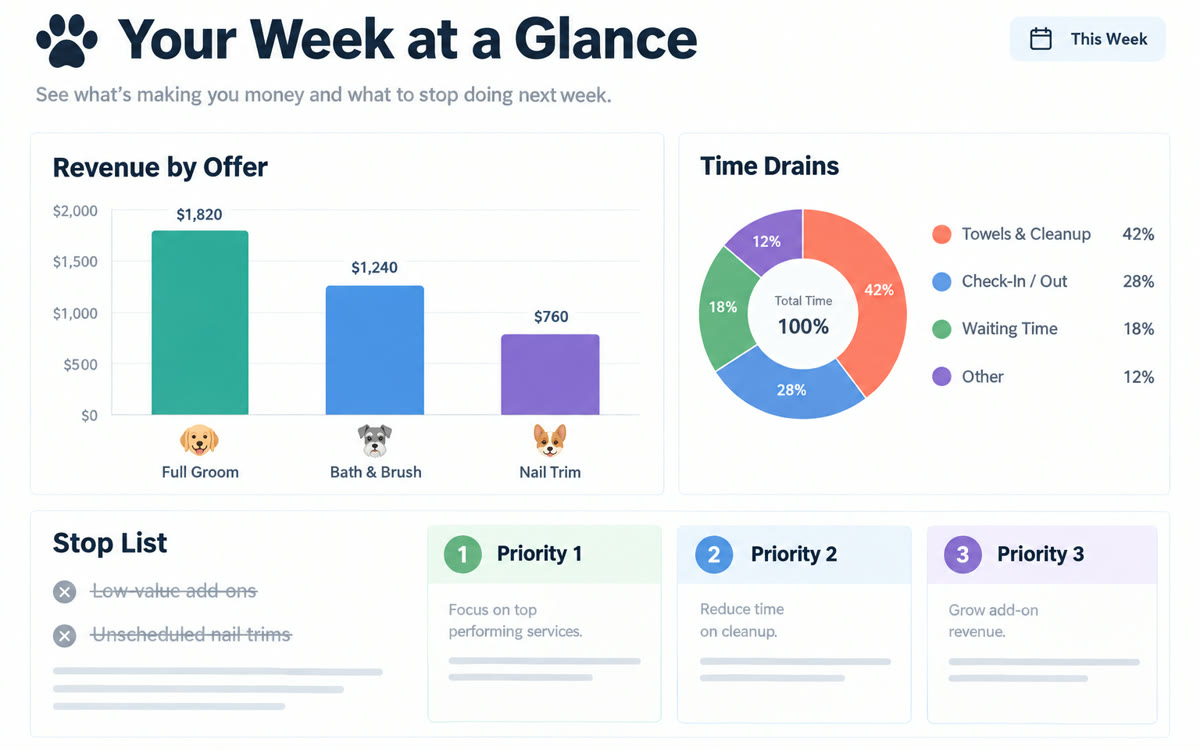
A sample of what you get back, made with AI.
Your prompt
Fill in your details. Skip any you like.
ChatGPT and Claude open with your prompt already typed in. It's copied too, just in case.
The prompt that gets copied
Act as my blunt business advisor. I've uploaded [SALES OR PAYMENTS EXPORT], [MY PROJECT OR CLIENT LIST], [NOTES FROM RECENT CLIENT CALLS], and [MY CALENDAR OR TIME LOG]. Build me a one-page weekly dashboard that shows: 1) what's actually making money, by offer or client, 2) what's eating my time without paying off, 3) what clients keep asking for that I don't offer yet, 4) what I should stop doing, and 5) the three highest-leverage actions for next week, each with the reason. Show your work by pointing to the numbers or notes behind every claim. If the data is too thin to judge something, say so.
Give AI your sales export, client list, call notes and calendar, and get a blunt weekly dashboard: what's earning, what's wasting time and the three moves that matter next week.
Step by step
- Export your sales or payments for the month and copy your client list and a few call notes.
- Upload them to ChatGPT or Claude with the prompt.
- Run the prompt every Friday.
What you'll get
A one-page dashboard with revenue by offer, time drains, repeated client requests, a stop list, and three priorities, each backed by your own data.
- Made for
- Coaches, Consultants, Small business owners
- Works in
- ChatGPT, Claude


