See which referral source brings in the most revenue
One prompt turns a plain list of jobs into a clickable view of where your money really comes from.
Published . Steps as of November 2026.
How can I see which referral source makes me the most money?
Put your projects in a Google Sheet with revenue and how each client found you, then ask Sheets canvas to build a view of revenue by source. As of November 2026, Sheets canvas needs Google AI Pro or Ultra, or a Workspace Business or Enterprise Standard or Plus plan. It fits best if you already log every project in one sheet. If your sources are written in different ways, the prompt asks Gemini to group the obvious matches first.
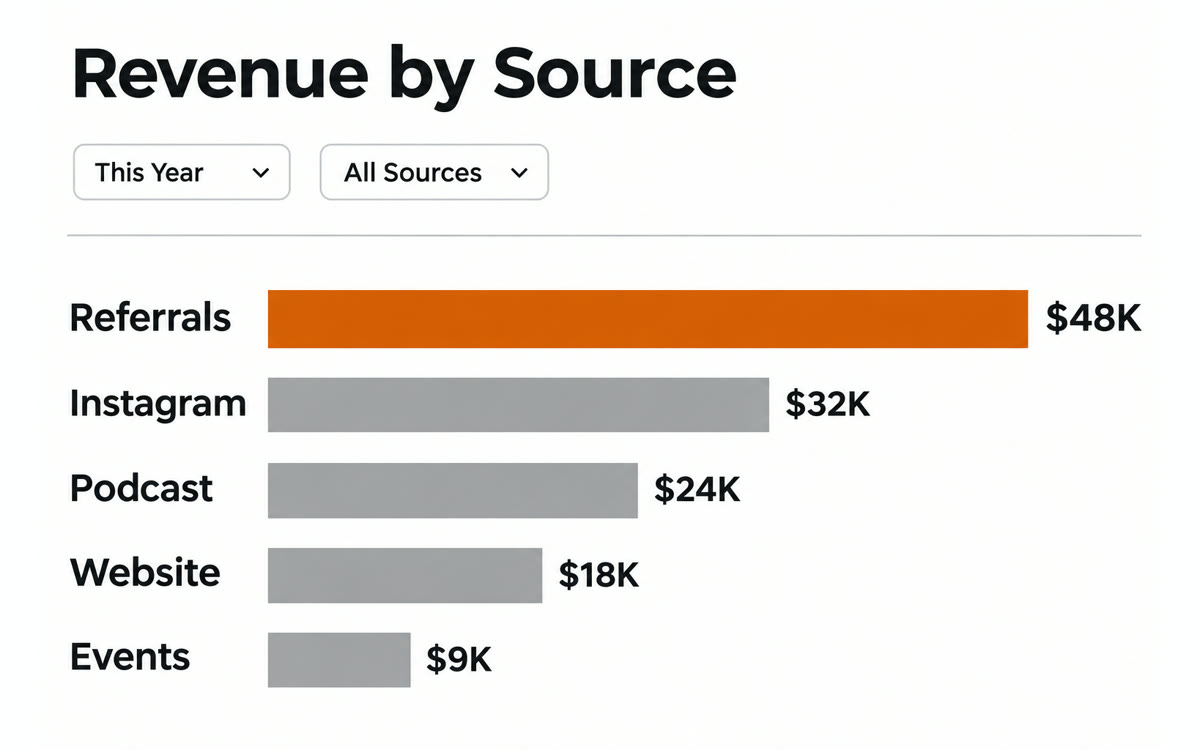
A sample of what you get back, made with AI.
Your prompt
Fill in your details. Skip any you like.
This AI can't be filled in from a link, so the button copies your prompt: paste it into the new chat.
The prompt that gets copied
Using the data in this sheet, build an interactive view of my revenue by referral source. Each row is one project with these columns: [YOUR COLUMNS, e.g. client, date, revenue, how they found me]. Group sources that are clearly the same, like "IG" and "Instagram". For each source, show total revenue, number of projects and average project value, sorted from highest total revenue down. Let me filter by [TIME PERIOD, e.g. last 12 months] and click a source to see its projects. At the top, add a short note that names my strongest source, my weakest one, and any source where one or two big projects make the total look better than it really is. Don't change my original data.
Keep a sheet of projects with what each one earned and how the client found you. Sheets canvas turns it into a clickable view of revenue by referral source.
Step by step
- Open your project list in Google Sheets with columns for client, revenue and referral source
- Click Insert, then Create a canvas
- Paste the prompt below into the Gemini box and fill in the details
- Click a source on the canvas to see its projects, then fix any messy entries in the sheet
What you'll get
An interactive canvas on top of your sheet with revenue, project count and average value per referral source, plus a short note on where to focus.
Sheets canvas needs Google AI Pro or Ultra, or a Workspace Business or Enterprise Standard or Plus plan.
- Made for
- Coaches, Consultants, Small business owners
- Works in
- Gemini