See how big things really are with a side-by-side drawing
Ask how a polar bear compares to a tiger and get a drawing of both next to a person, with real heights.
Published . Steps as of October 2026.
How can I see the real size difference between two animals?
Ask an AI chatbot for a to-scale drawing of both, next to an average adult, with labeled heights. ChatGPT can draw it right in the chat with its new visual answers (as of October 2026), and Claude or Gemini can draw a simple chart from the same prompt. For kids, ask for three easy facts underneath. If something looks wrong, like a bear facing backwards, ask for a quick fix.
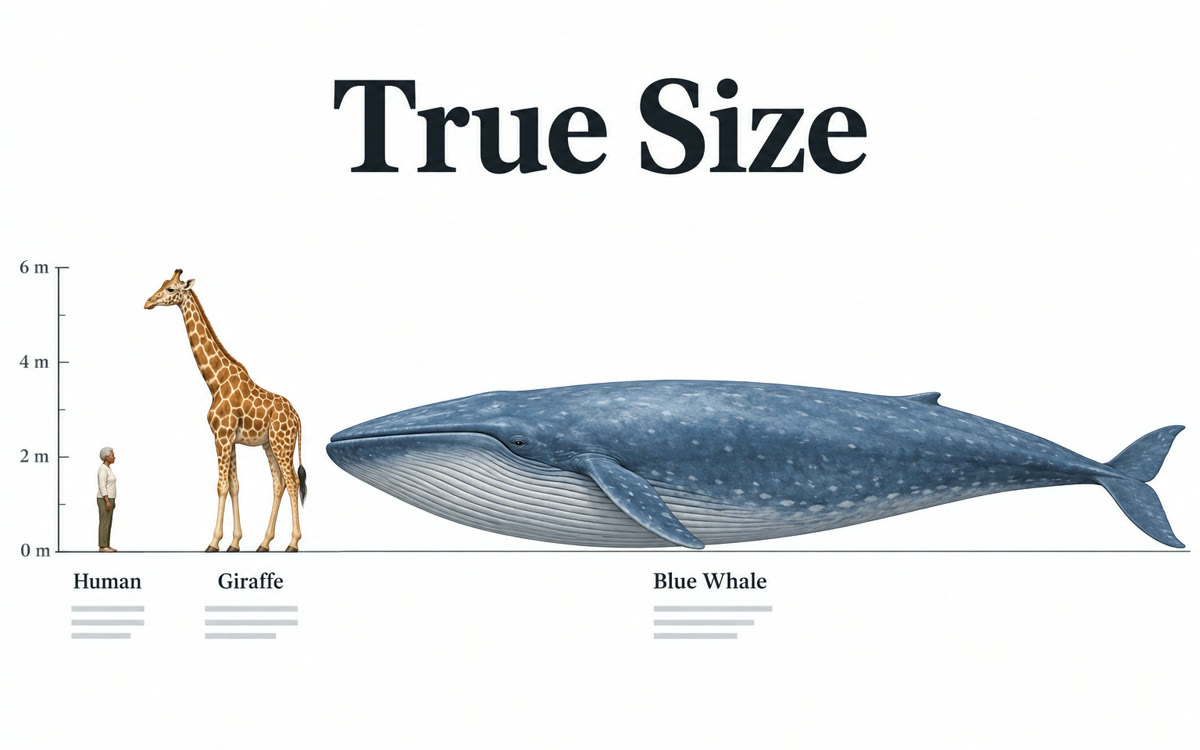
A sample of what you get back, made with AI.
Your prompt
Fill in your details. Skip any you like.
ChatGPT and Claude open with your prompt already typed in. Gemini can't be filled in from a link, so its button copies your prompt: paste it into the new chat.
The prompt that gets copied
Draw a simple side-by-side picture that shows the real size difference between [THINGS TO COMPARE, e.g. a polar bear and a tiger]. Put an adult person of average height next to them for scale, all standing on the same ground line, and keep every item to the same scale. Label each one with its typical height and length, in [UNITS TO USE, e.g. feet and inches]. Under the picture, add 3 short facts that make the difference easy to remember, written for [WHO IT'S FOR, e.g. my 8-year-old]. If sizes vary a lot, use a typical adult and say so. Use a drawn chart or simple shapes, not a photo, and make it clean and easy to read.
Ask for a to-scale drawing of any two or three things next to a person, from animals to planets to cars. You get a clear picture plus the real numbers, so the size difference finally clicks.
Step by step
- Pick two or three things you want to compare.
- Paste the prompt and fill in the things and who it's for.
- Ask for a fix if anything looks off, like an animal facing the wrong way.
What you'll get
A labeled, to-scale drawing of the things you picked next to a person, plus three easy facts about the difference.
Works best in a normal chat, not a temporary one, per the thread.
- Made for
- Everyone
- Works in
- ChatGPT, Claude, Gemini