Get more Google reviews with a request text customers answer
It writes a different ask for first-timers, loyal regulars and big jobs, so it never feels like a form letter.
Published . Updated . Steps as of October 2026.
How do I ask customers for Google reviews by text?
Copy your review link from your Google Business Profile and paste it into ChatGPT, Claude or Gemini with your business details. You get four short requests for text and email, with nothing offered in return. If it's a first-timer, use that version. For loyal regulars or big jobs, use theirs. Save them in your phone and send one after each job.
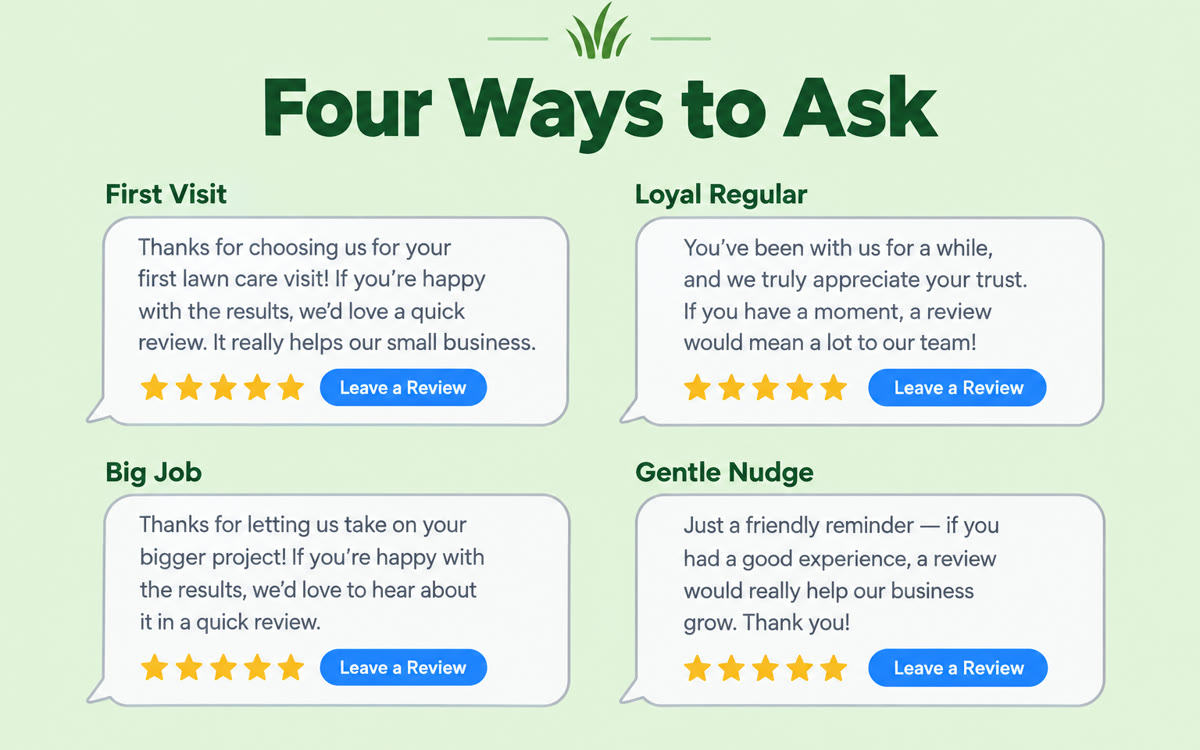
A sample of what you get back, made with AI.
Your prompt
Fill in your details. Skip any you like.
ChatGPT and Claude open with your prompt already typed in. Gemini can't be filled in from a link, so its button copies your prompt: paste it into the new chat.
The prompt that gets copied
Write short review requests for customers of [YOUR BUSINESS, e.g. a mobile car detailing service].

My Google review link: [YOUR REVIEW LINK]
When I usually ask: [WHEN YOU ASK, e.g. the evening after the job]

Write:
1. A text under 40 words for a happy first-time customer
2. A text under 40 words for a loyal regular
3. An email under 90 words for a big job, mentioning [JOB DETAIL, e.g. the ceramic coating]
4. A one-line nudge to send 3 days later if they haven't left one

Rules:
- Sound like me talking, warm and a little informal
- Ask for an honest review, never a 5-star one
- Never offer a discount, gift or anything else in return, because Google doesn't allow it
- Mention that it takes about a minute
- Put the link on its own line
Tell it about your customers and paste your review link. You get short, friendly review requests for text and email that follow Google's rules, with nothing offered in return.
Step by step
- Copy your review link from your Google Business Profile.
- Paste it into the prompt with your business details.
- Save the messages in your phone's notes or text shortcuts.
- Send one after each job, while the customer is happiest.
What you'll get
Four short review requests for different customers and moments, all within Google's rules.
Google bans offering anything in exchange for reviews. Ask for honest feedback only.
- Made for
- Small business owners
- Works in
- ChatGPT, Claude, Gemini