See which clients really pay you the least per hour
A client you love can turn out to be your lowest real hourly rate once emails count.
Published . Steps as of October 2026.
How do I figure out which clients are actually worth my time?
Work out each client's real hourly rate by adding admin time and late payments to the hours you deliver. Claude, ChatGPT and Gemini can all build the calculator in the chat, so pick the one you use most. It fits coaches and consultants on monthly retainers, where emails and revisions hide. If you bill by the project, enter the project fee and total hours instead, and check the math before you use it in a quote.
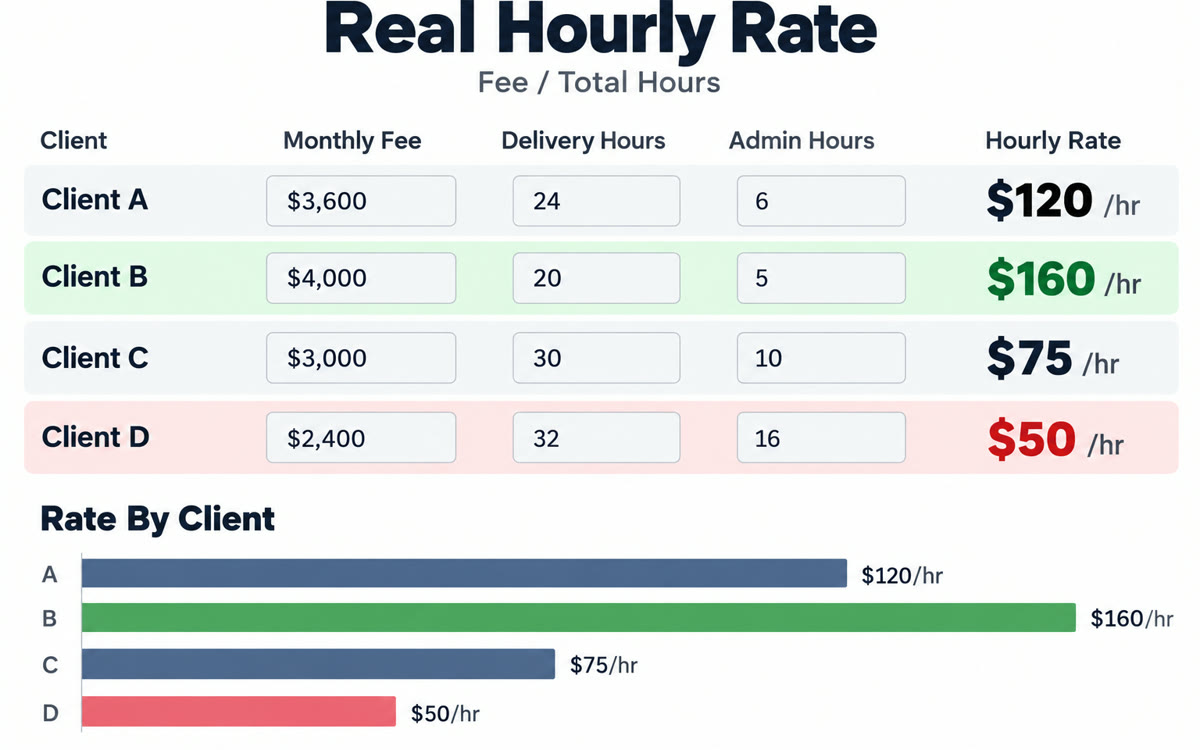
A sample of what you get back, made with AI.
Your prompt
Fill in your details. Skip any you like.
Claude and ChatGPT open with your prompt already typed in. Gemini can't be filled in from a link, so its button copies your prompt: paste it into the new chat.
The prompt that gets copied
Build me a simple interactive calculator I can use right here in the chat to find my real hourly rate per client. For each client, let me enter: what they pay per month, hours of actual delivery, hours of admin (emails, meetings, revisions, chasing payments), and how many days late they usually pay. Show each client's real hourly rate, sorted lowest to highest, and flag anyone below [YOUR MINIMUM HOURLY RATE]. Start it with these clients: [YOUR CLIENTS, e.g. Dana, Tidewell, Northbay]. Under the table, add one line on what's dragging the lowest rate down, such as admin hours or late payments. Show the math for each row so I can check it.
Get a small calculator right in your chat where you enter each client's fee, hours, admin time and late payments, and see your true hourly rate for each one.
Step by step
- Paste the prompt below into Claude, ChatGPT or Gemini.
- Enter each client's fee, delivery hours and admin hours in the calculator.
- Sort by real hourly rate to see who's lowest.
- Ask for three ways to raise the rate on your bottom client.
What you'll get
A working calculator in your chat that ranks clients by real hourly rate and shows what's dragging the lowest one down.
- Made for
- Coaches, Consultants, Small business owners
- Works in
- Claude, ChatGPT, Gemini


