Let clients build their own package on a private proposal page
Clients click their own package together and watch the total change, instead of skimming a PDF.
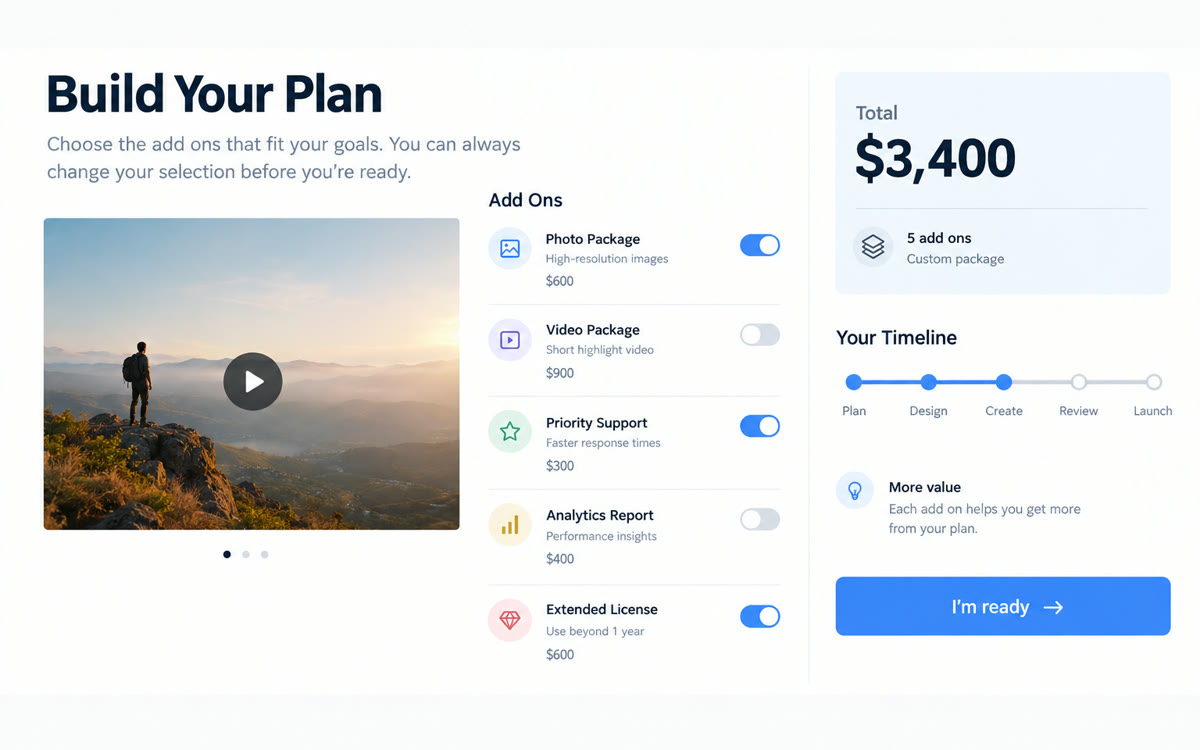
A sample of what you get back, made with AI.
Your prompt
Fill in your details. Skip any you like.
ChatGPT and Claude open with your prompt already typed in. Gemini can't be filled in from a link, so its button copies your prompt: paste it into the new chat.
The prompt that gets copied
Build an interactive proposal web page for [CLIENT BUSINESS, e.g. Harbor Yoga] from [YOUR BUSINESS, e.g. Northline Marketing]. Sections: a short summary of their goal, which is [CLIENT GOAL, e.g. fill more weekday classes], what we'll do, a timeline, and a pricing builder. The core package is [CORE PACKAGE, e.g. Launch Plan at $2,400]. Optional add-ons: [EXTRAS WITH PRICES, e.g. ads setup $600, photo shoot $450]. Show each add-on as a toggle with one line on what it delivers, and update the total and the timeline as options change. Add a 'What happens next' section with [NEXT STEPS, e.g. sign, kickoff call, week one plan] and a big button that says [BUTTON TEXT, e.g. I'm ready, let's talk] linking to [CONTACT LINK, e.g. your booking page]. Use [YOUR BRAND COLORS, e.g. navy and gold] and make it look polished on a phone. Don't add any claims, guarantees or results I haven't given you.
Describe your proposal to Canva Code and get an interactive page in your branding. Clients switch add-ons on and off, watch the total and timeline update, and open it with a password only they have.
Step by step
- Select Code on the Canva homepage and paste the prompt with your client's details.
- Select Preview and click every option to check each total against your price sheet.
- Select Publish, set the site address, then open Settings.
- Turn off Visible in search engines, set Password protection, then select Publish.
- Send the link and the password in separate messages, then follow up two days later.
What you'll get
A branded, password-protected proposal page with add-on toggles, a live total, a timeline and one clear button to say yes.
Canva Code needs Canva Pro or higher and uses your AI allowance. Each Code thread keeps one URL that updates when you publish.
- Made for
- Consultants, Coaches, Small business owners
- Works in
- Canva