Turn a pile of paper mail into a to-do list with due dates
A dozen envelopes become one short list: what to pay, what to sign and when.
Published . Updated . Steps as of October 2026.
How do I turn a pile of paper mail into a to-do list?
Scan the week's letters, bills and notices into one PDF. In the ChatGPT app, open the camera, tap the three-dot menu and select Scan (as of October 2026). Send the PDF with the prompt. The same prompt works in Gemini and Claude too. You get what to pay, sign or answer, with amounts and due dates. Add the dates to your calendar and recycle the safe pile.
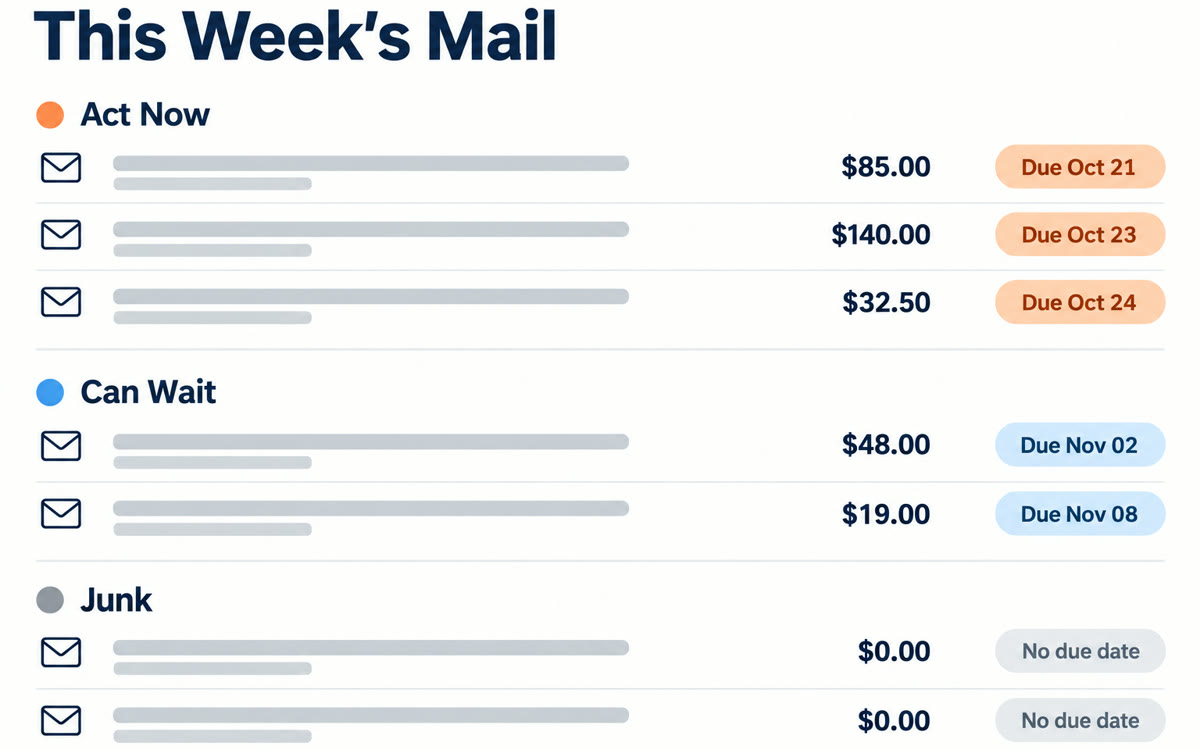
A sample of what you get back, made with AI.
Your prompt
Fill in your details. Skip any you like.
ChatGPT and Claude open with your prompt already typed in. Gemini can't be filled in from a link, so its button copies your prompt: paste it into the new chat.
The prompt that gets copied
I've scanned this week's paper mail. Go through every page and sort it into three groups: needs action from me, keep for my records, and safe to recycle. For each item that needs action, tell me who it's from, what they want, the amount if there is one, the due date, and the exact next step (pay, sign, call, reply or fill in). Flag anything that looks like a scam, a late notice or a price increase. Put the action items in order of due date in a checklist. Then tell me which papers I should keep and for how long. My household is [WHO THE MAIL IS FOR, e.g. me, my partner and our two kids].
Scan the week's letters, bills and notices into one PDF with your phone. AI sorts what needs action, what can wait and what's junk, with every amount and due date pulled out.
Step by step
- Open the camera in the ChatGPT app, tap the three-dot menu and select Scan
- Scan each page of your mail, one after another
- Send the combined PDF with the prompt below
- Add the due dates it finds to your calendar
What you'll get
A due-date checklist of what to pay, sign or answer, a list of papers to keep, and a pile you can safely recycle.
The multi-page Scan option is rolling out in ChatGPT on iOS. On other phones, attach photos of each page.
- Made for
- Everyone, Small business owners
- Works in
- ChatGPT, Gemini, Claude