Learn new words in any language with one labeled picture
A busy kitchen with 20 objects, each labeled in Spanish with pronunciation, on one printable page.
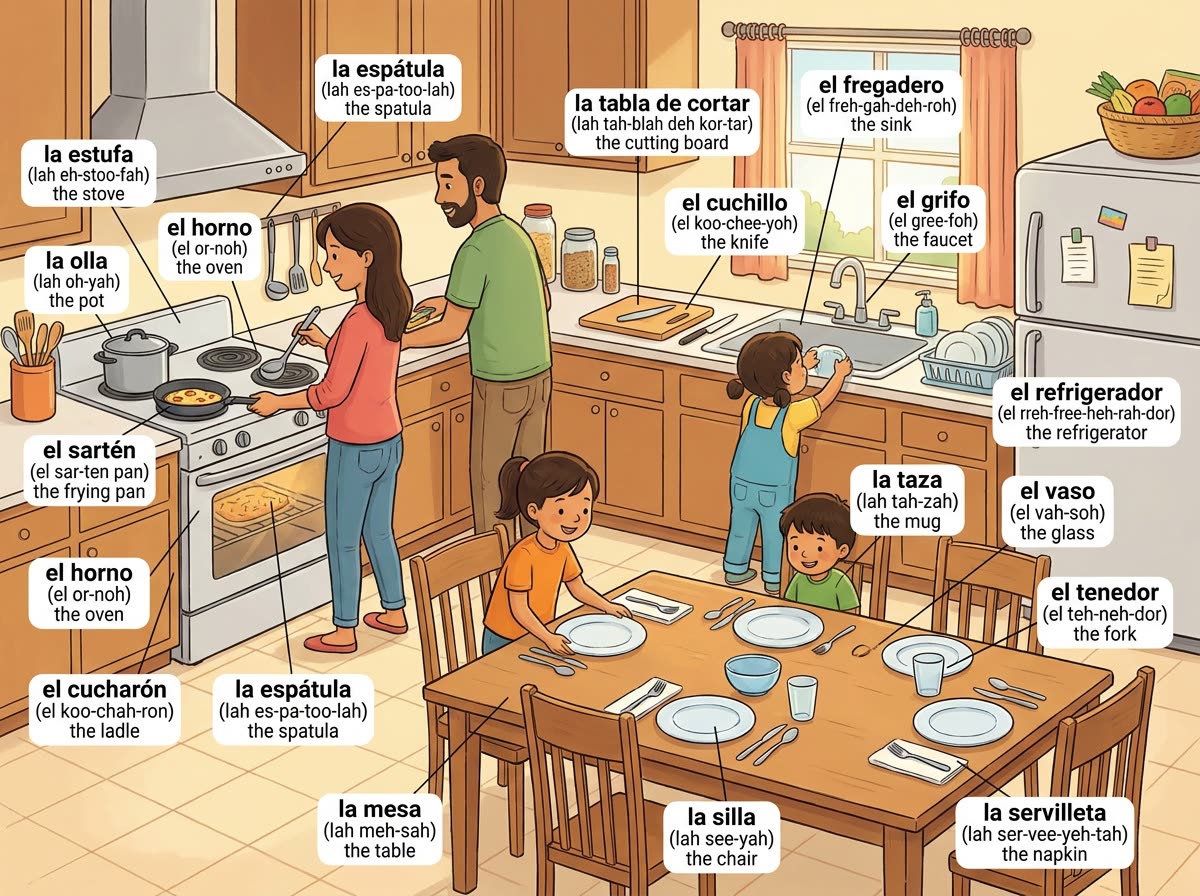
A real example, made with this exact prompt in Google Gemini's image tool, with sample details filled in. Sample details used: The scene: a busy family kitchen; Target language: Spanish; Your language: English; Learner level: beginner adult.
Your image prompt
Fill in your details. Skip any you like.
Each button copies your prompt and opens a new chat that makes images. Just paste it in.
The prompt that gets copied
Draw a detailed, cheerful illustration of [THE SCENE, e.g. a busy family kitchen]. Label about 20 everyday objects in the scene. Each label has three lines: the word in [TARGET LANGUAGE, e.g. Spanish], with its article if the language uses one; a simple pronunciation guide; and the word in [YOUR LANGUAGE, e.g. English]. Use thin leader lines from each label to its object, and don't let labels overlap. Pick words a [LEARNER LEVEL, e.g. beginner adult] would use every day. Use a clean, friendly picture-book style and large, easy-to-read text.
Pick a scene, like a kitchen or a farmers market, and get a detailed illustration with every object labeled in the language you're learning, plus pronunciation and your own language.
Step by step
- Choose a scene and the language you're learning.
- Paste the prompt and spot-check a few labels with a dictionary.
- Print it or set it as your phone wallpaper for daily practice.
What you'll get
A labeled scene with about 20 everyday words in your new language, with pronunciation and translation.
Spot-check a few words with a dictionary, since labels can contain mistakes.
- Made for
- Everyone
- Works in
- Gemini, ChatGPT