Turn a site visit voice memo and photos into a job quote
It writes a 'not included' list, the part of a quote that saves arguments when the job is done.
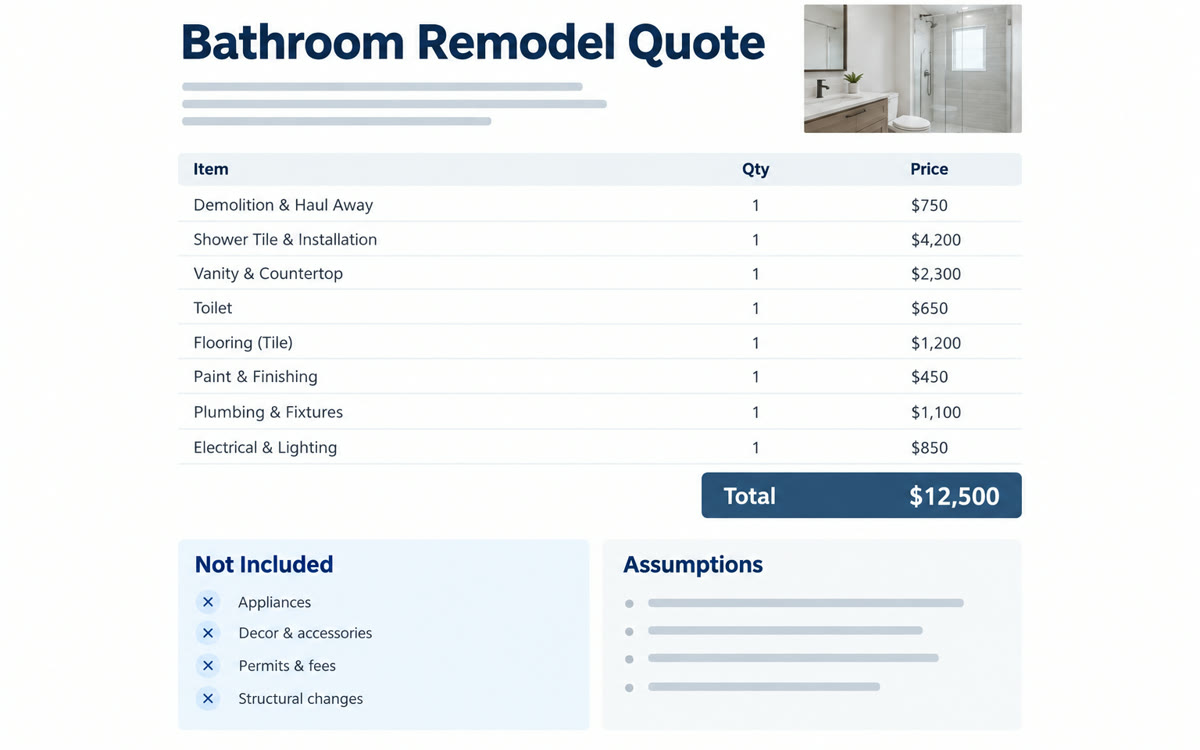
A sample of what you get back, made with AI.
Your prompt
Fill in your details. Skip any you like.
Claude and ChatGPT open with your prompt already typed in. Gemini can't be filled in from a link, so its button copies your prompt: paste it into the new chat.
The prompt that gets copied
I'm a [YOUR TRADE, e.g. painting contractor]. Below is the transcript of my voice memo from a site visit, and I've attached photos.
[PASTE VOICE MEMO TRANSCRIPT]

My rates: [YOUR RATES, e.g. $65 an hour, 2-person crew]
Materials markup: [MATERIALS MARKUP, e.g. 15% on cost]
How I lay out quotes: [YOUR QUOTE FORMAT, e.g. paste an old quote here]

Build a quote with:
1. A short scope of work in plain words
2. Line items with labor hours, materials and prices, showing the math
3. What's included and what's not included
4. Assumptions, like access or surface condition, that could change the price
5. Timeline, payment terms and how long the quote is valid

Use only what's in my memo and photos. Wherever you had to estimate quantities or hours, mark it "check" so I review it before sending.
Talk through the job into your phone, snap a few photos and add your rates. You get an itemized quote with labor, materials, what's included and what isn't, ready to check and send.
Step by step
- Record a voice memo as you walk the job, then copy its transcript.
- Snap photos of the key areas.
- Attach the photos, paste the transcript and fill in the prompt.
- Check every line marked 'check' and adjust the price before you send it.
What you'll get
An itemized quote with scope, line items, inclusions, exclusions and assumptions, laid out your way.
Always check the numbers. AI only knows your material prices if you give them.
- Made for
- Small business owners
- Works in
- Claude, ChatGPT, Gemini