Grow on TikTok with photo slideshows, no filming needed
No camera, no face, no editing. Slideshows let you post every day with just an idea and a phone.
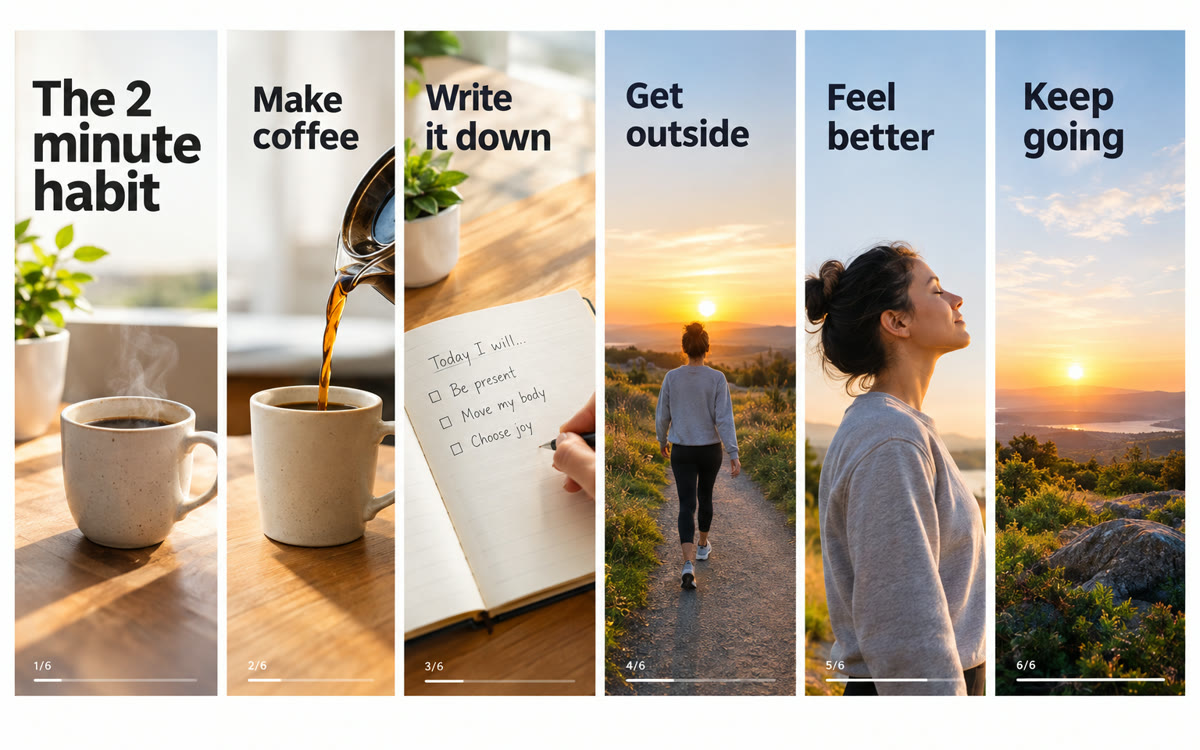
A sample of what you get back, made with AI.
Your prompt
Fill in your details. Skip any you like.
ChatGPT and Claude open with your prompt already typed in. Gemini can't be filled in from a link, so its button copies your prompt: paste it into the new chat.
The prompt that gets copied
Create a 6-slide TikTok photo slideshow about [YOUR TOPIC] for [YOUR AUDIENCE]. The goal is [YOUR GOAL, e.g. send people to my free guide].

Slide 1: a hook in under 8 words that makes people stop and swipe. Use curiosity or a surprising result.
Slides 2 to 5: one short point per slide, under 15 words each, building a mini story.
Slide 6: a payoff plus a soft call to action.

For each slide give me:
1. The on-screen text.
2. An image prompt for a vertical 9:16 photo in a consistent [PHOTO STYLE, e.g. cozy natural-light phone photo] look, with empty space where the text will sit.

Then write a caption under 100 words that adds one extra tip, plus 5 hashtags. Keep everything sounding like a real person, not an ad.
Get a complete TikTok photo slideshow plan: a hook slide, story slides, matching image prompts, and the caption and hashtags.
Step by step
- Fill in your topic and paste the prompt.
- Generate each slide's image from its image prompt in ChatGPT or Gemini.
- Add the slide text in TikTok's photo mode or a design app.
- Post with the caption and pick a trending sound.
What you'll get
Six slides of on-screen text, matching image prompts, a caption, and hashtags.
- Made for
- Creators, Small business owners, Coaches
- Works in
- ChatGPT, Gemini, Claude


