Turn your event flyer into countdown clips that fill seats
Ask it to change the 5 to a 4 and you've got tomorrow's post, with everything else exactly the same.
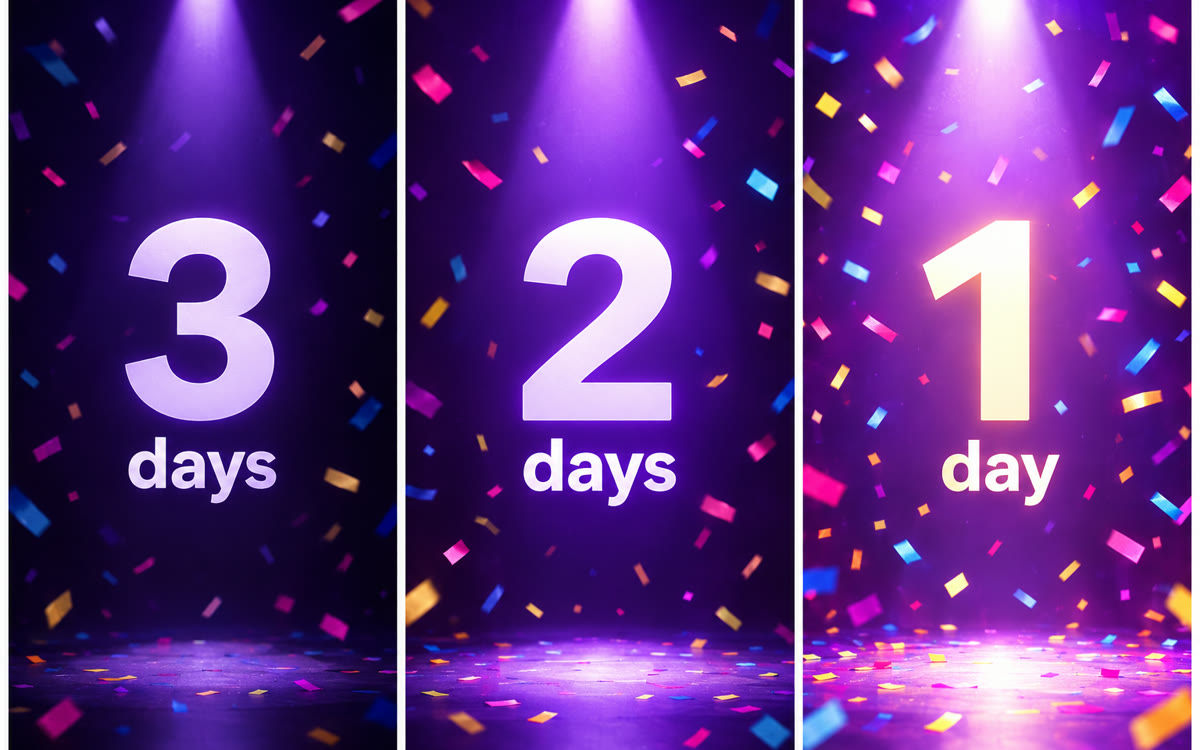
A sample of what you get back, made with AI.
Your prompt
Fill in your details. Skip any you like.
Claude and ChatGPT open with your prompt already typed in. Gemini can't be filled in from a link, so its button copies your prompt: paste it into the new chat.
The prompt that gets copied
I've attached the flyer for my event. Turn it into a 10-second promo reel as one web page that plays by itself in the preview. Make it punchy, like an ad.

Event: [EVENT NAME, e.g. Spring Business Mixer]. Date and time: [EVENT DATE AND TIME, e.g. Thursday, April 9, 6 PM]. The main reason to come: [THE BIG DRAW, e.g. meet 40 business owners in one room].

Scenes:
1. A huge countdown number slams in: [DAYS TO GO, e.g. 5] DAYS TO GO.
2. The event name and the big draw, in short bold lines.
3. The date and time, clear and easy to read.
4. End card: [YOUR CALL TO ACTION, e.g. Grab a free ticket, link in bio].

Match the flyer's colors and fonts as closely as you can, and use only facts from the flyer. Fast cuts, smooth motion, no sound, vertical 9:16, words inside safe margins. Start on one blank second, hold the end card for 2 seconds, and add a Replay button below the frame. Keep the countdown number easy to change, so I can ask for a new one each day.
Attach your event flyer and Claude makes a punchy 10-second promo reel with a big countdown number. Change the number each day and record a fresh clip for every day of the week.
Step by step
- Open Claude, attach your flyer, and paste the prompt with your event details.
- Watch the reel and check the date and time against your flyer.
- Record it with Shift-Command-5 (Mac) or Windows+Shift+R (Windows), or your phone's screen recorder.
- Ask for the next countdown number each day, then record and post the new clip.
What you'll get
A 10-second vertical event promo with a countdown you can update daily, so you get a fresh teaser clip for every day before the event.
Works on every Claude plan and in Gemini Canvas. In ChatGPT, click Preview on the code block.
- Made for
- Small business owners, Coaches, Creators, Everyone
- Works in
- Claude, Gemini, ChatGPT