Get a fully designed Word document from one plain request
Ask for a client proposal and the layout, headings and styling come built in, not just the words.
Published . Steps as of October 2026.
Can Copilot in Word design a whole document for me?
Yes. Ask Copilot in Word for the kind of document you need, such as a proposal or report, and it applies a structure, layout, formatting and visual design that suit that document type. This rolled out in October 2026 for Microsoft 365 customers with Copilot in Word. It's best for consultants and coaches who send polished documents often. Always check the facts and numbers before you send it.
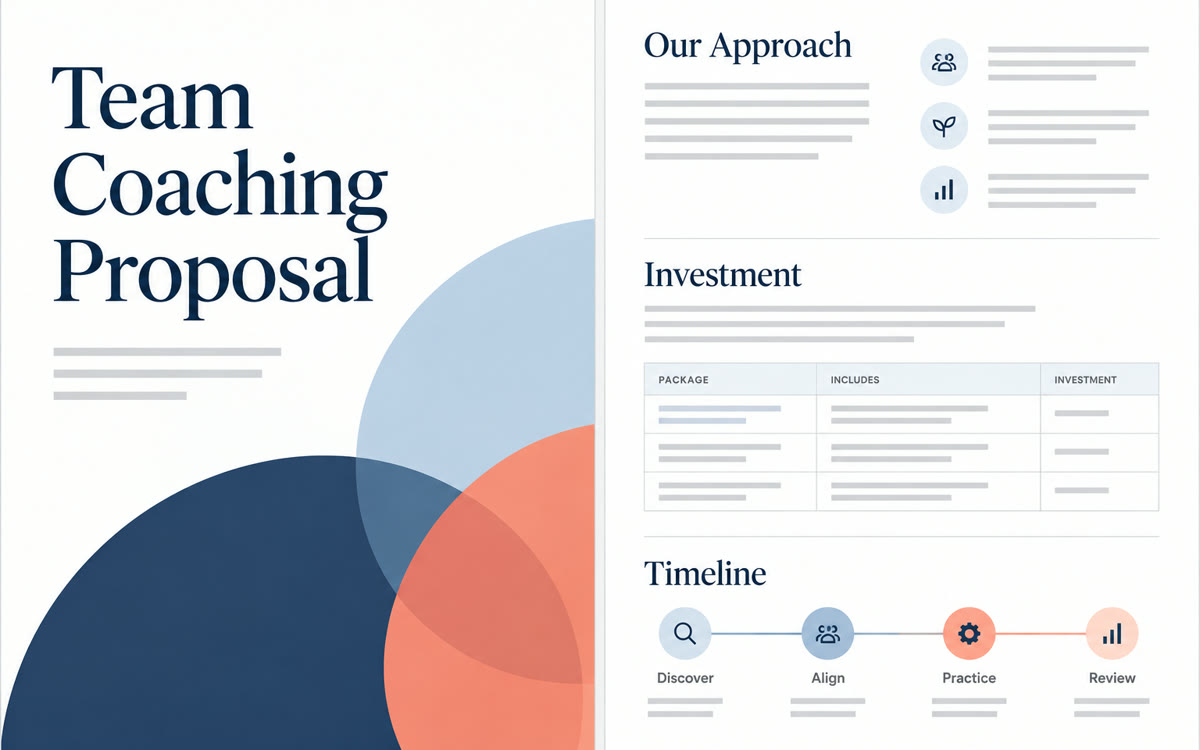
A sample of what you get back, made with AI.
Your prompt
Fill in your details. Skip any you like.
This AI can't be filled in from a link, so the button copies your prompt: paste it into the new chat.
The prompt that gets copied
Create a [DOCUMENT TYPE, e.g. one-page client proposal] for [YOUR BUSINESS, e.g. Tidewell Coaching]. It's for [WHO WILL READ IT, e.g. an HR director at a clinic], and the goal is to [YOUR GOAL, e.g. win a 3-month team coaching program]. Use these facts and nothing else: [KEY FACTS, e.g. 6 group sessions, starts in January]. Give it the structure, layout and design that suit this kind of document, with clear headings, a short summary up top and one clear next step at the end. Keep the tone warm and professional, and leave a marked placeholder anywhere you need a detail I haven't given you.
Ask Copilot in Word for a proposal, report or guide and it applies the structure, layout and design that fit that type of document. You start from a polished draft, not a blank page.
Step by step
- Open a new blank document in Microsoft Word
- Select Copilot and paste the prompt below with your details
- Ask Copilot to change any section, like adding a pricing table
- Read every number and claim before you send it
What you'll get
A ready-to-edit Word document with the structure, layout and styling that suit its type.
Needs Copilot in Word through a Microsoft 365 plan that includes it. Rolled out October 2026.
- Made for
- Consultants, Coaches, Small business owners
- Works in
- Copilot



 Before