See how people unwound after work across 5,000 years
Each image comes with a short caption on what that job was and how people really rested after it.
Published . Steps as of November 2026.
How do I make AI pictures of daily life in different eras?
Ask ChatGPT or Gemini for a short series of photorealistic images, one era at a time, with a caption under each. ChatGPT suits a step-by-step series because you can ask for the next image when you're ready. Gemini works well too if you'd rather do it there. If it's for kids, ask for captions in simpler words. If it's for your feed, ask for the same framing on every image so the set looks like one carousel.
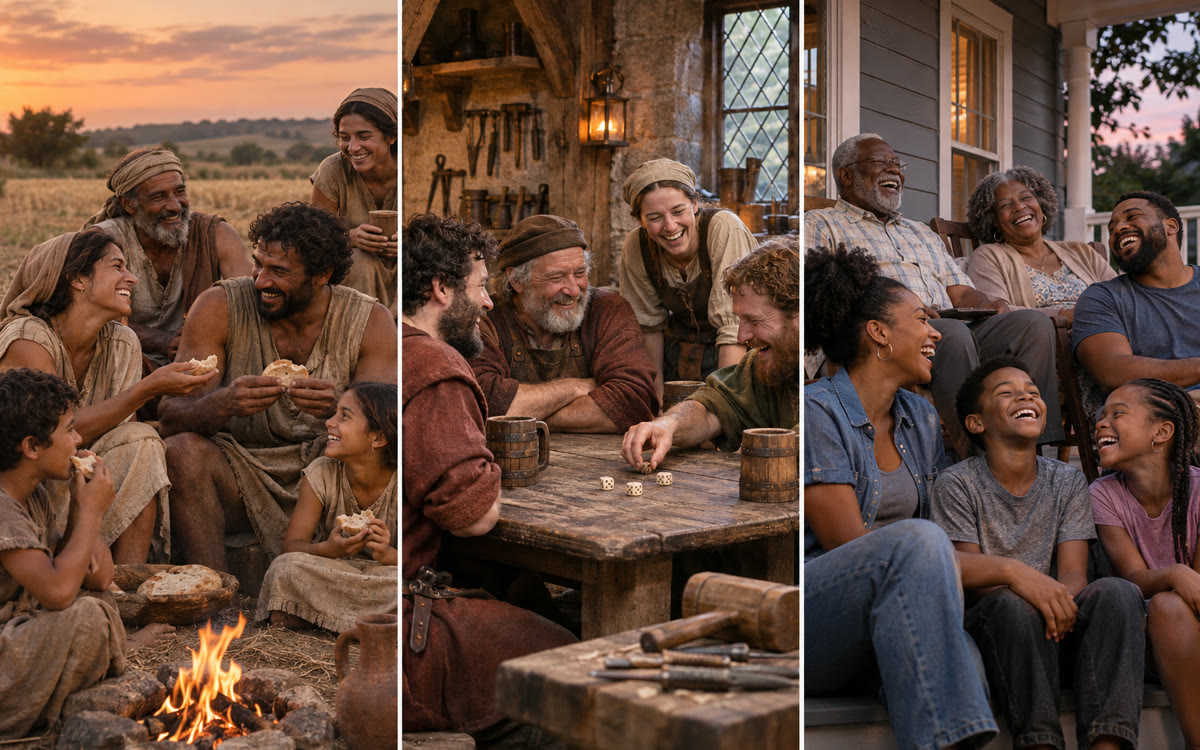
A sample of what you get back, made with AI.
Your image prompt
Fill in your details. Skip any you like.
Each button copies your prompt and opens a new chat that makes images. Just paste it in.
The prompt that gets copied
Make a series of [NUMBER OF IMAGES, e.g. 6] photorealistic images, one at a time, each showing ordinary people winding down after a hard day of work in a different time and place: [ERAS AND PLACES, e.g. ancient Egypt, a 1700s ship, a 1950s diner].

For every image:
- Show the end of a real working day for that era: their tools set aside, the light of that hour, what they'd eat or drink, who they'd sit with.
- Keep clothing, buildings and objects as historically accurate as you can. If something's uncertain, choose the most likely option.
- Make it feel candid and warm, like a documentary still, in a 4:5 vertical frame.

Under each image, write a two-sentence caption: what work these people did that day and how people of that time usually rested. Then ask if I'm ready for the next one.
Ask for a series of realistic photos showing ordinary people relaxing after a day's work in different eras and places. You get a warm history lesson in pictures, ready to share or post.
Step by step
- Open ChatGPT or Gemini and paste the prompt below.
- Pick the eras you want, or leave the list as is.
- Ask for the next image each time until the series is done.
- Save the set and post it as a carousel, or share it with the family.
What you'll get
A set of candid, period-accurate images of people relaxing after work, each with a short caption about the job and how they rested.
- Made for
- Everyone, Creators
- Works in
- ChatGPT, Gemini