Will AI cold email tools get my domain sent to spam?
It depends on who you're mailing and from which domain. Fast, high-volume AI sends to people who never opted in are what burn a domain, and swapped-name "personalization" gets fingerprinted. Google tells bulk senders to stay below a 0.10% spam rate and never reach 0.30%. If you must go cold, use a separate throwaway domain, ramp up slowly, and keep unsubscribing to one click. On your main domain, mail people who opted in. They almost never mark you as spam.
Tool features, plans, and prices as of .
The real reason your cold emails hit spam
A reader emailed me last month, frustrated. He'd wired up an AI tool to write and send a few hundred cold emails a day, each one "personalized," and inside 2 weeks even his replies to warm clients were landing in spam.
He thought the AI wrote bad copy. He'd quietly cooked his own sending domain, and no subject line rewrite was going to un-cook it.
A few hundred AI-written cold emails a day, and inside 2 weeks even his replies to warm clients were landing in spam.
For 18 years I ran a SaaS business with a team of 20-plus behind me, engineers, marketers, support, and between us we sent over 550 million emails. I've watched this exact thing happen more times than I can count. Here's what's really going on.
Let's clear up the biggest myth first. When your emails start landing in spam, you go rewrite the subject line. You swap "Quick question" for "Loved your recent post." You add the recipient's first name. You feel productive.
None of that is why you're in spam. Inbox providers are running a reputation score on the domain you send from, the same way a bank runs a credit score on you. Every send either builds that score or spends it. A burned domain sends good copy straight to spam.
And the fastest way to torch a domain's reputation is the exact behavior AI cold-email tools are built to do at scale: send a lot of messages, fast, to people who never asked to hear from you, from a domain with no track record. Let's take those apart, because each one matters and the fix for each is different.
Volume without permission is what actually burns you
I want to be precise here, because "cold email is bad" is lazy and wrong. Plenty of legitimate businesses send cold email. What burns your domain is volume the recipients never asked for.
Every inbox provider is measuring one number above all others: how often people who receive your mail mark it as spam. That's your complaint rate, and it's the single most important number in your sending life.
Google publishes its own guidance for bulk senders, and it's refreshingly specific. Google says to keep your spam rate, as reported in its Postmaster Tools, below 0.10%. And it says to avoid ever reaching a spam rate of 0.30% or higher.
Google tells bulk senders to stay under 0.10% and never reach 0.30%. That's 3 complaints per thousand emails.
Those numbers are tiny. 0.10% is one complaint per thousand emails. 0.30%, the number Google tells you never to touch, is 3 complaints per thousand. That is not "a few grumpy people," and it's enough to get your domain throttled or blocked.
Now layer the AI part on top. The whole pitch of AI cold-email software is "send more, personalized, automatically." So the tool encourages you to 10x your daily volume.
But every one of those extra emails is another roll of the dice on a complaint, and the math is brutal: more volume means more complaints in absolute terms. It also means you're sending faster than a real human ever could, which is itself a flag.
A brand-new domain that suddenly fires off hundreds of messages a day looks exactly like a spammer, because that behavior pattern is what spammers do.
The permission piece is the part people skip. The same email, word for word, produces a completely different reputation outcome depending on how the recipient got on your list.
| Same email, sent to... | People who opted in | People who never asked |
|---|---|---|
| Odds they hit the spam button | Low. They downloaded your guide, replied to you, or bought from you | High. They don't recognize your name and the spam button is the fastest exit |
| Effect on your complaint rate | Keeps you comfortably under Google's 0.10% line | Blows past three-in-a-thousand without you noticing |
| What happens when you scale volume | Reputation compounds upward with every clean send | Every extra send is another roll of the dice on a complaint |
| Bounce risk | Low. Addresses were typed by their owner | High. Scraped and bought lists are full of stale and wrong addresses |
| What it costs you long term | An asset you can mail for years | The domain your invoices and client replies also go out from |
Templated "personalization" gets fingerprinted
This is the part almost nobody tells you, and it's where AI outreach quietly makes things worse rather than better.
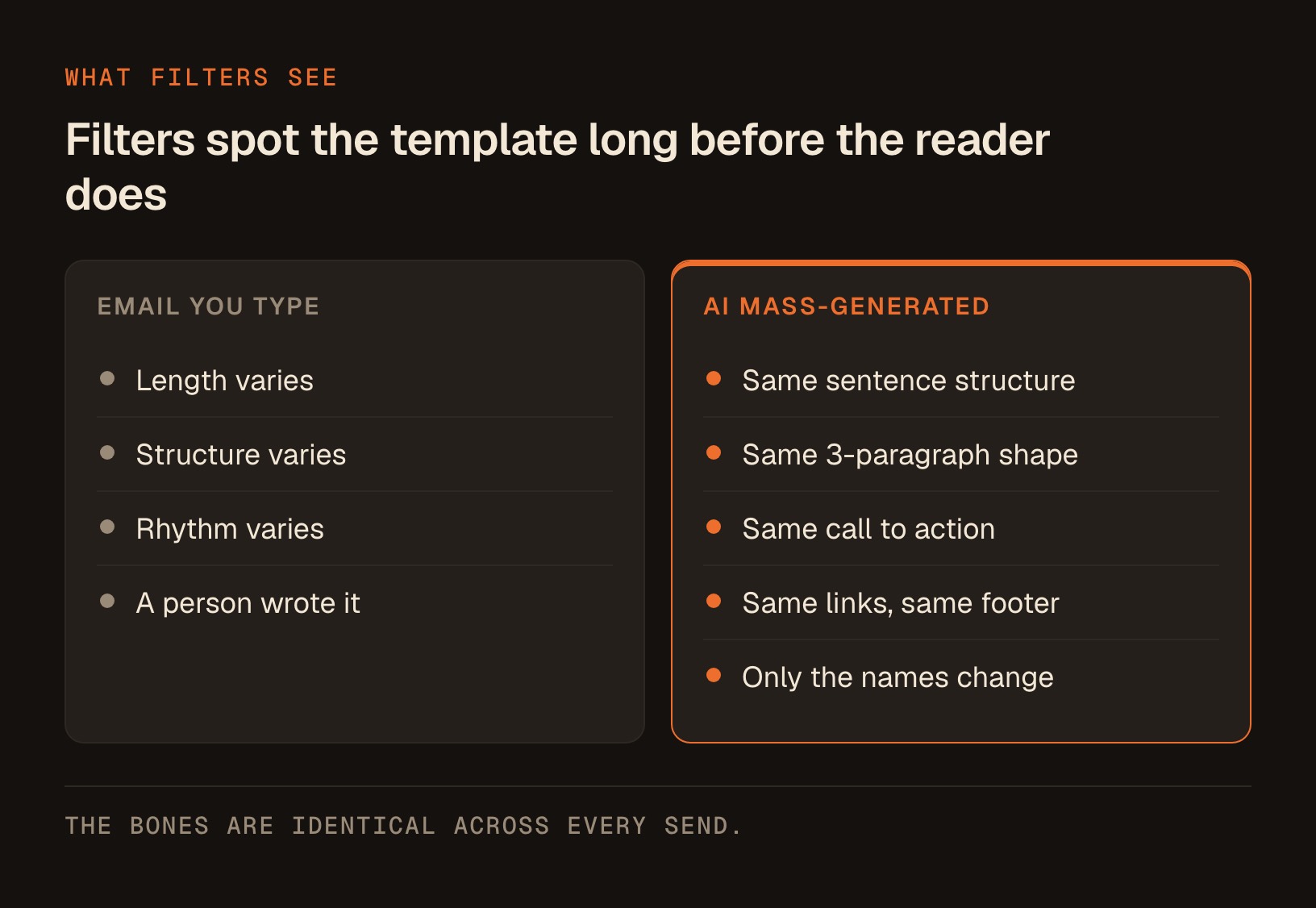
When an AI tool "personalizes" a thousand cold emails, it's usually filling the same skeleton with swapped variables. Same sentence structure. Same three-paragraph shape. Same call to action. Same links. Same footer. The bones are identical across every send, even though the first name and the company name change.
Filters are very, very good at seeing through that. They fingerprint the structure, the link patterns, the sending cadence, and the near-duplicate body content across thousands of recipients.
A run of a thousand near-identical emails, sent in a tight window, from one domain, to people who never engaged, is one of the cleanest spam signatures there is. The personalization you paid for is cosmetic, and the filter that decides whether the human ever sees the message was never fooled by it for a second.
The template is the tell. Real one-to-one email, the kind you actually type, varies in length, structure, and rhythm because a person wrote it. Mass-generated email doesn't, and that regularity is exactly what gets caught.
The AI is genuinely good at writing a warm, specific-sounding note. But warmth in the words does nothing when the sending pattern screams "bulk," and cold outreach at scale is bulk by definition.
The free tools that show you the damage before it's permanent
Here's the good news, and it's the most useful thing in this article. You don't have to guess whether you're in trouble. 3 free tools show you your actual standing, and you check them in a browser, no code, nothing to install. Check them in this order.
Start with your own sending platform's dashboard. Whatever you send through has a reports tab, and it shows you the numbers that matter most: bounce rate, spam-complaint rate, and unsubscribes. This is your first alarm, because it updates fastest.
If your bounce rate is climbing, your list is full of dead addresses and every one of those is a reputation hit. If your complaint rate is anywhere near that 0.10% line, stop sending and fix the list before you do anything else.
Next, set up Google Postmaster Tools. This is Google's own free dashboard, and it's the closest thing you'll get to seeing your domain through Gmail's eyes. It shows your domain's reputation on a simple scale, your spam rate against that 0.10% and 0.30% guidance, and whether your authentication is passing.
Setting it up is a few clicks. Go to the Postmaster Tools site, sign in with a Google account, and add your sending domain.
It hands you a TXT record. You paste that record into the DNS settings wherever you bought the domain, or you forward it to whoever manages your domain for you, and then you click verify.
Postmaster Tools stays blank until you've sent enough mail to Gmail addresses for Google to report on it. That empty dashboard is where most people assume they did it wrong and quit.
Then it looks broken, and it isn't. The dashboard stays empty until you've sent enough mail to Gmail addresses for Google to report on it. Keep sending your normal mail and the charts fill in.
Once data appears, you can watch your reputation trend line. When it starts sliding, that's your early warning, weeks before your mail actually starts disappearing.
Then run a single message through mail-tester.com. It gives you a temporary address, you send one email to it, and it gives you a score plus a plain-English list of what to fix: missing authentication, spammy content, blocklist appearances, broken formatting.
If the score comes back anywhere short of the top of its scale, read the list before that email goes to real people. Anything flagged about authentication or blocklists is worth acting on the same day.
The fix list splits into 2 kinds of problem. Some items live in the email itself (the copy, the links, the formatting) and you change them per send. Others live at the domain level (SPF, DKIM, DMARC, blocklist entries) and you fix them once, forever, for every email you'll ever send.
Here's how the 3 fit together, so you know which one to reach for.
| Tool | What it tells you | When to use it | Cost |
|---|---|---|---|
| Your platform's dashboard | Bounce, complaint, and unsubscribe rates on your real sends | Every send, first thing you check | Free (built in) |
| Google Postmaster Tools | Your domain's reputation and spam rate through Gmail's own eyes | Set up once, watch the trend weekly | Free |
| mail-tester.com | A score and fix list for one specific message | Before any important campaign | Free |
If you set up nothing else, set up Postmaster Tools. Seeing your reputation trend is what separates people who recover from people who lose the domain entirely. By the time your mail is visibly landing in spam, the damage is already weeks old, and the trend line would have told you a month earlier.
If your domain is already sliding, here's the order to fix it
Most people find an article like this after the damage started, not before. If your mail is already disappearing, the order you do things in matters more than any single fix.
1. Stop sending to cold addresses entirely, today. Nothing else works while fresh complaints are still arriving. Pause every sequence, every automation, every tool that mails people who never asked.
2. Clean the dead addresses out of your list. Hard bounces are their own reputation hit, and a stale list keeps generating them. Remove anything that has bounced, and remove anyone who hasn't opened or clicked in a long time.
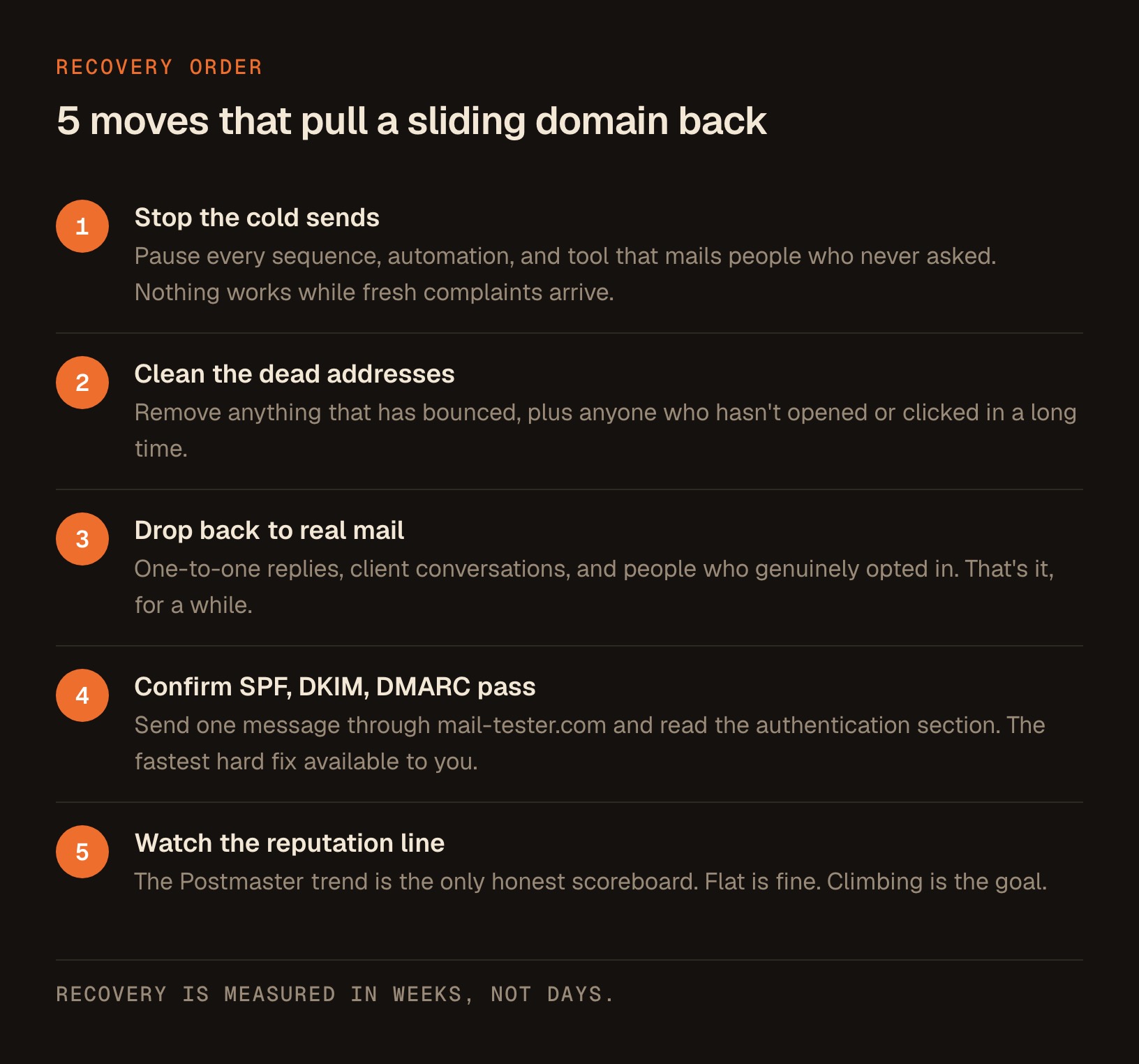
3. Drop your volume back to real mail only. One-to-one replies, client conversations, and people who opted in. That's it, for a while.
4. Confirm SPF, DKIM, and DMARC are actually passing. Don't assume. Send one message through mail-tester.com and read the authentication section. This is the fastest hard fix available to you.
5. Watch the Postmaster reputation line, weekly. That trend is the only scoreboard that counts. Flat is fine. Climbing is the goal.
Now the hard part. Recovery is measured in weeks, not days, and it's boring the whole way: normal volume, real recipients, no shortcuts, nothing to speed it up. There is no button.
Some domains don't come back at all, which is exactly why the separate-domain advice below exists. The reader who emailed me was standing right here, on a domain his invoices and client replies also went out from, which is what made it expensive.
Have Claude read your own numbers back to you
Here's a prompt you can paste straight into the Claude desktop app. Grab the numbers off your sending dashboard and Postmaster Tools, drop them in, and let it tell you plainly whether you're safe or sliding.
You're an email deliverability advisor. I'm a solo business owner sending email
from my own domain. I'm going to give you my current numbers and you'll tell me,
in plain language, whether my sending reputation is healthy or at risk, and the
2 or 3 most important things to fix first.

My numbers:
- Emails sent in the last 30 days: [number]
- Bounce rate: [%]
- Spam complaint rate: [%]
- Unsubscribe rate: [%]
- Google Postmaster domain reputation (High / Medium / Low / Bad): [value]
- Are SPF, DKIM, and DMARC all passing? [yes / no / not sure]

For reference, Google tells bulk senders to keep the spam complaint rate below
0.10% and to never reach 0.30%. Judge my complaint rate against that.

Give me:
1. A one-line verdict: healthy, watch closely, or stop sending now.
2. The single biggest risk in my numbers and why it matters.
3. The first 3 actions I should take, in order, easiest first.
Be direct. If I'm about to burn my domain, say so plainly.
Run that once a month with fresh numbers and you'll catch a slide long before it costs you the inbox. It's the kind of small, repeatable check that quietly protects the thing your whole business runs on.
What to do instead if you still want to reach cold prospects
I'm not going to tell you never to contact anyone new. That's not realistic and it's not honest. But there's a right way to warm up a cold audience that doesn't set fire to the domain you send everything else from.
There are 4 moves, and the failure mode attached to each one is what makes it stick.
| The move | Do this | What happens if you skip it |
|---|---|---|
| Separate domain | Buy a lookalike domain used only for cold outreach. Keep your real domain for clients, invoices, and your newsletter | One bad campaign takes down the domain your entire business runs on, invoices included |
| Slow ramp | Start with a handful of sends a day and increase only when your numbers stay flat | A new domain firing hundreds a day reads as a spammer from the very first week |
| Authentication | Get SPF, DKIM, and DMARC passing before the first send | Google treats bulk mail without all 3 as suspicious by default |
| One-click unsubscribe | Put a visible, working unsubscribe link in every marketing message | People who want out use the spam button instead, and that's the one that damages you |
Send from a separate domain, never your main one. If the outreach domain burns, you throw it away and your business keeps running. This one move has saved more solo operators than any copy tweak ever will.
Start slow and stay human-paced. A domain that ramps gradually looks like a person. One that opens with hundreds looks like a spammer. Here's a conservative rule of thumb, not a Google-published number, so treat it as a shape rather than a spec:
- Week one: a handful of sends a day, to the warmest, most likely-to-reply people you have.
- Week 2: roughly double it, but only if bounces and complaints stayed flat.
- Week 3 onward: double again, on the same condition, every time.
- The gate: any week where bounces or complaints moved up, you hold at the same volume. You never increase on a week the numbers got worse.
That gating rule is the whole idea. Ramping on a schedule is guessing. Ramping only when the numbers stayed flat is warming up.
Get the authentication right before your first send. SPF, DKIM, and DMARC are the 3 checks that prove you are who you say you are. Google requires all 3 for bulk senders now.
Here's what each one actually does, in English, so you know what you're looking at when you open that settings page.
| Check | What it proves in plain English | Where you set it up | What happens without it |
|---|---|---|---|
| SPF | That the service sending mail as you is one you actually authorized | A TXT record in your domain's DNS settings, using the value your sending platform gives you | Anyone can send mail that claims to be from your domain, so providers trust none of it |
| DKIM | That the message really came from your domain and wasn't altered on the way | A record your sending platform generates, pasted into the same DNS settings | Providers can't confirm the mail is yours, so it gets treated as suspicious |
| DMARC | What you want inbox providers to do when a message fails SPF or DKIM, and where to send the reports | One more TXT record in DNS, usually starting in a monitor-only mode | Google requires it for bulk senders, so your bulk mail can be rejected outright |
Your sending platform has a settings page that walks you through adding these to your domain. It's a one-time setup and it's non-negotiable. If that sentence made you nervous, lean on your platform's own support docs or hand the records to whoever manages your domain.
Make unsubscribing effortless. Google now requires marketing mail to support one-click unsubscribe with a clearly visible link. Counterintuitive as it feels, a prominent unsubscribe link protects your reputation, because someone who unsubscribes doesn't hit the spam button.
Google now requires marketing mail to support one-click unsubscribe with a clearly visible link. Every unsubscribe you make easy is a complaint you never receive.
And here's the reframe. The highest-deliverability list is the one that opted in. People who asked to hear from you almost never mark you as spam, which keeps you under Google's line, which keeps your reputation high, which lands your next email in the inbox.
Every warm subscriber is a small deposit in the reputation account that cold blasting drains. If you want a calm, repeatable way to build that kind of list and mail it without ever tripping a filter, I wrote a full walkthrough on how to ship a weekly newsletter in about an hour, and the deliverability habits in it are the same ones that keep a domain healthy for years.
The short version
Your cold emails aren't landing in spam because the writing is bad. They're landing in spam because you're sending a lot of near-identical, template-shaped mail, fast, to people who never opted in, from a domain inbox providers are quietly scoring the whole time.
AI just lets you break the rules of email at a scale no human could, thousands of times an hour.
The fix is boring and it works:
- Watch your complaint rate against Google's 0.10% line.
- Set up Postmaster Tools so you can see your reputation before it collapses.
- If you're already sliding, stop the cold sends first, clean the list, and give it weeks.
- Send from a throwaway domain if you must go cold at all, warm it up slowly, and pour your real energy into a list that actually wants you.
Do that and your important email, the replies to clients, the invoices, the newsletter, keeps landing exactly where it should.
I run all of this on my own now, no team, no engineers, and I'm happier and shipping faster than I was with 20-plus people. That's the point: one solo operator can handle every bit of it.
Every skill I build lives in the Solo Creators AI Studio, along with a direct line to me. Come find me in the Studio.
Key takeaways
- Your domain's reputation, not your subject line, decides whether email lands. A burned domain sends good copy straight to spam.
- Google tells bulk senders to keep the spam complaint rate below 0.10% and to never reach 0.30%, which is just three complaints per thousand emails.
- Volume without permission is what burns you. Cold lists mean strangers with their thumb on the spam button, and AI tools push you to send more, faster, which reads as spammer behavior.
- AI 'personalization' fills the same template with swapped names. Filters fingerprint the identical structure across thousands of sends and catch it every time.
- Three free browser tools show your standing in order: your platform's dashboard first, then Google Postmaster Tools, then mail-tester.com.
- If you're already sliding, stop the cold sends, clean the dead addresses, drop back to real mail, confirm SPF, DKIM and DMARC pass, then watch the trend. Recovery takes weeks, and some domains never come back.
- If you must go cold, use a separate throwaway domain, ramp up only in weeks where bounces and complaints stayed flat, and make unsubscribing one click.
- The highest-deliverability list is the one that opted in, because people who asked to hear from you almost never mark you as spam.
Get this skill, and every one I build.
30-day money-back guarantee. Cancel anytime.
Questions people ask
Why are my cold emails going to spam even though the copy looks good?
What spam complaint rate is safe?
My domain is already burning. How do I fix it?
Does AI personalization help my emails avoid spam?
What free tools can show me if my domain is burning?
My Postmaster Tools dashboard is empty. Did I set it up wrong?
Can I do cold outreach without ruining my main domain?
Is a visible unsubscribe link bad for my email?

Ronnie spent 18 years building a SaaS with a team of 20 that served over 650,000 customers, generated over $14M in sales, and sent over 550M emails. Now he's solo, solving real business bottlenecks and turning them into working AI skills, workflows, and automations. He teaches all of it, with direct access to him, inside the Solo Creators AI Studio Skool community. See what he's built →
 Michael HattawayFounder, Iron Strengthens Iron
Keep reading