Find speaking gigs that fit you, with a source in every cell
Each filled cell links to the page it came from, so you can check a deadline in one click before you pitch.
Published . Steps as of October 2026.
How do I find speaking gigs in my niche with AI?
Ask Gemini in Google Sheets to build the event list and fill in each detail from the web. As of October 2026, Fill with Gemini shows the source for every cell, so you can check a date before you pitch. If you just want a few ideas, a short list is enough. If you plan to apply to several events, ask for the full table with deadlines and fit scores, then click each source to confirm it.
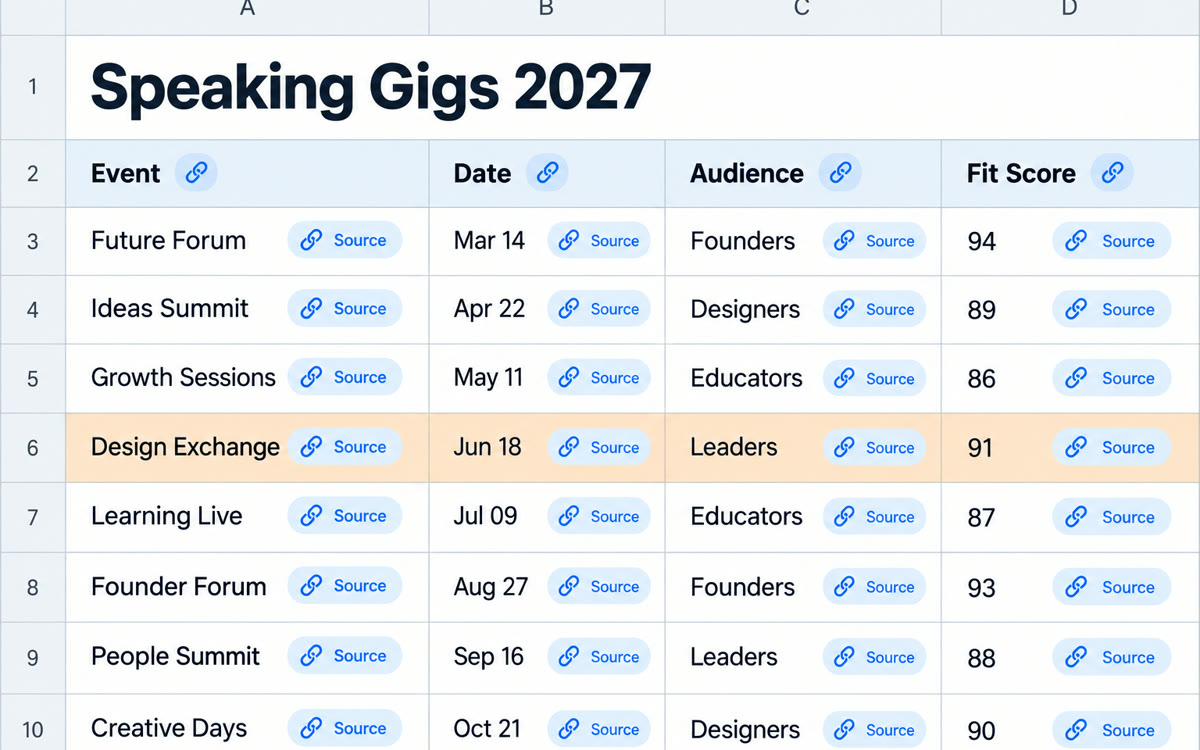
A sample of what you get back, made with AI.
Your prompt
Fill in your details. Skip any you like.
This AI can't be filled in from a link, so the button copies your prompt: paste it into the new chat.
The prompt that gets copied
Build a table in this sheet of 25 [EVENT TYPE, e.g. conferences and online summits] where someone who speaks on [YOUR TOPIC, e.g. burnout for small business owners] could be a good fit. The audience I want to reach is [YOUR IDEAL CLIENT, e.g. owners of 5 to 50 person firms]. Use these columns: Event name, Organizer, Usual month, Format (in person or online), Who attends, Speaker application page, Application deadline, Paid or unpaid if stated, Fit score from 1 to 5, Why it fits in one line. Fill each cell from web sources only. If you can't find something, write "not found" instead of guessing, especially for deadlines. Sort by fit score, highest first.
Ask Gemini in Google Sheets to build a list of events in your field with dates, audience and how to apply, and every filled cell shows the web page it came from.
Step by step
- Open a new Google Sheet on your computer
- Click Ask Gemini at the top right of Sheets
- Paste the prompt and fill in your topic and audience
- Click the source on any cell to check it before you apply
What you'll get
A sorted sheet of 25 events with dates, audience, application links and a fit score, where each cell shows its web source.
Fill with Gemini needs Google AI Pro or Ultra, or Workspace Business Standard or higher. Cell sources show in Sheets on the web.
- Made for
- Coaches, Consultants, Creators
- Works in
- Gemini