Find the colors that flatter you from one daylight selfie
One user has AI check every outfit's colors now, and says the daily compliments started soon after.
Published . Updated . Steps as of October 2026.
What colors look best on me based on a photo?
Take a no-filter selfie by a window in daylight, upload it to ChatGPT, Gemini or Claude, and paste the prompt. You'll get a named 12-color palette with hex codes, colors to avoid and outfit ideas. It says how confident it is given the lighting, so better light gives a better answer. If you only want the palette, save it in a note. If you want ongoing help, save it in a Project (as of October 2026) and send outfit photos later.
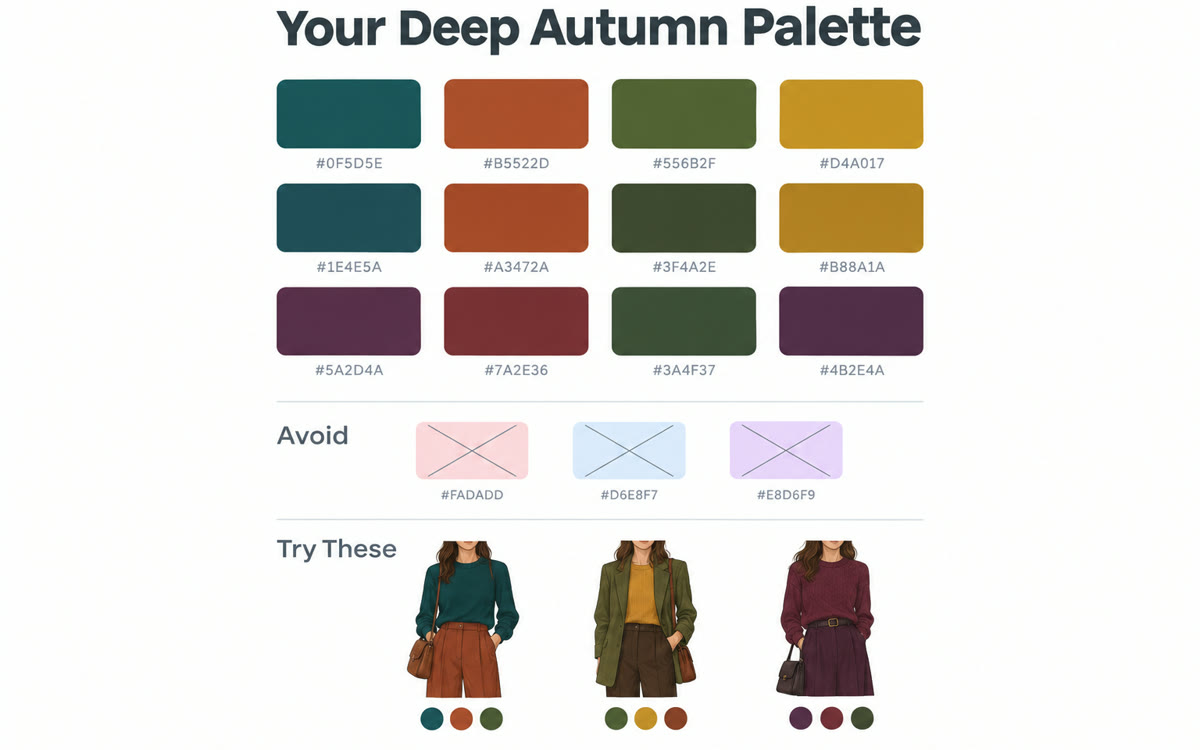
A sample of what you get back, made with AI.
Your prompt
Attach a clear photo first, then paste the prompt with it.
Fill in your details. Skip any you like.
ChatGPT and Claude open with your prompt already typed in. Gemini can't be filled in from a link, so its button copies your prompt: paste it into the new chat.
The prompt that gets copied
Here's a natural-light selfie with no filter. Act as a personal color analyst. 1) Describe my skin undertone, hair and eye colors as you see them, and say how confident you are given the lighting. 2) Suggest a 12-color palette that would flatter me, with names and hex codes, grouped into neutrals, main colors and accents. 3) List five colors to keep away from my face. 4) Give me outfit ideas for [WHERE YOU'LL WEAR THEM, e.g. video calls and workshops]. 5) Suggest metal and glasses frame colors. When I send outfit photos later, check them against this palette.
Upload a no-filter selfie taken in daylight. AI suggests a color palette for your clothes, on-camera outfits and accessories, then checks any outfit photo you send against it.
Step by step
- Take a selfie by a window in daylight with no filter.
- Upload it and paste the prompt.
- Save the palette in a Project or a note.
- Send outfit photos later for a quick color check.
What you'll get
A named 12-color palette with hex codes, colors to avoid and outfit ideas to check against.
- Made for
- Everyone, Coaches, Creators
- Works in
- ChatGPT, Gemini, Claude

 Before